


apple patient
  • Home
  • News
  • Rumors
  • Tips & Tricks
  • Reviews
  • Insights
No Result
View All Result
  • Home
  • News
  • Rumors
  • Tips & Tricks
  • Reviews
  • Insights
No Result
View All Result
apple patient
No Result
View All Result

Apple Tip: Battery care for M4 iPad Pro & M2 iPad Air

Milan Jovicic by Milan Jovicic
May 15, 2024 - 17:54 CEST
in Apple Tips & Tricks
0
M4 iPad Pro Apple

Image: Apple

WhatsAppFacebookEmail
Threads

Apple has introduced an innovative feature that can significantly improve battery life in the latest iPad Pro and iPad Air models. Below, we'll look at how you can take advantage of the new setting and extend the life of your battery.

The importance of a long-lasting battery for mobile devices cannot be overemphasized. It allows for longer use without constant charging, thus significantly improving the user experience. Apple, a leader in the technology field, has developed a new feature that aims to do just that. However, until now, this was only limited to the iPhone 15 lineup. Now the M4 iPad Pro and M2 iPad Air also benefit.

The new battery charge limit function

Apple's new M4 iPad Pro and M2 iPad Air models are equipped with a special setting that optimizes battery health. This feature prevents the devices from being charged beyond 80%. This limitation is crucial because it reduces the time the battery takes to be fully charged, thereby reducing wear and tear.

M4 iPad Pro & M2 iPad Air: Why an 80% limit?

Apple explainedthat limiting charging to 80% helps preserve battery health. This helps slow the chemical aging of the battery, which is accelerated especially when it is constantly charged to full capacity. When the hard 80% limit is active, the iPad only charges up to this percentage, preventing excessive wear.

Practical instructions for setting

  • Open Settings: On your M4 iPad Pro or M2 iPad Air, go to Settings.
  • Navigate to battery health: Select the “Battery” option and then “Battery health”.
  • Enable 80% Limit: Turn on the 80% Limit option to use the feature.

Additionally, in this menu you can see the battery's manufacturing date and the number of charging cycles, giving you a deeper insight into the condition of your device.
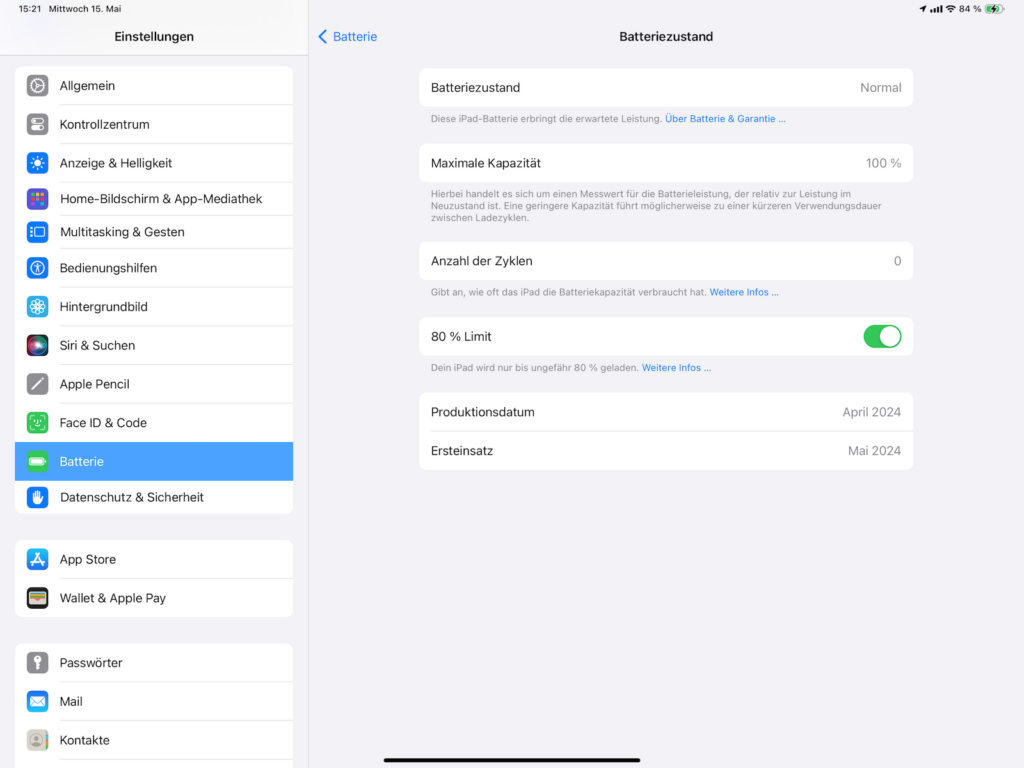
Image: Apfelpatient

Long-term benefits

Using this setting can significantly extend the life of the battery. This means less frequent battery changes and better environmental performance, as fewer batteries need to be disposed of.

The 80% charging limit: Apple's path to more sustainable products

The innovative 80% charge limit is an excellent example of how Apple continues to develop technologies that not only improve the user experience but also help protect the environment. By taking advantage of this new feature, you can maintain the performance of your iPad for years to come while helping protect the environment. Try it out and see how easy it is to extend the life of your battery. Looking for new accessories? Then take a look in our Amazon Storefront - there you will find numerous products from leading providers, also for HomeKit and Co.! (Image: Apple)

  • iPad Air and iPad Pro: Everything about the new battery menu
  • M4 iPad Pro: Hidden security feature discovered

Make Apfelpatient a preferred source One click – and you'll see us more often on Google
Was this article helpful?
YesNo
Tags: iPadiPad AiriPad ProiPadOS
SendShareSend
Share

Our Amazon Storefront

A handpicked selection of products for iPhone, Mac and more – sorted by topic and updated regularly.

Shop Now

This post contains affiliate links (including Amazon). We earn a small commission on qualifying purchases – at no extra cost to you. Learn more on our Partner Program page.

Previous Post

Apple Vision Pro registered in China: Expansion near

Next Post

Apple announces new accessibility features for iOS 18 & Co.

Milan Jovicic

Milan Jovicic

Milan founded Apfelpatient in 2016 and has been responsible for all editorial content since 2018 — news, rumors, guides, and product reviews. Apple devices here are not test units on loan for two weeks but everyday tools: from the iPhone through MacBook Pro, MacBook Air, and iMac to the Apple Vision Pro, at least one device from nearly every product category is in daily use, many of them replaced annually. Every menu path in a guide is verified on the device before it is published.

Glass panel set into the aluminium frame on the back of an iPhone 17 Pro Max in Cosmic Orange, whereas the iPhone 20 glass design is said to wrap the glass around the edges

iPhone 20: Glass design is not supposed to be scrapped after all

August 12, 2026 - 2:50 PM CEST
Jennifer Bailey on stage at an Apple event in front of a projected Apple Card, the Apple Pay chief is leaving the company in October

Apple Pay: Jennifer Bailey is leaving Apple in October

August 12, 2026 - 2:31 PM CEST
Four stacked MacBooks seen from the port side with MagSafe 3 and USB-C, where each model needs a different MacBook power adapter for full charging speed

MacBook power adapter: What wattage does your model need?

August 12, 2026 - 2:14 PM CEST

About APFELPATIENT

APFELPATIENT brings you the latest Apple news, product updates, guides, reviews and tips across the entire Apple ecosystem — from the iPhone to the Mac to the Apple Vision Pro. From the first rumors to confirmed news: researched responsibly.

Follow Apfelpatient

Facebook Instagram YouTube Threads Threads

Company

  • About Apfelpatient
  • Contact
  • Author Profiles

Community

  • Netiquette
  • Push Notifications
  • RSS feed

Legal

  • Legal Notice
  • Privacy Policy
  • Terms of Use
  • Cookie Settings
  • Affiliate Program

Resources

  • Sitemap

© 2026 Apfelpatient. All rights reserved.

No Result
View All Result
  • Home
  • News
  • Rumors
  • Tips & Tricks
  • Reviews
  • Insights

© 2026 Apfelpatient. All rights reserved. Page Directory

Change language to Deutsch



