Apfelpatient
  • Home
  • News
  • Rumors
  • Tips & Tricks
  • Reviews
  • Insights
No result
View All Results
  • iPhone 18
  • iPhone 18 Pro
  • iPhone Duo
  • Apple Home
  • Siri AI
  • HomePod
  • HomePod mini
  • HomePod mini 2
  • MacBook Pro
  • Apple TV 4K
  • Apple Watch Series 12
  • Apple Watch Ultra 4
  • AirPods 5
  • iOS 27
  • iPadOS 27
  • macOS
  • MacBook Neo
  • iPhone 17e
  • AirTags
  • iOS 26
  • iPhone 17
  • iPadOS
  • iMac
  • Mac mini
  • Apple TV
  • iPad Pro
  • iPhone Air
  • Apple Vision Pro
  • iPhone 16
  • AirPods 4
  • Apple Watch Ultra
  • MacBook Air
  • iPad
  • AirPods Max
  • AirPods Pro 3
  • Mac Studio
  • Studio Display
  • iPad Air
  • iPad mini
  • watchOS 27
  • Apple CarPlay
  • Apple Pay
  • watchOS 26
  • Home
  • News
  • Rumors
  • Tips & Tricks
  • Reviews
  • Insights
No result
View All Results
Apfelpatient
No result
View All Results
  • iPhone 18
  • iPhone 18 Pro
  • iPhone Duo
  • Apple Home
  • Siri AI
  • HomePod
  • HomePod mini
  • HomePod mini 2
  • MacBook Pro
  • Apple TV 4K
  • Apple Watch Series 12
  • Apple Watch Ultra 4
  • AirPods 5
  • iOS 27
  • iPadOS 27
  • macOS
  • MacBook Neo
  • iPhone 17e
  • AirTags
  • iOS 26
  • iPhone 17
  • iPadOS
  • iMac
  • Mac mini
  • Apple TV
  • iPad Pro
  • iPhone Air
  • Apple Vision Pro
  • iPhone 16
  • AirPods 4
  • Apple Watch Ultra
  • MacBook Air
  • iPad
  • AirPods Max
  • AirPods Pro 3
  • Mac Studio
  • Studio Display
  • iPad Air
  • iPad mini
  • watchOS 27
  • Apple CarPlay
  • Apple Pay
  • watchOS 26

MacBook Neo: Two USB-C ports with important differences

Milan Jovicic by Milan Jovicic
March 4, 2026 - 16:33 CET
in Apple News
0
MacBook Neo Apple

Image: Apple

WhatsAppFacebookEmail
Threads

This article may contain affiliate links. Learn more on our Partner Program page.

Make Apfelpatient a preferred source One click – and you'll see us more often on Google

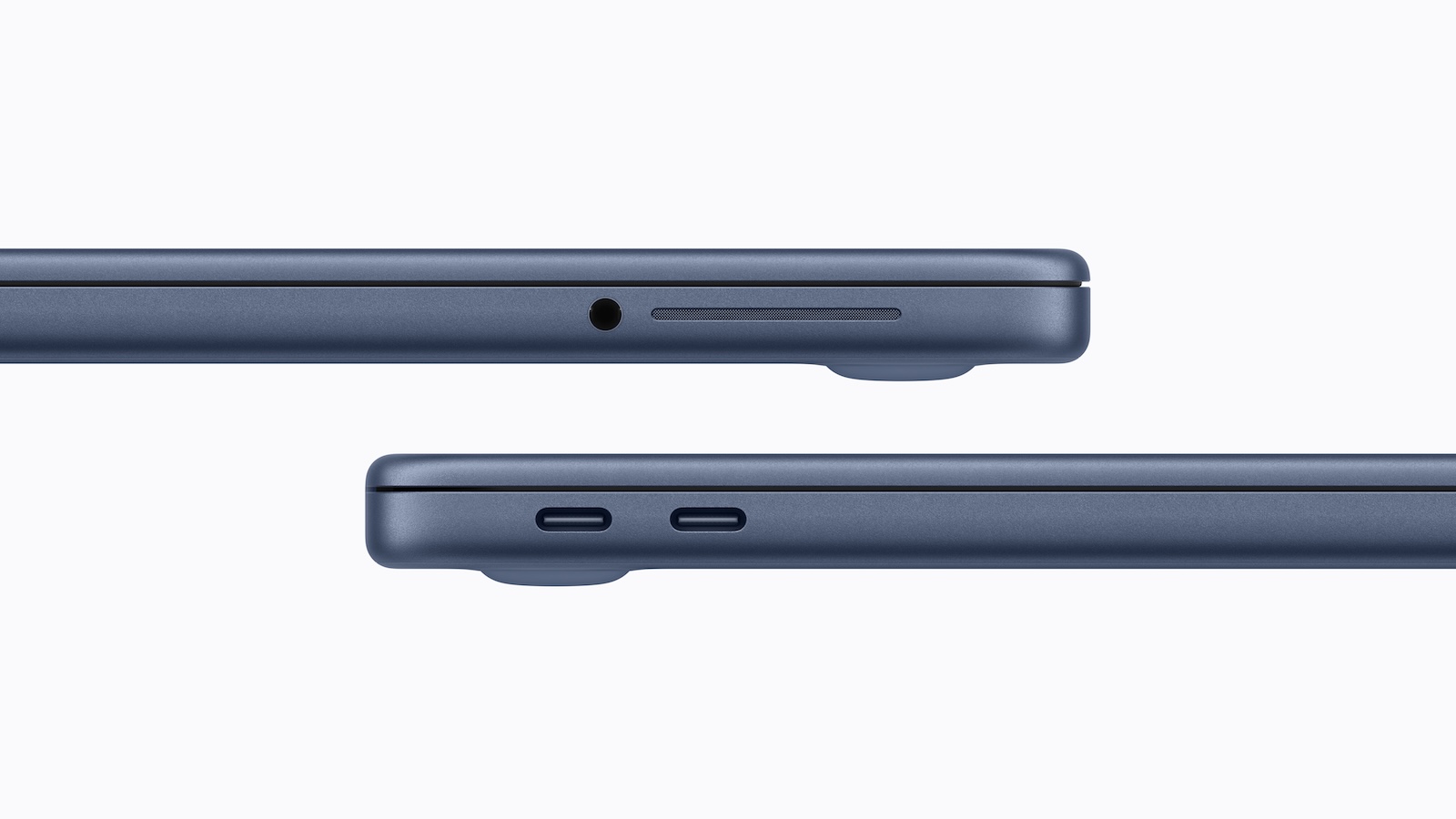
The MacBook Neo features an unusual port configuration. It has two USB-C ports that look identical externally but function differently. One port is significantly faster than the other and supports additional features. These differences are relevant for several typical applications, such as connecting an external monitor or transferring large amounts of data. Anyone using the MacBook Neo should be aware of these details, as they affect the practical use of the device.

USB-C has established itself as the standard port for modern laptops in recent years. A single port can perform multiple tasks, including charging, data transfer, and connecting to an external display. This concept is also implemented in the MacBook Neo.

However, the device's two USB-C ports are not configured identically. Although they look the same, they differ in speed and functionality. This technical decision is likely related to the installed processor and affects several usage scenarios.

Two USB-C ports with different specifications

The MacBook Neo has two USB-C ports that use different technical standards.

  • The left port is a USB-C 3 port. This supports a maximum data transfer speed of up to 10 Gb/s.
  • The right port, on the other hand, is a USB-C 2 port, which is limited to a maximum data transfer speed of up to 480 Mb/s.

This makes the difference between the two ports significant. While the USB-C 3 port is suitable for fast external storage devices or other power-intensive devices, the USB-C 2 port is more in line with the speed of older USB standards.

DisplayPort is only available via one connection

Another important difference concerns support for external displays. Only the MacBook Neo's USB-C 3 port supports DisplayPort.

This means that an external monitor can only be connected via this port. If the USB-C 2 port is used instead, no display output is available.

Therefore, the correct connection must be selected when using an external display.

Both ports support charging

Despite the different data speeds, both USB-C ports on the MacBook Neo can be used for charging.

The power supply can therefore be connected to either of the two ports. The limitation applies exclusively to data transmission and display function, not to the charging process.

Indistinguishable from the outside

One notable feature is that the two USB-C ports are visually indistinguishable. There are no visible markings or indicators to show which port is faster.

The differences only become apparent during use, for example in the speed of data transfer or when connecting a monitor.

Connection to the A18 Pro chip

The different capabilities of the ports are likely related to the hardware architecture. The MacBook Neo uses the A18 Pro chip.

The limitation of one port to USB 2 speeds is likely related to the A18 Pro's USB controller. It may only support a limited number of high-speed interfaces, which is why only one of the two ports receives full USB-C 3 functionality.

Other ports of the MacBook Neo

In addition to the two USB-C ports, the MacBook Neo has a headphone jack. No other ports are available. These include, among others:

  • MagSafe for charging
  • additional USB ports
  • HDMI
  • SD card reader

Therefore, charging is only possible via USB-C.

Pre-order and market launch

The MacBook Neo is available for pre-order now. Official availability begins on Wednesday, March 11th. From that point on, the device will be available for regular purchase.

MacBook Neo: Two USB-C ports with different functions

The MacBook Neo features a streamlined port layout with two USB-C ports and a headphone jack. Although the two USB-C ports look identical, their technical specifications differ significantly.

One port supports USB-C 3 with speeds up to 10 Gb/s and DisplayPort, while the other is limited to USB-C 2 with speeds up to 480 Mb/s. Both ports can be used for charging, but only the faster port is suitable for external displays and high data transfer rates.

These differences are likely related to the A18 Pro chip's USB controller. The device is available for pre-order now and will be released on March 11. The best products for you: Our Amazon storefront offers a wide selection of accessories, including those for HomeKit. (Image: Apple)

  • MacBook Neo: Touch ID is only available at an extra cost
  • MacBook Neo: Apple's new entry into the Mac world
  • iPhone Security: Dangerous exploit toolkit in circulation
  • M4 iPad Air: First Geekbench results have surfaced
  • Studio Display XDR supports DICOM medical images
  • Apple is promoting Mac gaming at GDC 2026
  • Studio Display XDR: 120 Hz only with certain Macs
  • Studio Display & Studio Display XDR without Intel support
  • OpenAI: GPT-5.3 enables better dialogue
  • Meta Ray-Ban: Data privacy nightmare revealed
  • The Pro Display XDR is being discontinued
  • MacBook Air M5: What the new generation brings
  • MacBook Pro with M5 Pro & M5 Max officially unveiled
  • Apple M5 Pro and M5 Max: More power for professionals
  • Apple presents Studio Display & Studio Display XDR
  • Apple TV: No third season for Palm Royale
  • Anthropic simplifies AI migration with import tool
  • Where is the file located? Offline Files knows the answer instantly
  • iOS 26.4 Beta 3 is here: Next step towards release
  • Paramount plans mega streaming service with HBO
  • Apple unveils new accessories for spring 2026
  • Will an iPhone 16e case also fit the iPhone 17e?
  • iPad Air with M4 is here: Here's what the update offers
  • The iPhone 17e is here: Here's what's inside the new model

Was this article helpful?
YesNo
Tags: MacMacBook Neo
SendShareSend
Share

Our Amazon Storefront

A handpicked selection of products for iPhone, Mac and more – sorted by topic and updated regularly.

Shop Now

This post contains affiliate links (including Amazon). We earn a small commission on qualifying purchases – at no extra cost to you. Learn more on our Partner Program page.

Previous Post

MacBook Neo: Touch ID is only available at an extra cost

Next Post

MacBook Neo: More recycled materials than ever before

Milan Jovicic

Milan Jovicic

Milan founded Apfelpatient in 2016 and has been responsible for all editorial content since 2018 – news, rumors, how-to guides and product reviews. Here, Apple devices aren't review units kept for two weeks, they're everyday tools: from iPhone to MacBook Pro, MacBook Air and iMac all the way to Apple Vision Pro, at least one device from every product category is in daily use, many of them replaced every year. Every menu path in a guide is checked on the device before it goes live.

Related posts

Apple TV: New Fraggles special starts on December 4th

by Milan Jovicic
November 10, 2026 - 7:25 PM CET
Fraggles special on Apple TV: Key art for "Fraggle Rock: A Holiday Gift" with five Fraggles gathered around a glowing snow globe in a wintry cave.

Apple TV is showing the trailer for „Fraggle Rock: A Big Gift“. The holiday special starts on December 4th, also with a German dub.

Read moreDetails

Apple Arcade: Football Manager 27 and LEGO DUPLO

by Milan Jovicic
November 10, 2026 - 7:15 PM CET
Apple Arcade Football Manager 27 and LEGO DUPLO: Artwork for LEGO DUPLO Playtime with two figures, a dog, a red car and colourful DUPLO bricks.

Apple Arcade: Football Manager 27 Touch is here, and on December 3rd LEGO DUPLO, Prince of Persia and two other games will follow in German.

Read moreDetails

Apple TV: Sign language is coming to the app

by Milan Jovicic
November 10, 2026 - 18:57 CET
Apple TV sign language: A screen shows a scene from "Being Heumann" with an on-screen interpreter, in front of it Apple TV 4K and the Siri Remote.

The Apple TV app is getting sign language support: Starting November 13th, the feature will launch with "Being Heumann", initially only in ASL and BSL instead of DGS.

Read moreDetails

Apple: Class action lawsuit over Google deal allowed in Canada

by Milan Jovicic
November 10, 2026 - 1:34 PM CET
Apple class action Canada: unfolded iPhone Duo on a wooden table, the Settings app shows Google selected as the search engine, with Yahoo, Bing, DuckDuckGo and Ecosia below

A court in Canada has allowed a class-action lawsuit against Apple. The allegation: Apple accepted payment from Google to avoid competition.

Read moreDetails

iOS 27.2.1 closes a vulnerability in iMessage group conversations

by Milan Jovicic
November 9, 2026 - 23:23 CET
iOS 27.2.1 security vulnerabilities: Messages app icon with a speech bubble on a graphite gradient

Strangers could join iMessage group conversations: iOS 27.2.1 closes the vulnerability and fixes pairing errors with Bluetooth and AirPlay.

Read moreDetails
Load More

Categories

  • Apple Insights
  • Apple Rumors
  • Apple News
  • Apple Tips & Tricks
  • iPhone news, rumors and tips
  • Mac and MacBook News
  • Reviews
Make Apfelpatient a preferred source One click – and you'll see us more often on Google

About APFELPATIENT

APFELPATIENT brings you the latest Apple news, product updates, guides, reviews and tips across the entire Apple ecosystem — from the iPhone to the Mac to the Apple Vision Pro. From the first rumors to confirmed news: researched responsibly.

Follow Apfelpatient

Facebook Instagram YouTube Threads Threads

Company

  • About Apfelpatient
  • Contact
  • Author Profiles

Community

  • Netiquette
  • Push notifications
  • RSS feed

Legal

  • Legal Notice
  • Privacy Policy
  • Terms of Use
  • Cookie settings
  • Affiliate Program

Resources

  • Sitemap

© 2026 Apfelpatient. All rights reserved.

No result
View All Results
  • Home
  • News
  • Rumors
  • Tips & Tricks
  • Reviews
  • Insights

© 2026 Apfelpatient. All rights reserved. Site map

Change language to Deutsch