Apfelpatient
  • Home
  • News
  • Rumors
  • Tips & Tricks
  • Reviews
  • Insights
No result
View All Results
  • iPhone 18
  • iPhone 18 Pro
  • iPhone Duo
  • Apple Watch Series 12
  • Apple Watch Ultra 4
  • AirPods 5
  • iOS 27
  • iPadOS 27
  • macOS
  • MacBook Neo
  • iPhone 17e
  • AirTags
  • iOS 26
  • iPhone 17
  • MacBook Pro
  • iPadOS
  • iMac
  • Mac mini
  • HomePod
  • Apple TV
  • iPad Pro
  • iPhone Air
  • Apple Vision Pro
  • iPhone 16
  • AirPods 4
  • Apple Watch Ultra
  • HomePod Mini
  • MacBook Air
  • iPad
  • AirPods Max
  • AirPods Pro 3
  • Apple Watch Series 3
  • Mac Studio
  • Studio Display
  • iPad Air
  • iPad mini
  • watchOS 27
  • Apple CarPlay
  • Apple Pay
  • watchOS 26
  • Home
  • News
  • Rumors
  • Tips & Tricks
  • Reviews
  • Insights
No result
View All Results
Apfelpatient
No result
View All Results
  • iPhone 18
  • iPhone 18 Pro
  • iPhone Duo
  • Apple Watch Series 12
  • Apple Watch Ultra 4
  • AirPods 5
  • iOS 27
  • iPadOS 27
  • macOS
  • MacBook Neo
  • iPhone 17e
  • AirTags
  • iOS 26
  • iPhone 17
  • MacBook Pro
  • iPadOS
  • iMac
  • Mac mini
  • HomePod
  • Apple TV
  • iPad Pro
  • iPhone Air
  • Apple Vision Pro
  • iPhone 16
  • AirPods 4
  • Apple Watch Ultra
  • HomePod Mini
  • MacBook Air
  • iPad
  • AirPods Max
  • AirPods Pro 3
  • Apple Watch Series 3
  • Mac Studio
  • Studio Display
  • iPad Air
  • iPad mini
  • watchOS 27
  • Apple CarPlay
  • Apple Pay
  • watchOS 26

iOS 27.2: Apple Books gets a redesigned reading view

Milan Jovicic by Milan Jovicic
October 6, 2026 - 21:39 CEST
in Apple News, iPhone news, rumors and tips
0
Apple Books iOS 27.2: Books app icon on a light cream-colored gradient

Image: Apple / Apfelpatient

WhatsAppFacebookEmail
Threads
Make Apfelpatient a preferred source One click – and you'll see us more often on Google

Shortly before the release of the iPhone Duo, an iPhone that unfolds like a book, Apple is revamping the reading view in its Books app. In the third beta of iOS 27.2, progress bars, buttons, and menus have been rearranged. The changes affect only the reading experience itself.

The changes are included in the third beta of iOS 27.2, which has been available to developers since October 5th. Unlike many code discoveries of the past few days, they are already active there.

Apple Books, installed on the iPhone as the Books app, now features a cleaner reading view in the style of Liquid Glass. The remaining new features of this point version are summarized in the overview for iOS 27.2.

Key Facts at a Glance

  • In Apple Books' reading view, new progress bars show how far you are in the book.
  • The menu in the bottom right corner has a new icon with three dots and follows the Liquid Glass design of other apps.
  • The bookmark has been removed from the menu and is now located as a separate button in the top right corner.
  • The close button moves to the top left, the back button to the bottom left and becomes larger.

What changes in reading view

The most noticeable new feature is the progress bars. They show you where you are in the book while reading.
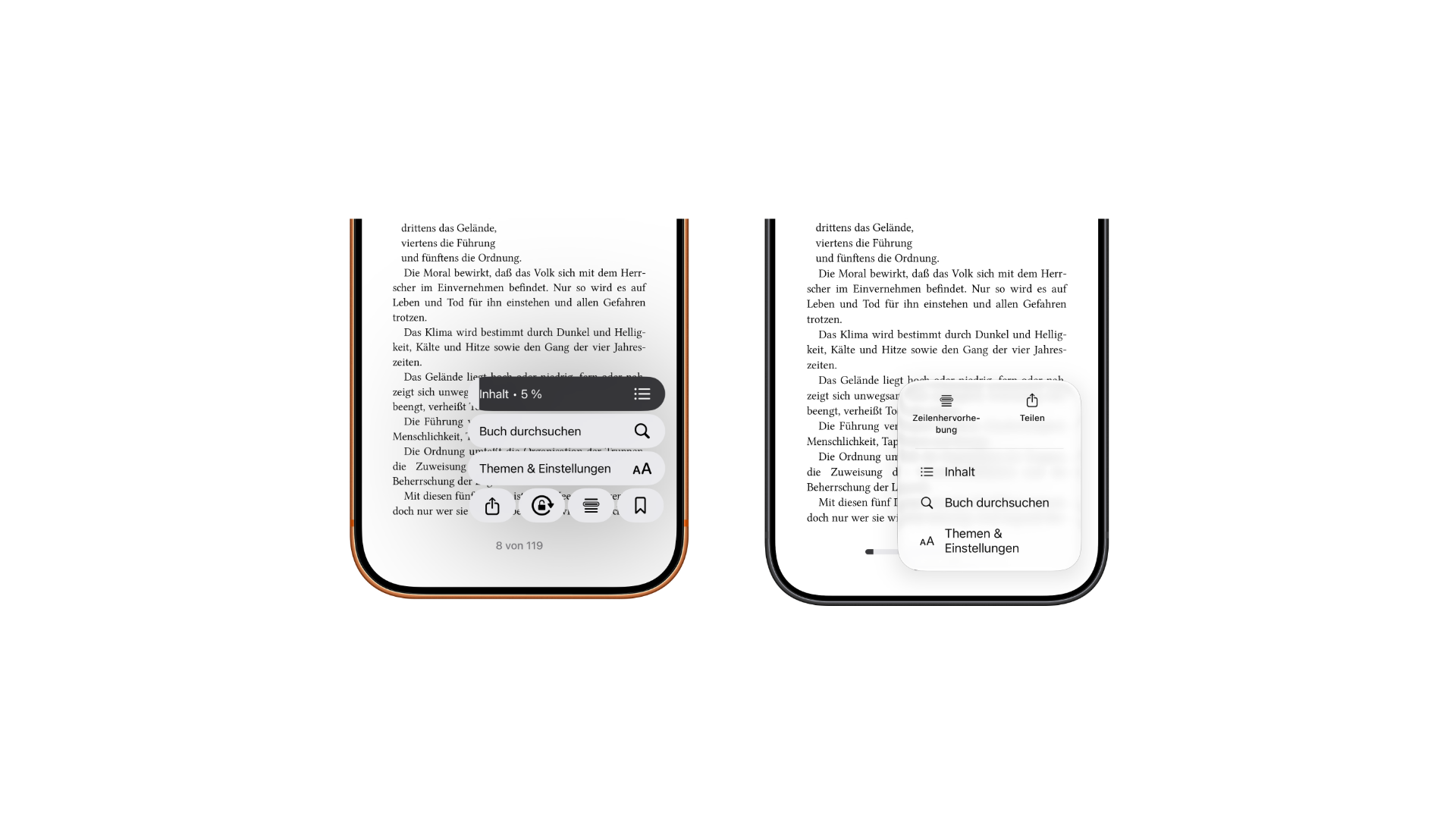
Apple Books iOS 27.2: reading view menu compared, previous version with stacked entries and bookmark in the bottom row on the left, new version with line highlighting, share, contents, search book and themes & settings on the right
The Reading View menu in Apple Books: on the left, the previous version; on the right, the new version in the iOS 27.2 beta. (Image: Apfelpatient)

The menu in the bottom right corner now features a three-dot icon and is implemented as the default menu in the Liquid Glass design. This means it behaves like the menus in other iOS 27 apps, instead of having its own unique design.

Buttons in new places

The bookmark was previously hidden in this menu. In Beta 3, it's now a separate button in the top right corner and can be accessed with a single tap. The button to close a book is now located in the top left corner.
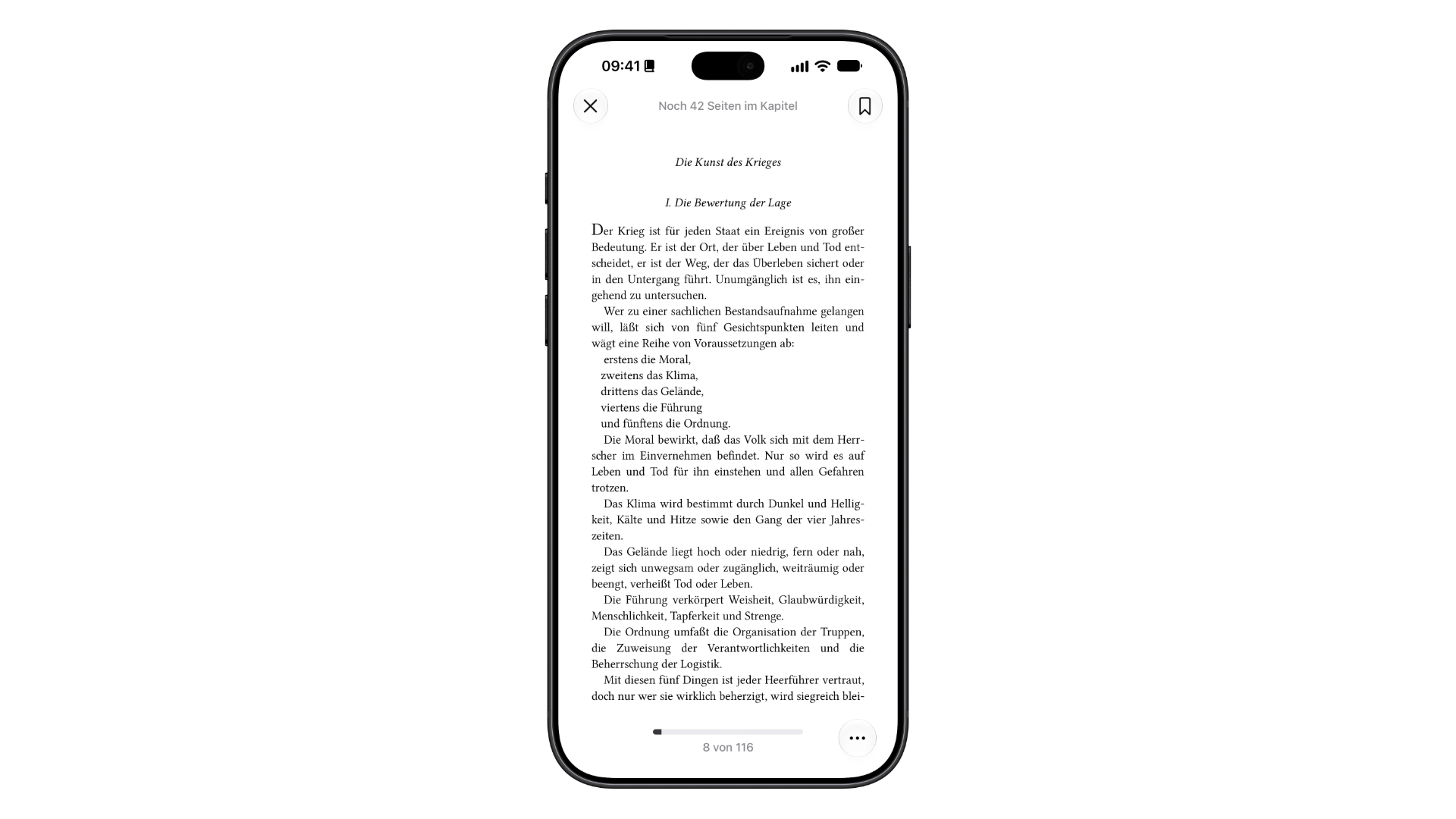
Apple Books iOS 27.2: new reading view with close button top left, bookmark button top right, progress bar and three-dot menu button at the bottom
The new reading view in the iOS 27.2 beta: The bookmark is located as a separate button in the top right corner. (Image: Apfelpatient)

The back button moves to the bottom left and is larger than before.

Matching the iPhone Duo

The timing is perfect for the iPhone Duo: The iPhone Duo will be released on October 23rd, and a video released on the same day already shows how the device's file preview displays PDFs with two pages side by side.

A device that opens up to resemble a book makes reading one of its most obvious uses. A reading view that is clearer and shows progress is a natural fit.

Small changes with a noticeable effect

I consider the removal of the bookmark function to be the most useful change. Frequent readers constantly set bookmarks – having to open a menu each time was an unnecessary extra step. The progress bars answer the most common reading question without requiring any searching.

It's not a major overhaul, more of a cleanup. For the iPhone Duo, a dedicated double-page view in Apple Books would be the logical next step, in my opinion.

Do you read books on your iPhone in Apple Books or do you prefer another app? Tell us in the comments how you do it.


Was this article helpful?
YesNo
Tags: iOSiOS 27iOS 27.2iPhoneiPhone Duo
SendShareSend
Share

Our Amazon Storefront

A handpicked selection of products for iPhone, Mac and more – sorted by topic and updated regularly.

Shop Now

This post contains affiliate links (including Amazon). We earn a small commission on qualifying purchases – at no extra cost to you. Learn more on our Partner Program page.

Previous Post

The Choir: Corden and Jones are filming a series for Apple TV

Milan Jovicic

Milan Jovicic

Milan founded Apfelpatient in 2016 and has been responsible for all editorial content since 2018 — news, rumors, guides, and product reviews. Apple devices here are not test units on loan for two weeks but everyday tools: from the iPhone through MacBook Pro, MacBook Air, and iMac to the Apple Vision Pro, at least one device from nearly every product category is in daily use, many of them replaced annually. Every menu path in a guide is verified on the device before it is published.

Related posts

The Choir: Corden and Jones are filming a series for Apple TV

by Milan Jovicic
October 6, 2026 - 17:16 CEST
The Choir Apple TV: portraits of Ruth Jones on the left and James Corden on the right side by side

Ruth Jones and James Corden are directing "The Choir," a comedy-drama series for Apple TV. Guest stars include Waddingham, McAvoy, and Broadbent.

Read moreDetails

iPhone Duo: Video shows two-page PDF view

by Milan Jovicic
October 6, 2026 - 17:03 CEST
iPhone Duo PDF: two half-opened iPhone Duo models in a light and a dark color, each showing the back and the inner display

A video shows the iPhone Duo's file preview with two PDF pages side by side. The Apple Pencil with USB-C will be added later.

Read moreDetails

Apple TV and HomePod: Beta code reveals new features

by Milan Jovicic
October 6, 2026 - 16:53 CEST
Apple TV HomePod: Apple TV 4K in front of a TV with a HomePod on each side as a stereo pair

The 27.2 betas show new features for Apple TV and HomePod: surround sound with four HomePods, Siri in home theater, and new profile pictures.

Read moreDetails

Masimo: Apple must pay $184 million in interest

by Milan Jovicic
October 6, 2026 - 16:41 CEST
Masimo Apple: Apple Watch Ultra with Ocean Band lying on a grey surface

In the patent dispute with Masimo, Apple must pay an additional $184 million in interest. The total sum rises to approximately $818 million.

Read moreDetails

iOS 27.2: Code reveals filters for message suggestions

by Milan Jovicic
October 6, 2026 - 2:14 PM CEST
Suggestions in Messages: Messages app icon on a light green gradient

iOS 27.2 Beta 3 includes code for filters that hide suggestions in messages based on type. They can already be completely disabled.

Read moreDetails
Load More

Leave a Reply Cancel reply

Required fields are marked with * marked.

By submitting, you consent to the storage of your comment along with your name, email address and IP address. Details are available in our privacy policy.

Categories

  • Apple Insights
  • Apple Rumors
  • Apple News
  • Apple Tips & Tricks
  • iPhone news, rumors and tips
  • Mac and MacBook News
  • Reviews
Make Apfelpatient a preferred source One click – and you'll see us more often on Google

About APPLE PATIENT

APFELPATIENT brings you the latest Apple news, product updates, guides, reviews and tips across the entire Apple ecosystem — from the iPhone to the Mac to the Apple Vision Pro. From the first rumors to confirmed news: researched responsibly.

Follow Apfelpatient

Facebook Instagram YouTube Threads Threads

Company

  • About Apfelpatient
  • Contact
  • Author Profiles

Community

  • Netiquette
  • Push notifications
  • RSS feed

Legal

  • Legal Notice
  • Privacy Policy
  • Terms of Use
  • Cookie settings
  • Affiliate Program

Resources

  • Sitemap

© 2026 Apfelpatient. All rights reserved.

No result
View All Results
  • Home
  • News
  • Rumors
  • Tips & Tricks
  • Reviews
  • Insights

© 2026 Apfelpatient. All rights reserved. Site map

Change language to Deutsch