

apple patient
  • Home
  • News
  • Rumors
  • Tips & Tricks
  • Reviews
  • Insights
No Result
View All Result
  • iPhone 18
  • iPhone 18 Pro
  • iPhone Duo
  • Apple Watch Series 12
  • Apple Watch Ultra 4
  • AirPods 5
  • iOS 27
  • iPadOS 27
  • macOS
  • MacBook Neo
  • iPhone 17e
  • AirTags
  • iOS 26
  • iPhone 17
  • MacBook Pro
  • iPadOS
  • iMac
  • Mac mini
  • HomePod
  • Apple TV
  • iPad Pro
  • iPhone Air
  • Apple Vision Pro
  • iPhone 16
  • AirPods 4
  • Apple Watch Ultra
  • HomePod Mini
  • MacBook Air
  • iPad
  • AirPods Max
  • AirPods Pro 3
  • Apple Watch Series 3
  • Mac Studio
  • Studio Display
  • iPad Air
  • iPad mini
  • watchOS 27
  • Apple CarPlay
  • Apple Pay
  • watchOS 26
  • Home
  • News
  • Rumors
  • Tips & Tricks
  • Reviews
  • Insights
No Result
View All Result
apple patient
No Result
View All Result
  • iPhone 18
  • iPhone 18 Pro
  • iPhone Duo
  • Apple Watch Series 12
  • Apple Watch Ultra 4
  • AirPods 5
  • iOS 27
  • iPadOS 27
  • macOS
  • MacBook Neo
  • iPhone 17e
  • AirTags
  • iOS 26
  • iPhone 17
  • MacBook Pro
  • iPadOS
  • iMac
  • Mac mini
  • HomePod
  • Apple TV
  • iPad Pro
  • iPhone Air
  • Apple Vision Pro
  • iPhone 16
  • AirPods 4
  • Apple Watch Ultra
  • HomePod Mini
  • MacBook Air
  • iPad
  • AirPods Max
  • AirPods Pro 3
  • Apple Watch Series 3
  • Mac Studio
  • Studio Display
  • iPad Air
  • iPad mini
  • watchOS 27
  • Apple CarPlay
  • Apple Pay
  • watchOS 26

iOS 26.1 at a glance: What's new in the fourth beta

Milan Jovicic by Milan Jovicic
October 20, 2025 - 10:35 PM CEST
in Apple News
0
iOS 26.1 Beta 4 Apple

Image: Shutterstock / Harry Howitt

WhatsAppFacebookEmail
Threads

Despite its advanced stage in the beta cycle, iOS 26.1 is once again showing its active side in its fourth test version. Apple has integrated additional features that have a noticeable impact on usability, security, and personalization. Instead of just bug fixes, there are a few changes that are noticeable in everyday use.

iOS 26.1 is nearing its final release. The fourth beta makes it clear that the update is more than just a minor interim release. Apple is providing additional options that improve control over the system and allow for new design customizations. Existing features such as the lock screen camera and the haptic feedback when making phone calls have also been revised. Apple Intelligence is receiving visual tweaks – possibly affecting the beta status. The most important changes at a glance.

Transparency of Liquid Glass can be adjusted

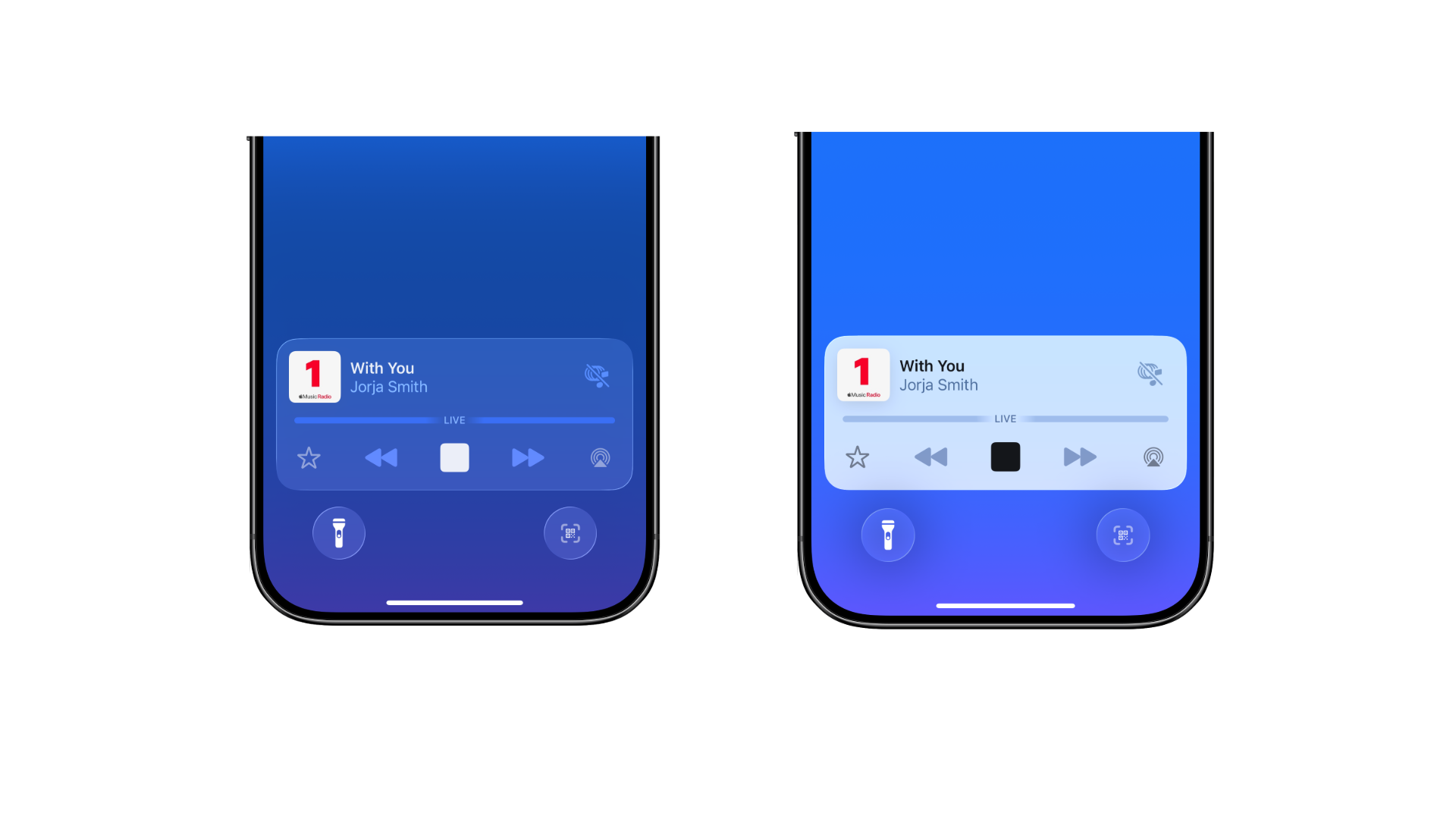
One of the most noticeable new features concerns the display of Liquid Glass—the transparent UI effect used in various areas such as menu bars and buttons. iOS 26.1 Beta 4 includes a new toggle function that allows you to customize the display. Under Settings > Display & Brightness, you can now choose between two modes:

  • Clear: Corresponds to the previous standard view with maximum transparency, where the background shines through clearly.
  • Tinted: Reduces transparency, increases opacity, and thus provides greater contrast.

The new setting allows you to adjust the visual appearance more closely to personal preferences or lighting conditions.
iOS 26.1 Apple
Image: Apfelpatient

Camera gesture on the lock screen can be deactivated

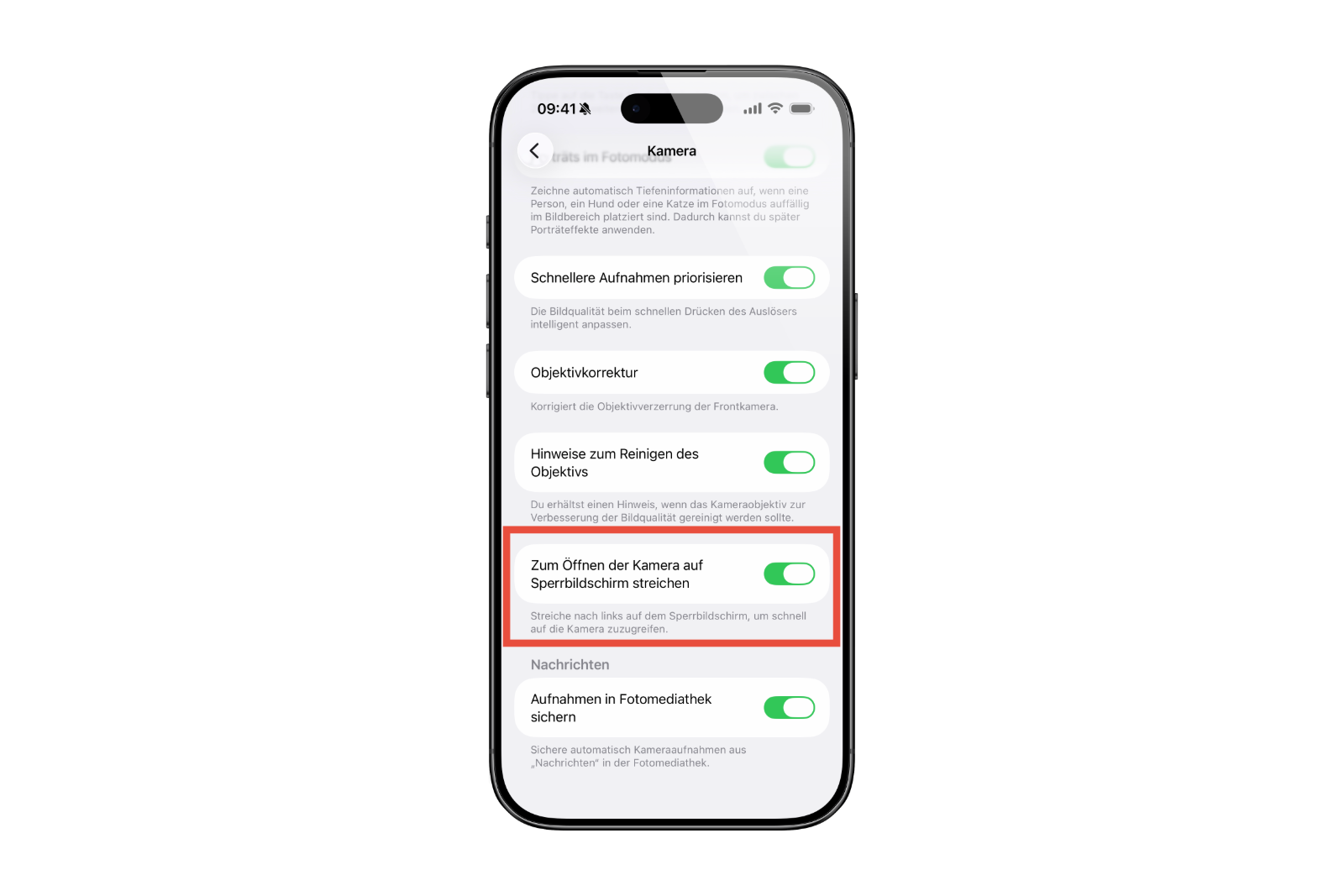
For years, launching the camera by swiping left from the lock screen has been a standard feature on iPhones. With iOS 26.1 Beta 4, there's now, for the first time , the option to specifically disable this behavior. The "Swipe on lock screen to open camera" option has been added to Settings > Camera.

If this feature is disabled, launching the camera via gesture from the lock screen will no longer be possible. However, the camera app itself will remain. This change increases control over camera access, especially in situations where the device is left unattended or shared with a third party.
iOS 26.1 Beta 4 Apple
Image: Apfelpatient

Haptic feedback can be controlled during calls

Another small but practical innovation concerns the phone app. Haptic feedback can now be deactivated when connecting or disconnecting. Previously, the device vibrated briefly when a call was connected or ended. This vibration can now be turned off using a simple toggle function. This setting offers additional convenience for those who prefer the quietest possible user experience.

Apple Intelligence: Visual changes and possible status changes

Apple continues to work on the "Apple Intelligence" area, which will play a central role in iOS in the future. In Beta 4 of iOS 26.1, the display within the settings has been adjusted: content is now left-aligned – a step that was already taken for other settings in previous beta versions.

It's also striking that the beta notice on Apple Intelligence has been removed. Whether this was an oversight or the feature's partial exit from beta status is unclear. The beta label is still present in the current macOS Tahoe 26.1 Beta 4, which suggests that the change in iOS could be a conscious decision—or a test run.

  • All highlights of iOS 26.1 Beta 3 at a glance

More features, more maturity: iOS 26.1 before rollout

Beta 4 of iOS 26.1 brings with it an unexpectedly large number of changes. The ability to customize the look of Liquid Glass provides more control over the interface. The new setting to disable the camera gesture improves security. The option to disable haptic feedback increases convenience. And Apple Intelligence is not only getting a visual update, but possibly also a status change. With these additions, iOS 26.1 gains depth and functionality. The official release of the final version is expected in the coming weeks. The best products for you: Our Amazon Storefront offers a wide selection of accessories, including those for HomeKit. (Image: Shutterstock / Harry Howitt)

  • iOS 26.1 allows you to disable the camera swipe function
  • iOS 26.1 Beta 4 brings new option for less transparency
  • iOS 26.1 Beta 4 is here: Apple prepares final touches
  • Apple in China: New antitrust complaint puts pressure on
  • iPhone 17 hits the market – strong demand in China and the USA
  • Apple Vision Pro Dual Knit Band meets with great demand
  • WhatsApp tests limit on unanswered chats
  • iPhone 17 Pro: Does Cosmic Orange really fade to rose gold?
  • Apple M5 chip in benchmark: Fast, efficient, future-proof
  • M5 MacBook Pro vs. M4 MacBook Pro: differences in the check
  • Apple Vision Pro M5 at a glance: technology, design and price
  • Apple M5 vs. M4: The most important innovations at a glance
  • Apple hints at 120 Hz support for upcoming Studio Display

Make Apfelpatient a preferred source One click – and you'll see us more often on Google
Was this article helpful?
YesNo
Tags: iOSiOS 26.1
SendShareSend
Share

Our Amazon Storefront

A handpicked selection of products for iPhone, Mac and more – sorted by topic and updated regularly.

Shop Now

This post contains affiliate links (including Amazon). We earn a small commission on qualifying purchases – at no extra cost to you. Learn more on our Partner Program page.

Previous Post

iOS 26.1 allows you to disable the camera swipe function

Next Post

Apple lawsuit without resistance: Prosser lets deadline pass [U]

Milan Jovicic

Milan Jovicic

Milan founded Apfelpatient in 2016 and has been responsible for all editorial content since 2018 — news, rumors, guides, and product reviews. Apple devices here are not test units on loan for two weeks but everyday tools: from the iPhone through MacBook Pro, MacBook Air, and iMac to the Apple Vision Pro, at least one device from nearly every product category is in daily use, many of them replaced annually. Every menu path in a guide is verified on the device before it is published.

Related posts

watchOS 27.2: Code reveals new screenshot preview

by Milan Jovicic
September 24, 2026 - 8:36 p.m. CEST
Apple Watch Ultra with an orange band showing the app view, the device getting the new screenshot preview in watchOS 27.2

watchOS 27.2 includes a new screenshot interface for the Apple Watch: preview, share, and delete, just like on the iPhone. It's currently inactive.

Read moreDetails

Apple TV: Peanuts classics free again for Christmas

by Milan Jovicic
September 24, 2026 - 6:43 p.m. CEST
Charlie Brown holding a small Christmas tree under a starry sky in the snow, a scene from A Charlie Brown Christmas, free again on Apple TV

Three classic Peanuts cartoons are back on Apple TV for the holidays, no subscription required. Plus, there are new specials featuring Snoopy and the Fraggle Rocks.

Read moreDetails

The Wanted Man: Hugh Laurie on Apple TV from January

by Milan Jovicic
September 24, 2026 - 6:19 p.m. CEST
Hugh Laurie as crime boss Felix Carmichael in an evening scene from The Wanted Man on Apple TV

The Wanted Man premieres on January 6, 2027 on Apple TV. Hugh Laurie plays a crime boss who wants to escape – the finale is in February.

Read moreDetails

Apple and Qualcomm extend patent license from 2027

by Milan Jovicic
September 24, 2026 - 6:04 p.m. CEST
Back of an iPhone 18 Pro Max in a burgundy case on a grey surface, covered by the renewed Apple Qualcomm patent license

Apple and Qualcomm are extending their patent license from April 2027. Why this has nothing to do with the modem change and affects Germany.

Read moreDetails

iPhone 18 Pro: Update to prevent Face ID restarts is coming

by Milan Jovicic
September 24, 2026 - 1:13 p.m. CEST
iPhone showing the General settings with Software Update, where the fix for the Face ID reboots on iPhone 18 Pro will arrive

Apple has confirmed an update to fix the restarts after failed Face ID recognition on the iPhone 18 Pro and Pro Max. An exchange is not worthwhile.

Read moreDetails
Load More

Categories

  • Apple Insights
  • Apple Rumors
  • Apple News
  • Apple Tips & Tricks
  • iPhone news, rumors and tips
  • Mac and MacBook News
  • Reviews

About APFELPATIENT

APFELPATIENT brings you the latest Apple news, product updates, guides, reviews and tips across the entire Apple ecosystem — from the iPhone to the Mac to the Apple Vision Pro. From the first rumors to confirmed news: researched responsibly.

Follow Apfelpatient

Facebook Instagram YouTube Threads Threads

Company

  • About Apfelpatient
  • Contact
  • Author Profiles

Community

  • Netiquette
  • Push Notifications
  • RSS feed

Legal

  • Legal Notice
  • Privacy Policy
  • Terms of Use
  • Cookie Settings
  • Affiliate Program

Resources

  • Sitemap

© 2026 Apfelpatient. All rights reserved.

No Result
View All Result
  • Home
  • News
  • Rumors
  • Tips & Tricks
  • Reviews
  • Insights

© 2026 Apfelpatient. All rights reserved. Page Directory

Change language to Deutsch



