


iOS 17 and iPadOS 17 are finally here, bringing with them a host of exciting features and improvements that revolutionize the user experience on iPhone and iPad. In this article, we will highlight the most notable new features in both operating systems, which include calls and messages, AirDrop, Smart Typing, Sleep, and Siri in iOS 17, as well as the exciting updates in iPadOS 17.
Apple's latest operating system versions, iOS 17 and iPadOS 17, focus on the needs and desires of users around the world. With an impressive range of innovations and improvements, they promise to change and improve the way we use our devices.
iOS 17: Calls and Messages
iOS 17 brings significant improvements to the Calls and Messages experience. Contact Poster allows you to set custom backgrounds for contacts, while Live Voicemail makes it easier to make calls while you're busy. Messages has been updated with useful features like inline replies and an improved interface for stickers and apps.
AirDrop
The popular AirDrop feature has also been updated. NameDrop allows you to exchange contact information simply by bringing your iPhones close together. Transferring large files over the Internet outside of WiFi range will also soon be supported.
Intelligent Input
The keyboard in iOS 17 has improved autocorrect that even focuses on sentence-level grammatical errors. Autocorrect has become smarter, especially in detecting “duck words.”
iOS 17 sleep mode
iOS 17 introduces "Stand By" mode, similar to the Apple Watch's Nightstand mode. When the iPhone is charging and locked, this mode displays a clock and provides access to widgets, notifications, and smart home controls.

Goodbye "Hey" Siri
One significant change concerns Siri, as in iOS 17 the "Hey" has been removed from "Hey Siri." Now all you need to do is say "Siri." Siri also supports back-to-back commands, making interaction with the virtual assistant more seamless.
iPadOS 17: Customizable lock screen and interactive widgets
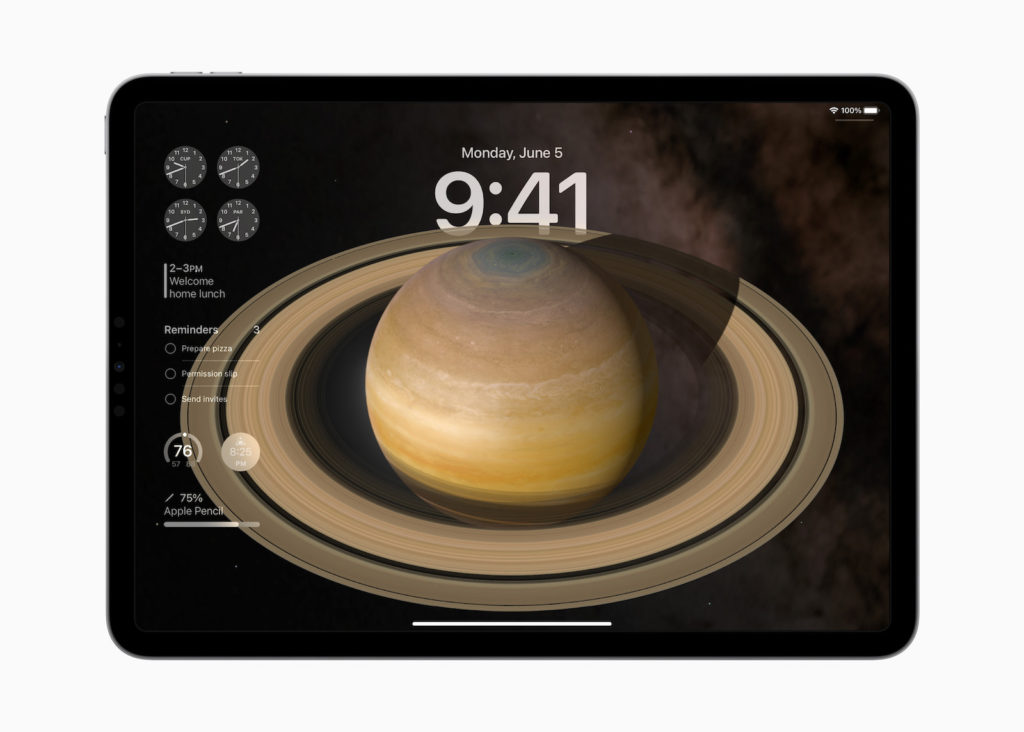
On the iPad, iPadOS 17 gets a customizable lock screen and interactive widgets that allow users to customize their home screen to their liking.
health app with extended functionality
The Health app on iPad is being expanded to offer a larger view with interactive charts and private data syncing to better protect users' health data.
Advanced note-taking app with PDF support
The Notes app on the iPad is being enhanced with full PDF support and Markdown functionality to make working with documents even more efficient.
iPadOS 17: Stage Manager updates and external display connection
Stage Manager receives updates including flexible layouts and improved functionality for connecting to external displays, enabling the use of webcams for video conferencing and more.
Compatibility
However, the update says goodbye to some iPhone and iPad models. According to Apple's website, the iPhone 8 (Plus) and iPhone X, as well as the first-generation iPad Pro and the fifth-generation iPad are no longer supported by iOS 17 or iPadOS 17.
iOS 17 & iPadOS 17 Conclusion
With iOS 17 and iPadOS 17, Apple has once again proven that they listen to the needs of their users and develop innovative solutions. Accessibility has been improved, calls and messages have become more user-friendly, AirDrop has become even more powerful, the keyboard is smarter, sleep mode is more useful and Siri is more responsive. On the iPad, iPadOS 17 offers more customization options and useful updates for various apps. It is clear that these new operating systems will have a lasting impact on the way we use our Apple devices. Now it is time to discover the exciting new features of iOS 17 and iPadOS 17 for yourself and make full use of the possibilities. Are you looking for new accessories? Then take a look in our Amazon Storefront - there you will find numerous products from leading providers, also for HomeKit and Co.! (Image: Apple)
- watchOS 10 & tvOS 17: Experience the next level of technology
- iOS 17: New features and improvements in the Maps app
- iOS 17: Discover what's new in the Apple Music app
- iOS 17: Siri and Spotlight experience new features
- iOS 17: Discover the new features for your lock screen
- iOS 17 AirPlay Innovations: Smarter, faster, more convenient
- AirDrop Upgrade: iOS 17 brings five innovative features
- Simpler and more creative: iOS 17 improves photo functions
- iOS 17: Discover the new features for phone and FaceTime
- Learn all about the new Safari features in iOS 17
- iOS 17: Five new security features for your iPhone





