

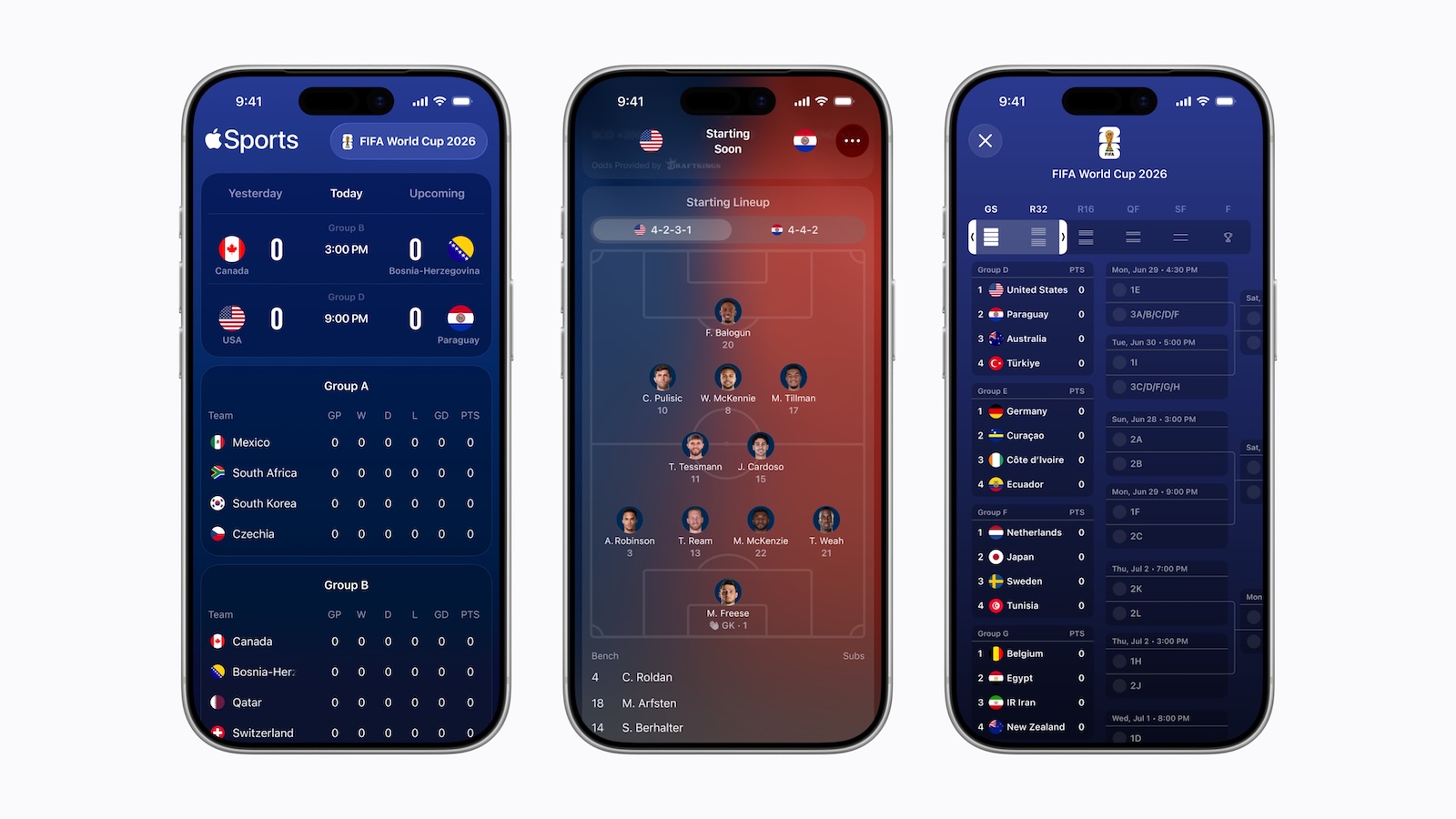
Just in time for the kickoff of the 2026 FIFA World Cup, Apple is releasing a major update for the Apple Sports app. Version 4.0 provides complete World Cup coverage with group stage information, lineups, and live scores – and makes the app available in over 90 additional countries for the first time.
Apple has updated its Sports app to version 4.0, laying the groundwork for the upcoming FIFA World Cup. The update arrives roughly three weeks before the opening match and transforms the app into the central World Cup companion on the iPhone. Users opening the app are immediately greeted with a banner highlighting the World Cup features and can follow individual teams or the entire tournament. Apple's timing of this update aligns with the company's broader sports strategy, which is currently most evident with Apple TV as a streaming service, Formula 1 broadcasts, and the MLS Season Pass.
What the World Cup module includes
The key new features revolve entirely around the tournament in the USA, Canada, and Mexico. Apple Sports displays the group compositions before kickoff and allows users to favor individual national teams. During the tournament, lineups, formations, and live updates provide real-time coverage. Three key components stand out from the feature set:
- Tournament Bracket View: A clear, scrollable view of the matches and results of each round, allowing you to follow each team's journey from the group stage to the final.
- Visual lineups: The Game Cards show each team's starting lineup as a graphical formation, thus providing additional tactical context before kickoff.
- One-tap to Apple News: Direct jump to editorial reporting – however, Apple News is not available in the EU and therefore not in Germany, so this feature is not available for the German target group.
Those who want to keep track of everything without selecting individual teams can subscribe to the entire FIFA World Cup 2026. This is especially useful for fans who want to follow multiple matches simultaneously or simply catch the most important highlights without having to commit to a specific team.
Oliver Schusser, Apple's Vice President for Music, Sports, Apple TV, and Beats, described the move in a statement as a deliberate moment of expansion – the World Cup connects fans worldwide and is therefore the ideal time to make Apple Sports accessible to more users. Speed and simplicity remain the central design principles.
For the first time, 48 teams are participating
The 2026 World Cup is the first World Cup in an expanded format. Instead of 32 teams, 48 nations will compete – a significant jump that fundamentally changes the tournament. More groups, more matches, more participants from regions that were rarely involved before. For a companion app like Apple Sports, this means a considerable increase in preparation effort – and at the same time, an opportunity to differentiate itself from established alternatives like FotMob or Sofascore.
Apple is building on what has defined the app since its launch in February 2024: a streamlined interface, fast live scores, and live activity on the lock screen and Apple Watch. Users with other apps open simultaneously will see the current score displayed directly via Dynamic Island and live activity. Live activity requires iOS 18 or later and watchOS 11 or later.
New features include: Widgets for following the World Cup can now be placed not only on the iPhone, but also on the iPad and MacBook. This keeps the tournament standings visible across the entire Apple ecosystem without having to open the app each time. Apple Sports also connects directly to the Apple TV app: A single tap is all it takes to switch from the score to the corresponding live broadcast on a linked streaming service.
Expanded global availability
The second major aspect of the update concerns availability. Apple has brought the Sports app to over 90 new countries and regions. This means the app is now available in more than 170 markets worldwide.
For German users, availability remains unchanged – Apple Sports has been available in the App Store in Germany since September 2025 and is part of the existing feature set. The global rollout is aimed at regions such as Latin America, Asia-Pacific, and parts of Africa, where World Cup interest is traditionally high and the app was previously unavailable. Apple is clearly targeting the global football community, which will reach its peak this summer.
Sport as a platform lever for Apple
The Sports app is one of Apple's most frequently updated apps and part of a broader strategy. Apple TV extends its sports streaming service with F1, MLS, and MLB, Apple Sports provides the free data layer, and the direct access to the Apple TV app allows users to watch live streams on linked streaming services with a single tap. The Apple TV app also lets users keep their favorite teams synchronized across Sports, Apple TV, and Apple News via My Sports. For Apple, sports is therefore less of a single product and more of a cross-platform offering that connects multiple services.
The fact that the World Cup update is free and works without a separate paywall underscores the app's role as an acquisition tool for the entire Apple Sports ecosystem. Those who use Apple Sports once are more likely to also switch to Apple TV – an effect the company is clearly aware of.
Three weeks until kickoff
The update is now available for free in the App Store. The 2026 World Cup starts in June, giving Apple Sports users plenty of time to set up the app, select their favorite teams, and configure live activities. New Apple Sports users can download the app for free from the App Store. For German fans, the app will be particularly interesting for those interested in the German national team – it allows users to follow lineups, schedules, and live scores of all German World Cup matches directly on their iPhones. (Image: Apple)
- Apple's voice control reveals what the new Siri will be able to do
- Apple Brings Apple Intelligence to Its Accessibility Features
- macOS 27: Four Intel Macs fall behind
- WWDC 2026: Apple confirms date, program and streaming details
- Indian antitrust case: Apple gets a two-month extension – but must deliver
- Apple's secret business: How defective chips become a multi-million dollar cost-saving model
- Apple and Epic set a timetable for new commission negotiations
- AirPods Max: Designer Whang reveals details from five years of development
- WhatsApp is now rolling out Liquid Glass more broadly on iOS
- Court draws Federighi into xAI lawsuit – Cook remains uninvolved
- Codex is moving into the ChatGPT mobile app
- iPhone 18: Apple Modem Brings a Hidden Privacy Benefit
- Intel manufactures chips for iPhone, iPad and Mac for the first time – Apple production is underway
- OpenAI is preparing legal action against Apple over its Siri partnership
- Anthropic's Mythos Uncovers New macOS Vulnerabilities – Apple Reviews Report
- Shrinking Season 4: Filming starts next week – premiere possible in early 2027
- iPhone 17 Pro charges faster than 32 other smartphones in the test
- Unlocked iPhones bring thieves up to $800 more





