This article may contain affiliate links. Learn more on our Partner Program page.
Apple is currently testing the beta version of iOS 26.1, the first major update for the current iPhone operating system, iOS 26. Although the new version of Siri is still missing, the update brings several changes that are noticeable in everyday use. In addition to new features in apps like Clock, Music, and Fitness, there are also visual tweaks and improvements to privacy, security, and accessibility. The update is already available to developers and public beta testers and is expected to be released in late October or early November.
With iOS 26.1, Apple is focusing on refinement and ease of use. The update isn't a major overhaul, but rather a collection of small but meaningful improvements that make the system smoother and more logical. New languages for Apple Intelligence, an expanded translation feature via AirPods, and more options for creating workouts demonstrate Apple's attention to detail. At the same time, design adjustments across several apps ensure a more consistent look.
Alarms and timers
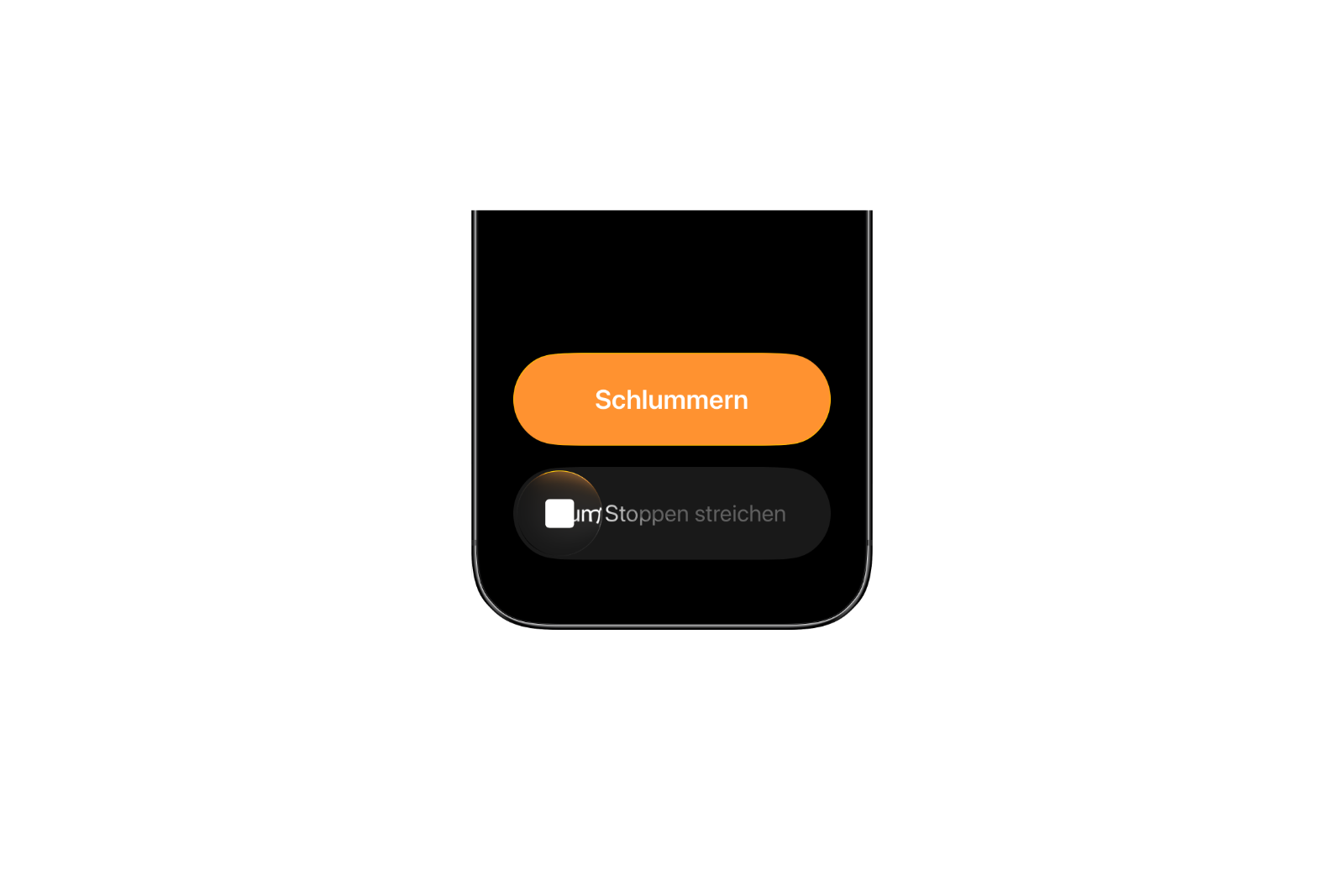
In iOS 26.1, the controls for alarms and timers in the Clock app are changing. Instead of tapping a stop button, you now need to use a slider to completely disable the alarm. A simple tap still triggers the snooze function. This prevents an alarm from being accidentally deactivated—especially useful for those who tend to be distracted in the morning.
New languages for Apple Intelligence
Apple is significantly expanding language support for Apple Intelligence. New additions include Danish, Dutch, Norwegian, Portuguese (Portugal), Swedish, Turkish, Traditional Chinese, and Vietnamese. This makes the AI feature available to a broader user base for the first time.
AirPods Live Translation
Live Translation with AirPods supports additional languages in iOS 26.1, including Japanese, Korean, Italian, and Chinese in both traditional and simplified Chinese. This lets you translate conversations with even more people in real time.
Important note: In EU member states, the function remains blocked until legal issues are resolved.
- Apple warns of DMA: When regulation becomes a risk
- Apple in Europe: What are the real consequences of the DMA?
Apple Music
In Apple Music, playback can now be controlled directly with swipe gestures. Swiping over the song title in the player switches to the next or previous track. This small change ensures a smoother user experience.
Fitness app
The Fitness app in iOS 26.1 offers the ability to create custom workouts. Users can freely choose the workout type, duration, start time, estimated active calories, and effort level. These flexible options complement the previously rather rigid training templates and make tracking more personalized.
Settings app
Apple has redesigned the layout of the Settings app. Text and icons in headings like "General," "Bluetooth," "Wi-Fi," "Cellular," "Personal Hotspot," and "Accessibility" are now left-aligned. This makes the interface appear cleaner and more modern.

Home screen folder
The folder view on the home screen also follows the new design. The folder name is now aligned to the top left instead of centered. This aligns the appearance with the changes in the Settings app.
Phone app
The Phone app's keyboard now uses the new "Liquid Glass" design in iOS 26.1. This subtle, slightly transparent effect adds depth and makes the numbers appear more modern.

Photos app
Apple has made several visual adjustments to the Photos app. The slider for browsing videos has been redesigned, and the navigation bar has a matte finish and stands out better against light backgrounds. When managing multiple photos, the "Play as Slideshow," "Mark as Favorite," and "Hide" options are now located at the top of the menu, simplifying operation.
Safari app
Safari gets a redesigned tab bar in iOS 26.1. It's now wider and has less padding at the edges. In "Reduce Transparency" mode, however, the padding has been slightly increased, making the display appear more harmonious.
Improved background security
The Privacy and Security section now includes an option to automatically download and install security improvements. This feature replaces the previous Rapid Security Response feature and ensures that important updates are installed in the background without user interaction.

Display settings
Under "Display" in the Settings app, iOS 26.1 now uses the official wallpaper of the new system instead of the old iOS 18 design. Additionally, the light refraction effect around app icons, known as "Liquid Glass," has been slightly adjusted. Colors and reflections appear slightly darker and more subtle.
background images
When setting a new wallpaper on the lock screen, prompts like "Pinch to crop" appear briefly and then disappear. This creates a cleaner look and is less distracting from the actual image.
Display accessibility
In the Accessibility settings, the "Display and Text Size" section has a new "Display Borders" option. This adds a visible border to all buttons. The previous "Button Shapes" setting is no longer available. This provides a clearer visual structure and makes it easier to use.
iPadOS 26.1
Many changes from iOS 26.1 are also included in iPadOS 26.1. Apple is also reintroducing the Slide Over feature. This allows an app to open as a floating window above other apps while retaining window-based multitasking functionality. Only one Slide Over app can be active at a time. The feature is activated via the green window resize button. Also new is a setting for adjusting the input gain when using an external microphone. This is especially useful for video recordings or podcasts.
Availability and compatibility
The beta version of iOS 26.1 is available to developers and public testers. Those interested in participating can sign up via Apple's beta website. The update is compatible with all devices that also support iOS 26. The official release is expected in late October or early November.
iOS 26.1 makes the iPhone rounder and smarter
With iOS 26.1, Apple delivers a solid interim update focused primarily on refinement and convenience. New operating concepts, more language options, visual improvements, and optimized security features make the system more stable and consistent. Even without major Siri updates, Apple shows that small changes often make the biggest difference. The best products for you: Our Amazon Storefront offers a wide selection of accessories, including those for HomeKit. (Image: Apfelpatient)
- Apple 2026 in transition: Five innovations will shape the year
- Apple on the verge of change: How the leadership team is changing
- Apple Glasses combine fashion, technology and AI in everyday life
- Apple Vision Air: Why the headset may never be released
- Apple announces new immersive content for Apple Vision Pro
- Apple Vision Pro: R2 chip should significantly increase performance
- iPad mini 8: All rumors and information at a glance