This article may contain affiliate links. Learn more on our Partner Program page.
Netflix, Disney+, and the Apple TV app already run directly on the television. So why put a box under the screen for €349? The answer has less to do with picture quality than with data, updates, and the rest of the apartment.
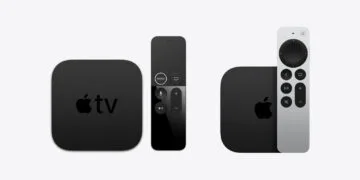
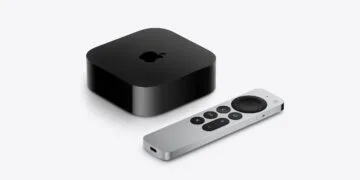
On October 13th, Apple unveiled the fourth generation of the Apple TV 4K. According to the announcement in the German Apple Newsroom, it costs €349 and will be available from November 13th. Featuring an A19 chip, far-field microphones, and a new Siri Remote, the new model is primarily designed as a central hub for the living room.
At the same time, almost every modern TV comes with its own streaming apps. The difference to the set-top box therefore no longer lies in the available content, but in data privacy, update support, and compatibility with Apple Home and HomePods – and, in one respect, also in the price. All articles about the device are compiled on the Apple TV 4K topic page.
Key Facts at a Glance
- Many smart TVs use ARC to recognize what is playing on the screen, according to a study even with content via HDMI.
- During setup, tvOS asks for permission to access Siri, location data, and analytics; since tvOS 14.5, apps must request permission before tracking.
- tvOS 27 runs on the Apple TV 4K from the second generation of 2021 onwards; the Apple TV HD from 2015 received updates up to tvOS 26.
- As a control center for Apple Home and with HomePods as speakers, the box can do things that no TV app can.
- AirPlay is no longer a valid argument; many TVs support it themselves. And 349 euros is a lot of money for a playback box.
What a smart TV records while you watch something
The term ACR stands for automatic content recognition. The television regularly creates a kind of fingerprint of the image and compares it to a database so that the manufacturer knows what is currently playing. This data can be used for advertising and passed on to third parties.
How far this extends was measured by a research team, including researchers from University College London, using televisions from Samsung and LG in the UK and the US. The study on ACR tracking in smart TVs, presented at the IMC conference in 2024, detected ACR traffic even when the television was only being used as a display for a laptop or game console connected via HDMI. With LG, the data was sent approximately every 15 seconds, while with Samsung, it was sent about once per minute.
The measurement also reveals the good news: With advertising and tracking options disabled, traffic to the ACR servers ceased in both countries. Instructions on how to disable tracking on LG and Samsung TVs explain how to do this for each manufacturer.
There's a catch, though: The study found discrepancies between the data actually collected and what manufacturers disclosed in response to GDPR-compliant data requests, as the university summarizes in its press release. Those unfamiliar with the settings will remain in the factory default state – which is enabled for data collection on many devices.
How tvOS handles your own data
Ars Technica conducted an in-depth tracking review of the Apple TV 2025 and concluded that the box collects significantly less data than other streaming hardware. According to the report, tvOS explicitly asks during setup whether Siri, location services, and sharing analytics data with Apple should be enabled. Ars Technica does not use tvOS.
In addition, there's a block on cross-app tracking. Since tvOS 14.5, according to Apple's support document, apps must request permission before tracking activity across apps and websites of other companies. Users who don't want to see any such requests can disable the "Allow apps to request tracking" option under "Settings" > "General" > "Privacy & Security" > "Tracking".
Further down in the same menu is the "Analysis and Improvements" section with "Share Apple TV Analytics" and "Share with App Development Teams." Both can be disabled later if they were accidentally selected during setup.
However, this doesn't give them carte blanche. The query only regulates tracking across third-party apps. What Netflix, Disney+, or a sports app collects about viewing behavior within their own apps remains the prerogative of the respective provider – on Apple TV just as it does on a television.
How long the box will receive updates
A television is often used for eight years or more, but the apps on it are dependent on the manufacturer's software. With Apple TV, support can be seen in the existing models. According to Apple's model overview, tvOS 27 supports the second and third generation Apple TV 4K; the fourth generation comes with it anyway.
| Model | Published | tvOS 27 |
|---|---|---|
| Apple TV HD | 2015 | No, the latest version is tvOS 26. |
| Apple TV 4K (1st generation) | 2017 | No, the latest version is tvOS 26. |
| Apple TV 4K (2nd generation) | 2021 | Yes |
| Apple TV 4K (3rd generation) | 2022 | Yes |
| Apple TV 4K (4th generation) | 2026 | Yes |
The Apple TV HD received system updates for roughly ten years. The first Apple TV 4K stopped receiving updates with tvOS 26, and Apple now considers it a vintage product. Whether upgrading is worthwhile is discussed in the buying guide for owners of the first Apple TV 4K.
More than just streaming: Control center and HomePods
The most noticeable difference compared to the TV app is when using the box in the rest of the home. The Apple TV 4K acts as a control center for Apple Home, keeping automations and remote access running, even when no iPhone is at home. According to the Newsroom announcement, the fourth generation also supports Thread for this purpose. The overview of the Home app in iOS 27 shows everything that can be controlled with the current Home app.
With HomePods, the Apple TV becomes a home theater system. Starting with the second generation, Apple TV 4K supports HDMI eARC, according to Apple, meaning audio from other sources connected to the TV can also be routed through the HomePods. Two speakers function as a HomePod stereo pair when connected to the Apple TV. According to Apple, surround sound with four HomePods is only available with the fourth generation.
AirPlay, on the other hand, is hardly a compelling reason to buy a TV anymore. Apple itself lists smart TVs with AirPlay support in its support documentation. For those who only occasionally want to send photos or videos from their iPhone to the TV, many current devices don't require a dedicated box.
Price as a counterargument
Apple charges €349 for the Apple TV 4K (4th generation). Apps on the TV itself are included, and streaming subscriptions are a separate cost. For those who only use one or two services, don't own HomePods, and don't have a smart home system, the price primarily offers a cleaner interface and reduced data usage.
Anyone who already owns a second- or third-generation Apple TV 4K already has most of the arguments above in their living room. Whether the jump to the new model is still worth it is calculated in the comparison between the Apple TV 4K with A19 and A15. How the setup works is explained in the guide to setting up the Apple TV.
Who will really benefit from this box?
I consider the Apple TV 4K the better choice if at least one of three things applies: Apple Home is to be used as a control center, HomePods are to handle the TV audio, or the TV is to learn as little as possible about one's viewing habits. In the last case, however, the box is only beneficial if the TV is then truly only used as a screen and its own tracking options are deactivated.
However, those who are satisfied with the built-in apps, don't use a smart home system, and only stream content are paying €349 for a difference they'll hardly notice in everyday use. In that case, I would save the €349 and instead disable the advertising and tracking options in the TV's menu.
Do you use Netflix and other streaming services via Apple TV or directly through the TV's apps – and have you ever disabled tracking there? Tell us in the comments how your living room is set up.
Frequently Asked Questions: Apple TV or Smart TV
Not for streaming, as the app runs directly on many smart TVs. The box also provides a control center for Apple Home and the ability to use HomePods as speakers for the TV. Furthermore, it eliminates the ARC content recognition, which many TVs use to report to their manufacturers what's currently playing.
tvOS does not use automatic content recognition (ACR). During setup, the system asks whether Siri, location services, and the sharing of analytics data should be enabled. What data individual apps like Netflix collect within their own apps is determined by the respective provider.
Under "Settings" > "General" > "Privacy & Security" > "Tracking", disable the option "Allow apps to request tracking". In the same menu, under "Analytics and Improvements", you can also disable analytics data.
The 2015 Apple TV HD received system updates up to tvOS 26. tvOS 27 runs on the second-generation Apple TV 4K from 2021 onwards.
Yes, many current smart TVs directly support AirPlay. Apple lists compatible TVs in its support section.
No, an Apple TV 4K is required for that. From the second generation onwards, audio from other sources on the TV can also be routed through the HomePods via HDMI eARC. Surround sound with four HomePods is only available with the fourth generation.
The fourth generation with A19 chip costs 349 euros and will be available in stores from November 13th.