
Apfelpatient
  • Home
  • News
  • Rumors
  • Tips & Tricks
  • Reviews
  • Insights
No result
View All Results
  • iPhone 18
  • iPhone 18 Pro
  • iPhone Duo
  • Apple Home
  • Siri AI
  • HomePod
  • HomePod mini
  • HomePod mini 2
  • MacBook Pro
  • Apple TV 4K
  • Apple Watch Series 12
  • Apple Watch Ultra 4
  • AirPods 5
  • iOS 27
  • iPadOS 27
  • macOS
  • MacBook Neo
  • iPhone 17e
  • AirTags
  • iOS 26
  • iPhone 17
  • iPadOS
  • iMac
  • Mac mini
  • Apple TV
  • iPad Pro
  • iPhone Air
  • Apple Vision Pro
  • iPhone 16
  • AirPods 4
  • Apple Watch Ultra
  • MacBook Air
  • iPad
  • AirPods Max
  • AirPods Pro 3
  • Mac Studio
  • Studio Display
  • iPad Air
  • iPad mini
  • watchOS 27
  • Apple CarPlay
  • Apple Pay
  • watchOS 26
  • Home
  • News
  • Rumors
  • Tips & Tricks
  • Reviews
  • Insights
No result
View All Results
Apfelpatient
No result
View All Results
  • iPhone 18
  • iPhone 18 Pro
  • iPhone Duo
  • Apple Home
  • Siri AI
  • HomePod
  • HomePod mini
  • HomePod mini 2
  • MacBook Pro
  • Apple TV 4K
  • Apple Watch Series 12
  • Apple Watch Ultra 4
  • AirPods 5
  • iOS 27
  • iPadOS 27
  • macOS
  • MacBook Neo
  • iPhone 17e
  • AirTags
  • iOS 26
  • iPhone 17
  • iPadOS
  • iMac
  • Mac mini
  • Apple TV
  • iPad Pro
  • iPhone Air
  • Apple Vision Pro
  • iPhone 16
  • AirPods 4
  • Apple Watch Ultra
  • MacBook Air
  • iPad
  • AirPods Max
  • AirPods Pro 3
  • Mac Studio
  • Studio Display
  • iPad Air
  • iPad mini
  • watchOS 27
  • Apple CarPlay
  • Apple Pay
  • watchOS 26

Find and delete photo duplicates under iOS 16 – here's how

Milan Jovicic by Milan Jovicic
June 18, 2022 - 08:38 CEST
in Apple Tips & Tricks
0
iOS 16 photo duplicates

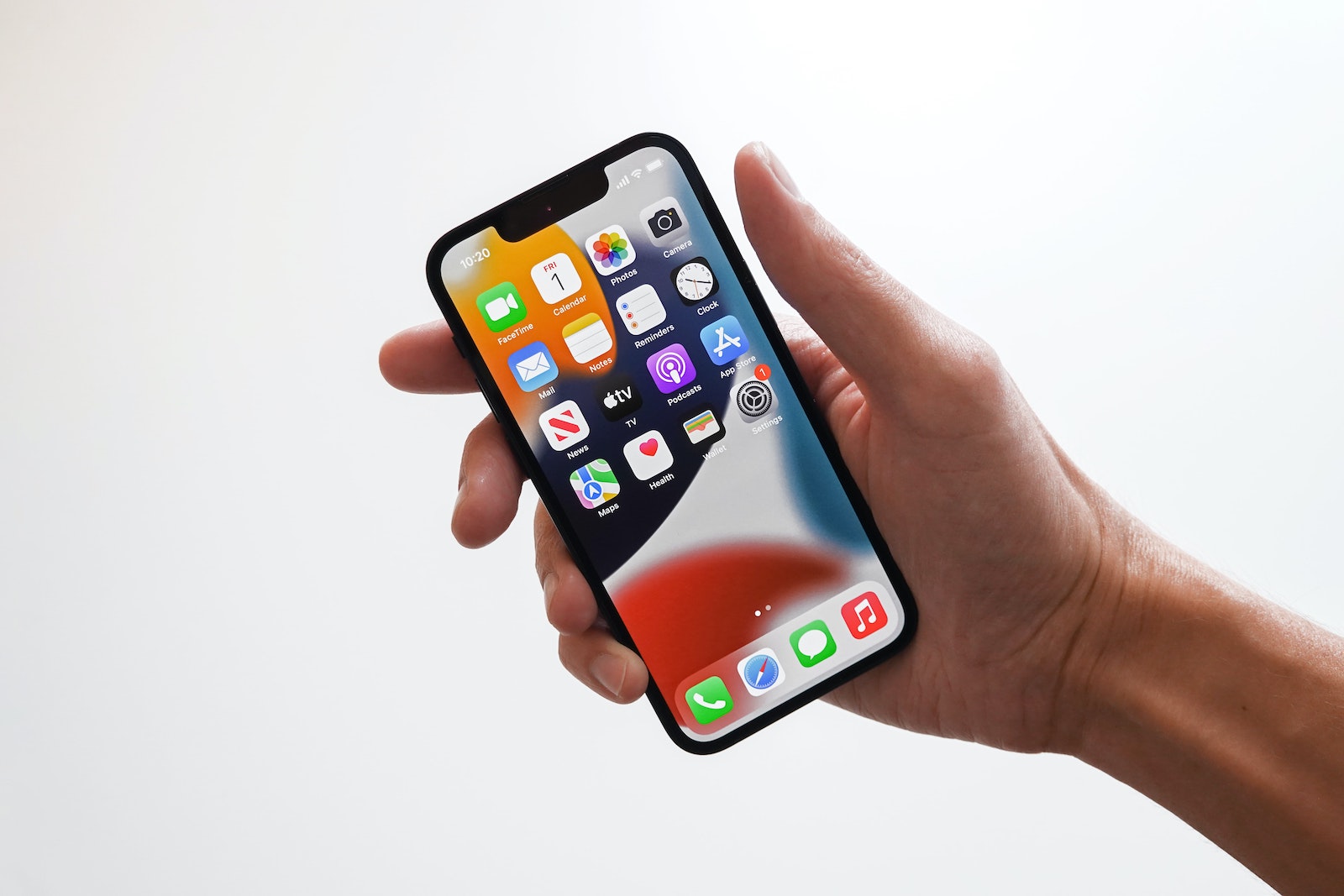
Photo by Unsplash / Jeremy Bezanger

WhatsAppFacebookEmail
Threads

This article may contain affiliate links. Learn more on our Partner Program page.

Make Apfelpatient a preferred source One click – and you'll see us more often on Google

iOS 16 brings many improvements to Apple's Photos app and one of the most useful new features is the integrated duplicate finder. Below you will learn how you can use the new feature to delete duplicate iPhone photos individually or in large batches.

Because it's so easy to take high-quality photos with the iPhone, it's easy to end up with a lot of shots in our photo collection, including many duplicate images. Until now, the best solution was to use a third-party app to find and remove duplicates. But this can be a difficult undertaking, as paid apps don't work as well as they often claim. With iOS 16, Apple now offers a built-in tool for finding and deleting duplicate iPhone photos that is super easy to use and works accurately. Apple describes the merge duplicates feature as follows:

Merging combines relevant data such as captions, keywords, and favorites into one photo with the highest quality. Albums containing merged duplicates are updated with the merged photo.

Apple also points out that the discarded duplicates will appear in the Recently Deleted album if you want to see what was deleted or restore recordings.

Duplicate iPhone photos: How to delete them under iOS 16

  • On iOS 16, open the native Photos app on your iPhone.
  • Select the “Albums” tab below.
  • On the main albums screen, scroll down.
  • Under the “Other” section, tap “Duplicates.”
  • Check the duplicate matches and tap “Merge” to delete duplicate iPhone photos.
  • You can also tap Select in the top right to select All or select multiple duplicates to merge them faster.
  • You can also tap the suggested duplicates to view them in your photo library and see how similar they are.

If you decide to merge or delete the duplicates found by iOS 16, tap the "Merge" button on the right to confirm, then tap "Merge X Duplicates."
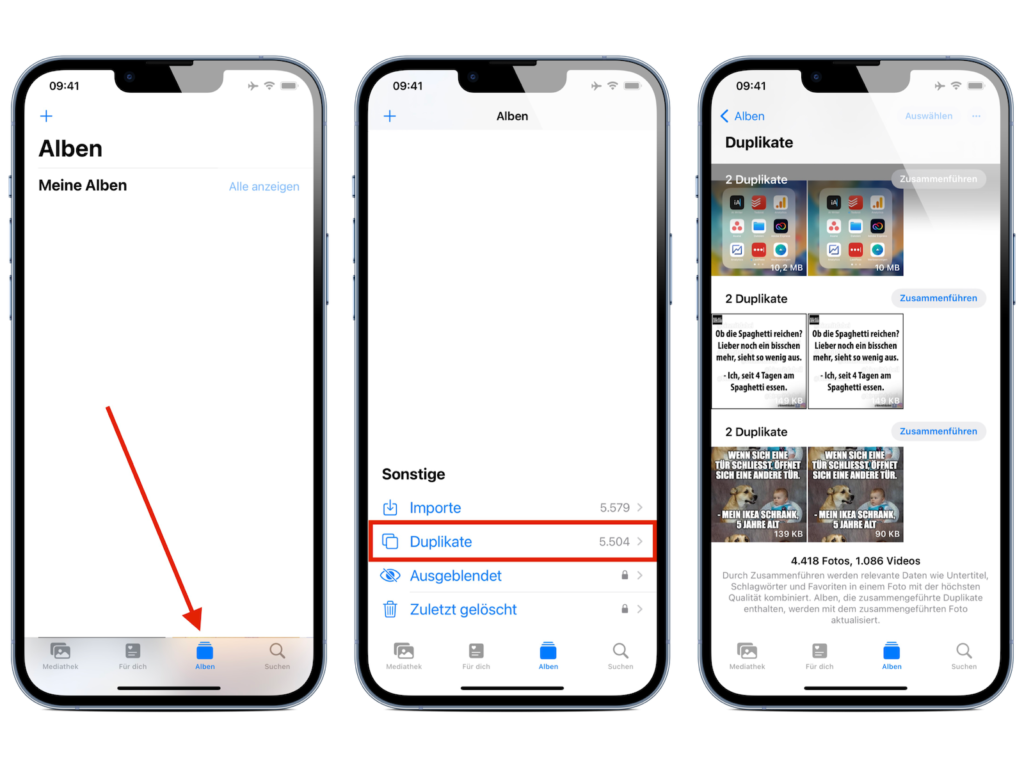
Image: Apfelpatient

A nice aspect of the feature is that each photo displays its size in the lower right corner, so you can quickly see how much storage space you're saving. The fastest way to delete duplicate iPhone photos is to use the "Select" button in the upper right corner. Then you can choose which photos you want to remove using "Select All" or "Tap/Swipe." Looking for new accessories? Check out these in our Amazon Storefront - there you will find numerous products from leading providers, also for HomeKit and Co.! (Photo by Unsplash / Jeremy Bezanger)

  • iOS 16: How to use personalized Spatial Audio for AirPods
Was this article helpful?
YesNo
Tags: iOSiOS 16iPadOSiPadOS 16macOSmacOS 13 Ventura
SendShareSend
Share

Our Amazon Storefront

A handpicked selection of products for iPhone, Mac and more – sorted by topic and updated regularly.

Shop Now

This post contains affiliate links (including Amazon). We earn a small commission on qualifying purchases – at no extra cost to you. Learn more on our Partner Program page.

Previous Post

WhatsApp gets new privacy settings

Next Post

New Dual USB-C Power Adapter: Apple provides support document

Milan Jovicic

Milan Jovicic

Milan founded Apfelpatient in 2016 and has been responsible for all editorial content since 2018 – news, rumors, how-to guides and product reviews. Here, Apple devices aren't review units kept for two weeks, they're everyday tools: from iPhone to MacBook Pro, MacBook Air and iMac all the way to Apple Vision Pro, at least one device from every product category is in daily use, many of them replaced every year. Every menu path in a guide is checked on the device before it goes live.

Related posts

Apple Creator Studio: Apps, subscription, and clear AI limits

by Milan Jovicic
November 18, 2026 - 8:06 PM CET
Apple Creator Studio app icons: Final Cut Pro, Logic Pro, Pixelmator Pro, Keynote, Pages, Numbers, Freeform, Motion, Compressor and MainStage

Apple Creator Studio: Which apps are included in the subscription, what the fall update brings, what's missing from the paid version, and where the AI limits lie.

Read moreDetails

WhatsApp hacked: How to protect your account

by Milan Jovicic
November 18, 2026 - 3:39 PM CET
WhatsApp hacked: App Store page of WhatsApp Messenger on the unfolded iPhone Duo

WhatsApp hacked? The latest scams, how to recover your account, and which settings permanently protect it with a password.

Read moreDetails

HomePod Surround: Set Up Four HomePods with Apple TV 4K

by Milan Jovicic
November 14, 2026 - 00:09 CET
HomePod surround: TV with Apple TV 4K, two HomePods at the front beside the screen and two HomePod mini as rear speakers

HomePod surround with Apple TV 4K: which HomePods work, how to position them, and how to set up the surround group and audio return channel.

Read moreDetails

iPhone Duo: How to pair and use Apple Pencil

by Milan Jovicic
November 12, 2026 - 1:51 PM CET
Folded iPhone Duo in a dark case on a grey stone surface with a white Apple Pencil on top – iPhone Duo with Apple Pencil

Apple Pencil on the iPhone Duo: Which stylus fits, how to pair it via cable, and what happens to the stylus after a restart.

Read moreDetails

Apple Watch Ultra: How to customize the action button

by Milan Jovicic
November 12, 2026 - 01:42 CET
Apple Watch Ultra Action button: watch with titanium case and light Ocean Band lying on a gray stone surface, the orange button on the side of the case in the foreground

Apple Watch Ultra: How to assign the action button to workout, flashlight, voice memo and more – including quick switching and siren.

Read moreDetails
Load More

Categories

  • Apple Insights
  • Apple Rumors
  • Apple News
  • Apple Tips & Tricks
  • iPhone news, rumors and tips
  • Mac and MacBook News
  • Reviews
Make Apfelpatient a preferred source One click – and you'll see us more often on Google

About APFELPATIENT

APFELPATIENT brings you the latest Apple news, product updates, guides, reviews and tips across the entire Apple ecosystem — from the iPhone to the Mac to the Apple Vision Pro. From the first rumors to confirmed news: researched responsibly.

Follow Apfelpatient

Facebook Instagram YouTube Threads Threads

Company

  • About Apfelpatient
  • Contact
  • Author Profiles

Community

  • Netiquette
  • Push notifications
  • RSS feed

Legal

  • Legal Notice
  • Privacy Policy
  • Terms of Use
  • Cookie settings
  • Affiliate Program

Resources

  • Sitemap

© 2026 Apfelpatient. All rights reserved.

No result
View All Results
  • Home
  • News
  • Rumors
  • Tips & Tricks
  • Reviews
  • Insights

© 2026 Apfelpatient. All rights reserved. Site map

Change language to Deutsch