
Apfelpatient
  • Home
  • News
  • Rumors
  • Tips & Tricks
  • Reviews
  • Insights
No result
View All Results
  • iPhone 18
  • iPhone 18 Pro
  • iPhone Duo
  • Apple Home
  • Siri AI
  • HomePod
  • HomePod mini
  • HomePod mini 2
  • MacBook Pro
  • Apple TV 4K
  • Apple Watch Series 12
  • Apple Watch Ultra 4
  • AirPods 5
  • iOS 27
  • iPadOS 27
  • macOS
  • MacBook Neo
  • iPhone 17e
  • AirTags
  • iOS 26
  • iPhone 17
  • iPadOS
  • iMac
  • Mac mini
  • Apple TV
  • iPad Pro
  • iPhone Air
  • Apple Vision Pro
  • iPhone 16
  • AirPods 4
  • Apple Watch Ultra
  • MacBook Air
  • iPad
  • AirPods Max
  • AirPods Pro 3
  • Mac Studio
  • Studio Display
  • iPad Air
  • iPad mini
  • watchOS 27
  • Apple CarPlay
  • Apple Pay
  • watchOS 26
  • Home
  • News
  • Rumors
  • Tips & Tricks
  • Reviews
  • Insights
No result
View All Results
Apfelpatient
No result
View All Results
  • iPhone 18
  • iPhone 18 Pro
  • iPhone Duo
  • Apple Home
  • Siri AI
  • HomePod
  • HomePod mini
  • HomePod mini 2
  • MacBook Pro
  • Apple TV 4K
  • Apple Watch Series 12
  • Apple Watch Ultra 4
  • AirPods 5
  • iOS 27
  • iPadOS 27
  • macOS
  • MacBook Neo
  • iPhone 17e
  • AirTags
  • iOS 26
  • iPhone 17
  • iPadOS
  • iMac
  • Mac mini
  • Apple TV
  • iPad Pro
  • iPhone Air
  • Apple Vision Pro
  • iPhone 16
  • AirPods 4
  • Apple Watch Ultra
  • MacBook Air
  • iPad
  • AirPods Max
  • AirPods Pro 3
  • Mac Studio
  • Studio Display
  • iPad Air
  • iPad mini
  • watchOS 27
  • Apple CarPlay
  • Apple Pay
  • watchOS 26

Pitaka MagEZ Folio 2 in review: Light, slim and functional

Milan Jovicic by Milan Jovicic
August 17, 2024 - 7:52 PM CEST
in Reviews
0
Pitaka MagEZ Folio 2 iPad Pro

Image: Pitaka

WhatsAppFacebookEmail
Threads

This article may contain affiliate links. Learn more on our Partner Program page.

Make Apfelpatient a preferred source One click – and you'll see us more often on Google
Transparency note: The product reviewed here was provided to us free of charge by the manufacturer or vendor. This did not affect our assessment. Learn more under Editorial Standards & Transparency.

If you want to get the most out of your iPad Pro, a protective yet stylish case is essential. Especially if you often carry your new M4 iPad Pro around with you, you want to make sure that it is not only well protected but also remains comfortable and functional. Today we take an in-depth look at the Pitaka MagEZ Folio 2 case, which is designed specifically for iPads and offers not only protection but also versatile features. Find out why this case could be a great addition to your iPad.

Tablets like the iPad Pro are impressive devices that combine power and portability in a sleek design. But this very portability brings with it the risk of scratches and damage. A case that offers both protection and additional features like a stand is therefore a must. The Pitaka MagEZ Folio 2 promises just that: protection without unnecessary bulk and a well-thought-out stand function for flexible use.
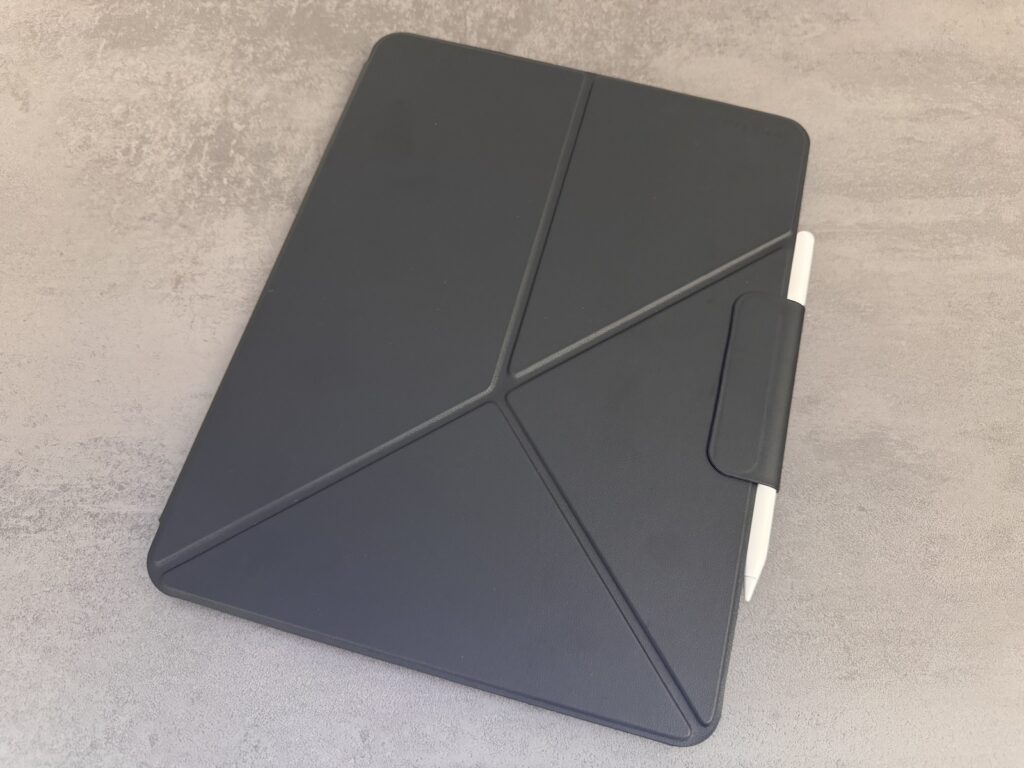
Image: Apfelpatient

Slim design and lightness

The Pitaka MagEZ Folio 2 stands out with its minimalist design and lightweight construction. If you carry your iPad Pro frequently, you'll appreciate the light weight of this case. It weighs less than 0.7 pounds and adds minimal thickness to the iPad's slim profile. This keeps your iPad Pro light and manageable without sacrificing the protection you need.

Comprehensive protection

Although the case is particularly light and thin, it still offers sufficient protection for your iPad. The front and back of the device are well covered, which protects against scratches and light impacts. Of course, it is not designed for extreme loads such as drops from great heights, but it is more than sufficient for everyday protection.
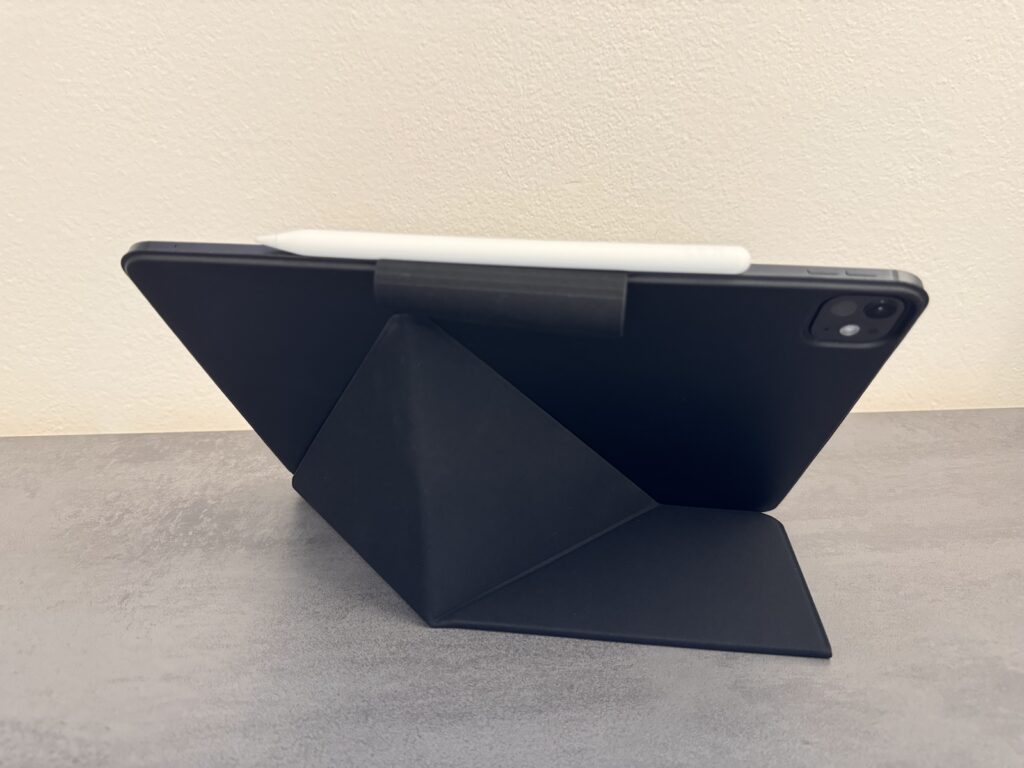
Image: Apfelpatient

Versatile origami stand

A highlight of the Pitaka MagEZ Folio 2 is the integrated origami stand. This allows you to position your iPad at different angles, both in portrait and landscape format. Whether you want to work, read or watch videos, the stand can be flexibly adapted to your needs. Particularly useful is the ability to tilt the iPad at an angle of around 30 to 35 degrees, making it easier to type and use the on-screen keyboard. The stand is sturdy enough not to give way even when you press hard on the screen.

Restrictions on the lap

However, a small disadvantage of the Origami stand is its limited usability on uneven surfaces such as your lap. The design is based on a triangular bracket that works perfectly on flat surfaces like tables but doesn't offer the same stability on the legs. If you are often on the move and use your iPad on your lap, this could be a limitation.
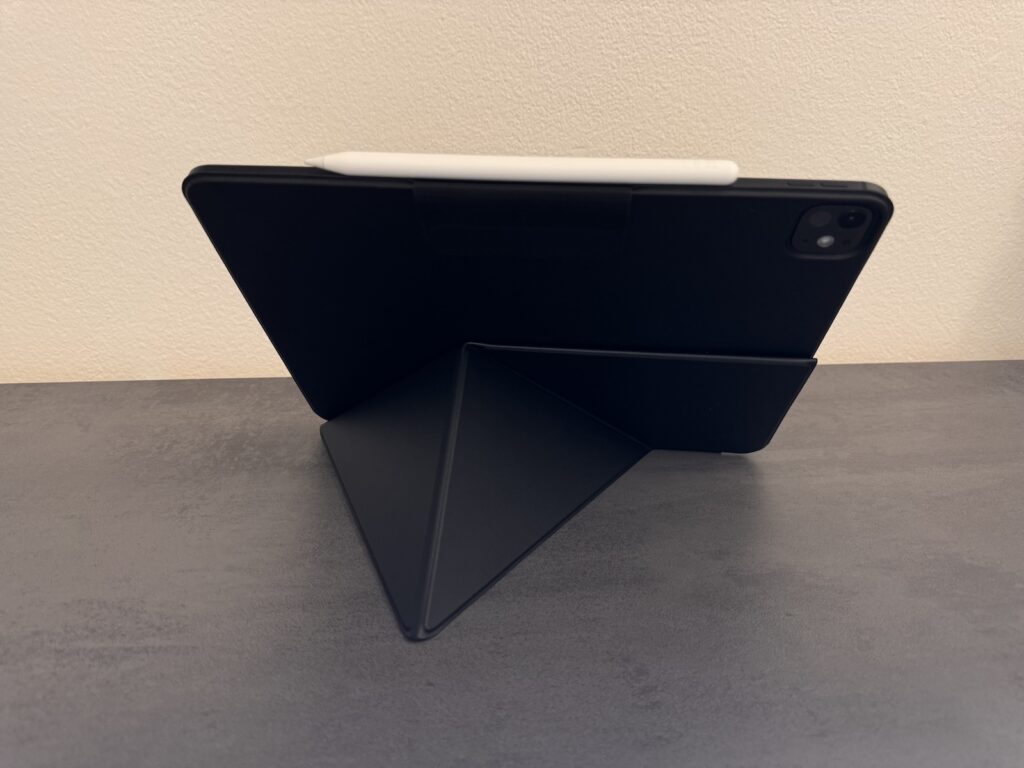
Image: Apfelpatient

Apple Pencil holder

Another practical feature of the Pitaka MagEZ Folio 2 is the integrated holder for the Apple Pencil. This holder holds the Pencil securely in its magnetic charging slot on the side of the iPad, so you don't have to worry about losing or damaging the Pencil. This feature is especially valuable if you use the Apple Pencil frequently and want to keep it close at hand.
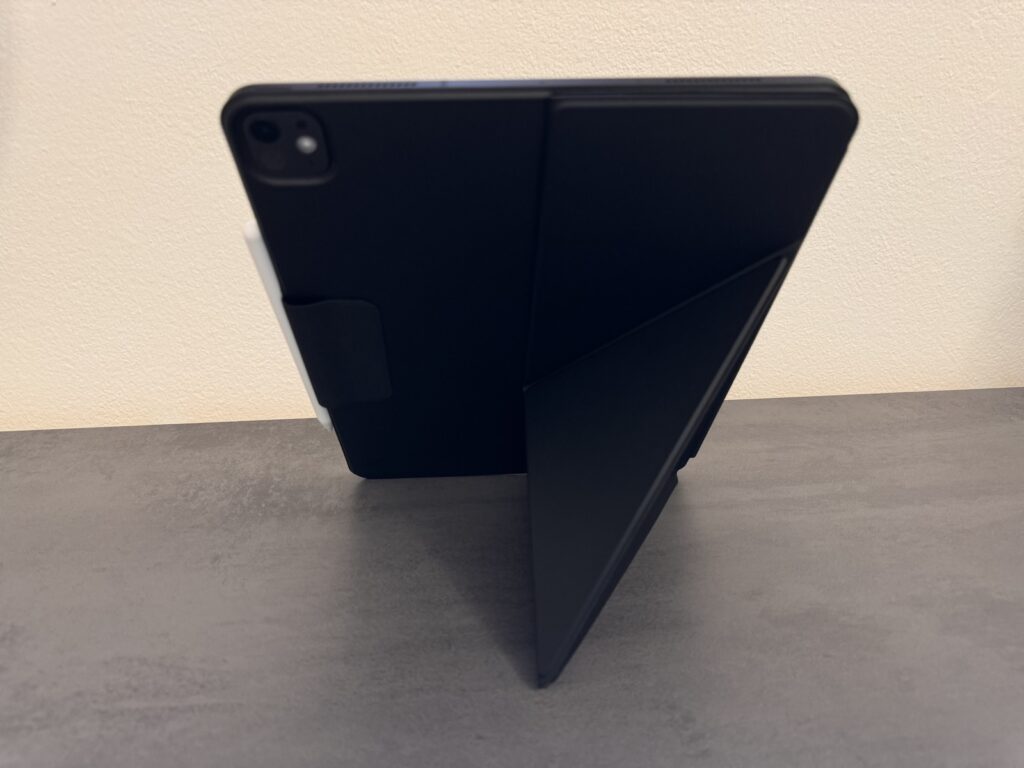
Image: Apfelpatient

Lightweight protection and more: The Pitaka MagEZ Folio 2 cover

The Pitaka MagEZ Folio 2 is an excellent choice for anyone looking for a slim, lightweight, and functional case for their iPad Pro. It offers basic protection, a clever origami stand, and a convenient Apple Pencil holder without significantly increasing the weight or thickness of your iPad. While the stand has its limitations when used on your lap, for most use cases, this case offers everything you need to get the most out of your iPad Pro or iPad Air. Priced at €59.99 for the 11-inch version and €69.99 for the 13-inch version, you get a well-thought-out and useful accessory that complements your iPad in style. (Image: Pitaka)

  • Clicks keyboard case in test: features and advantages
  • Pitaka MagEZ Case 2 in the test: Ultra-thin protection for your iPad

Was this article helpful?
YesNo
Tags: iPadiPad AiriPad ProPitaka
SendShareSend
Share

Our Amazon Storefront

A handpicked selection of products for iPhone, Mac and more – sorted by topic and updated regularly.

Shop Now

This post contains affiliate links (including Amazon). We earn a small commission on qualifying purchases – at no extra cost to you. Learn more on our Partner Program page.

Previous Post

iOS 18 and the Photos app: All new features at a glance

Next Post

iOS 18: Discover the new “Find Here” feature in Apple Maps

Milan Jovicic

Milan Jovicic

Milan founded Apfelpatient in 2016 and has been responsible for all editorial content since 2018 – news, rumors, how-to guides and product reviews. Here, Apple devices aren't review units kept for two weeks, they're everyday tools: from iPhone to MacBook Pro, MacBook Air and iMac all the way to Apple Vision Pro, at least one device from every product category is in daily use, many of them replaced every year. Every menu path in a guide is checked on the device before it goes live.

Related posts

iPhone Duo Disadvantages: What I Really Miss From the Pro Max

by Milan Jovicic
November 7, 2026 - 3:19 PM CET
iPhone Duo disadvantages compared: folded iPhone Duo in white next to a dark red iPhone Pro Max, both lying face down on a grey surface

Face ID, Action button, telephoto camera: What I miss after switching from the Pro Max to the iPhone Duo and why Apple Pay slows me down the most.

Read moreDetails

AirPods 5 review: ANC without silicone ear tips

by Milan Jovicic
November 6, 2026 - 00:39 CET
AirPods 5 review: open engraved charging case with both earbuds without silicone tips above it on a dark surface

AirPods 5 review: My experience with ANC without silicone ear tips, fit and phone calls, and when the AirPods Pro are the better choice.

Read moreDetails

iPhone Duo: How I Finally Warmed Up to Widgets

by Milan Jovicic
October 31, 2026 - 2:49 PM CET
iPhone Duo widgets on the Home Screen: unfolded iPhone Duo in landscape on a grey table, app icons on the left, widgets with a match schedule and a stock chart on the right

With the iPhone Duo, I finally use widgets: here's what my Home Screen looks like now and the three settings that keep it tidy.

Read moreDetails

iPhone Duo: My First Impressions After the First Few Days

by Milan Jovicic
October 25, 2026 - 23:02 CET
iPhone Duo unfolded next to an orange iPhone 17 Pro Max, a first impression of the difference in display size

First impressions of the iPhone Duo after switching from the Pro Max: hinge, crease, inner display, speakers and Touch ID in everyday use.

Read moreDetails

iPhone 18 Pro: Nomad Cases Review

by Milan Jovicic
October 10, 2026 - 4:44 PM CEST
Nomad cases iPhone 18 Pro: Modern Leather Case and Traditional Leather Case in Burgundy side by side on a grey surface

Five Nomad cases for the iPhone 18 Pro tested: from the ultra-thin leather back to the Rugged Case with 4.6 metres of drop protection, from 49 euros.

Read moreDetails
Load More

Categories

  • Apple Insights
  • Apple Rumors
  • Apple News
  • Apple Tips & Tricks
  • iPhone news, rumors and tips
  • Mac and MacBook News
  • Reviews
Make Apfelpatient a preferred source One click – and you'll see us more often on Google

About APFELPATIENT

APFELPATIENT brings you the latest Apple news, product updates, guides, reviews and tips across the entire Apple ecosystem — from the iPhone to the Mac to the Apple Vision Pro. From the first rumors to confirmed news: researched responsibly.

Follow Apfelpatient

Facebook Instagram YouTube Threads Threads

Company

  • About Apfelpatient
  • Contact
  • Author Profiles

Community

  • Netiquette
  • Push notifications
  • RSS feed

Legal

  • Legal Notice
  • Privacy Policy
  • Terms of Use
  • Cookie settings
  • Affiliate Program

Resources

  • Sitemap

© 2026 Apfelpatient. All rights reserved.

No result
View All Results
  • Home
  • News
  • Rumors
  • Tips & Tricks
  • Reviews
  • Insights

© 2026 Apfelpatient. All rights reserved. Site map

Change language to Deutsch