Apfelpatient
  • Home
  • News
  • Rumors
  • Tips & Tricks
  • Reviews
  • Insights
No result
View All Results
  • iPhone 18
  • iPhone 18 Pro
  • iPhone Duo
  • Apple Home
  • Siri AI
  • HomePod
  • HomePod mini
  • HomePod mini 2
  • MacBook Pro
  • Apple TV 4K
  • Apple Watch Series 12
  • Apple Watch Ultra 4
  • AirPods 5
  • iOS 27
  • iPadOS 27
  • macOS
  • MacBook Neo
  • iPhone 17e
  • AirTags
  • iOS 26
  • iPhone 17
  • iPadOS
  • iMac
  • Mac mini
  • Apple TV
  • iPad Pro
  • iPhone Air
  • Apple Vision Pro
  • iPhone 16
  • AirPods 4
  • Apple Watch Ultra
  • MacBook Air
  • iPad
  • AirPods Max
  • AirPods Pro 3
  • Mac Studio
  • Studio Display
  • iPad Air
  • iPad mini
  • watchOS 27
  • Apple CarPlay
  • Apple Pay
  • watchOS 26
  • Home
  • News
  • Rumors
  • Tips & Tricks
  • Reviews
  • Insights
No result
View All Results
Apfelpatient
No result
View All Results
  • iPhone 18
  • iPhone 18 Pro
  • iPhone Duo
  • Apple Home
  • Siri AI
  • HomePod
  • HomePod mini
  • HomePod mini 2
  • MacBook Pro
  • Apple TV 4K
  • Apple Watch Series 12
  • Apple Watch Ultra 4
  • AirPods 5
  • iOS 27
  • iPadOS 27
  • macOS
  • MacBook Neo
  • iPhone 17e
  • AirTags
  • iOS 26
  • iPhone 17
  • iPadOS
  • iMac
  • Mac mini
  • Apple TV
  • iPad Pro
  • iPhone Air
  • Apple Vision Pro
  • iPhone 16
  • AirPods 4
  • Apple Watch Ultra
  • MacBook Air
  • iPad
  • AirPods Max
  • AirPods Pro 3
  • Mac Studio
  • Studio Display
  • iPad Air
  • iPad mini
  • watchOS 27
  • Apple CarPlay
  • Apple Pay
  • watchOS 26

Backbone One PlayStation Edition: New iPhone controller in the test

Milan Jovicic by Milan Jovicic
August 6, 2022 - 7:19 PM CEST
in Reviews
0
Backbone One Playstation Edition

Backbone One Playstation Edition

WhatsAppFacebookEmail
Threads

This article may contain affiliate links. Learn more on our Partner Program page.

Make Apfelpatient a preferred source One click – and you'll see us more often on Google
Transparency note: The product reviewed here was provided to us free of charge by the manufacturer or vendor. This did not affect our assessment. Learn more under Editorial Standards & Transparency.

A few days ago, a brand new iPhone controller was introduced - the Backbone One PlayStation Edition. Below we'll take a look at what the new version of the joystick can do.

Mobile gaming has been particularly popular for several years. Various manufacturers have recognized this and developed corresponding accessories, including Backbone. A brand new iPhone controller has now been introduced, the Backbone One PlayStation Edition. In the press release, Backbone CEO Maneet Khaira said the following:

I'm excited to introduce Backbone One - PlayStation Edition, an officially licensed mobile controller for iPhone users.

The main feature of this version is the white PlayStation look and button labeling, so the controller harmonizes with the PlayStation Remote Play app. Since the Backbone One has the same basic hardware, it is just as easy to turn on and off as the original model with Xbox buttons.
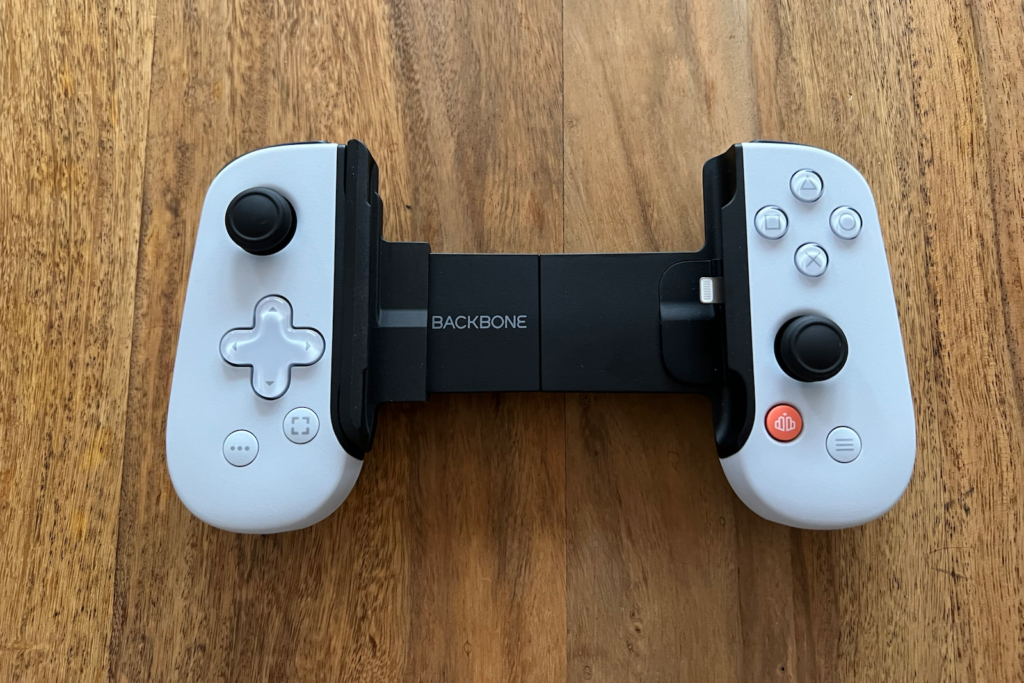
Image: Apfelpatient – Backbone One PlayStation Edition

What you should be aware of, however, is that the iPhone can only be placed in the controller without a case. Even a Pitaka case must be removed first. The controller still has simple controls with minimal latency, good analog audio transmission, and a lightning port for charging the iPhone. The controller uses very little power from the phone, which does not significantly affect battery life. The Backbone app also ensures that the controller is assigned the PlayStation name in games, so PlayStation fans do not have to translate the buttons from the common Xbox standards. Overall, it is a good gaming experience.

Backbone One PlayStation Edition: Even longer gaming sessions are no problem

However, using the same basic hardware means that the sticks are arranged high and low, Xbox-style, rather than flush with each other. However, this shouldn't be a problem for most. As for the shape of the joystick, it sits much more comfortably in the hands than the Razer Kishi V1 or a Nintendo Switch with Joy-Cons. So the shape means longer gaming sessions are no problem. Of course, you can't compare the Backbone One to a full-fledged PlayStation or Xbox controller.
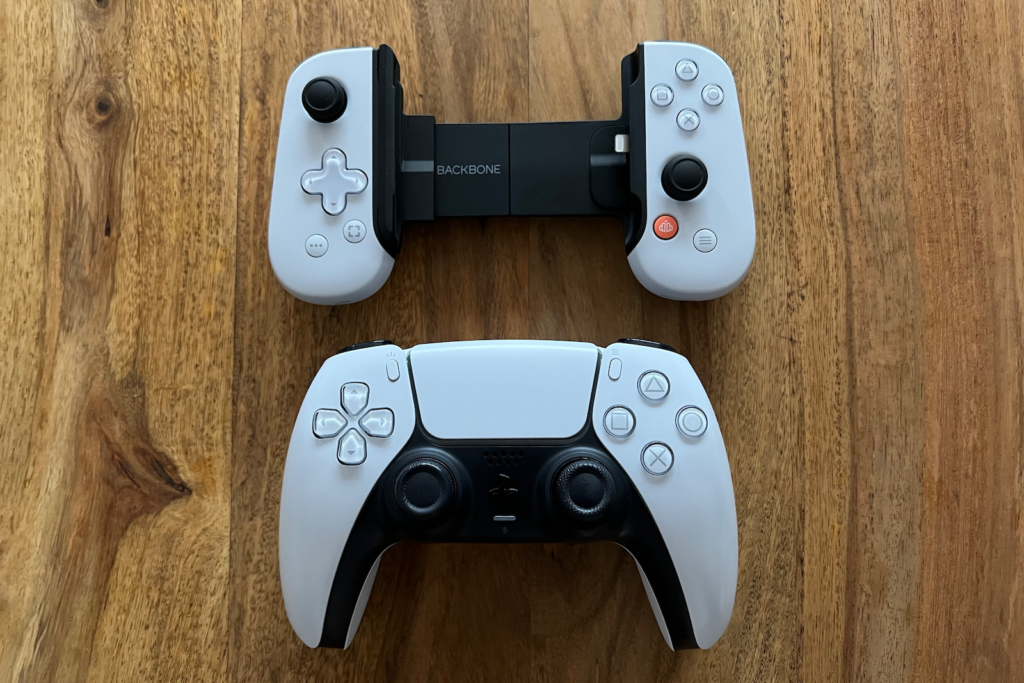
Image: Apfelpatient – Backbone One PlayStation Edition compared with the DualSense

By the way, the joystick has its own "Backbone" button, which functions like a home button. Pressing it automatically takes you to the Backbone app, which brings together all the games that support the controller.
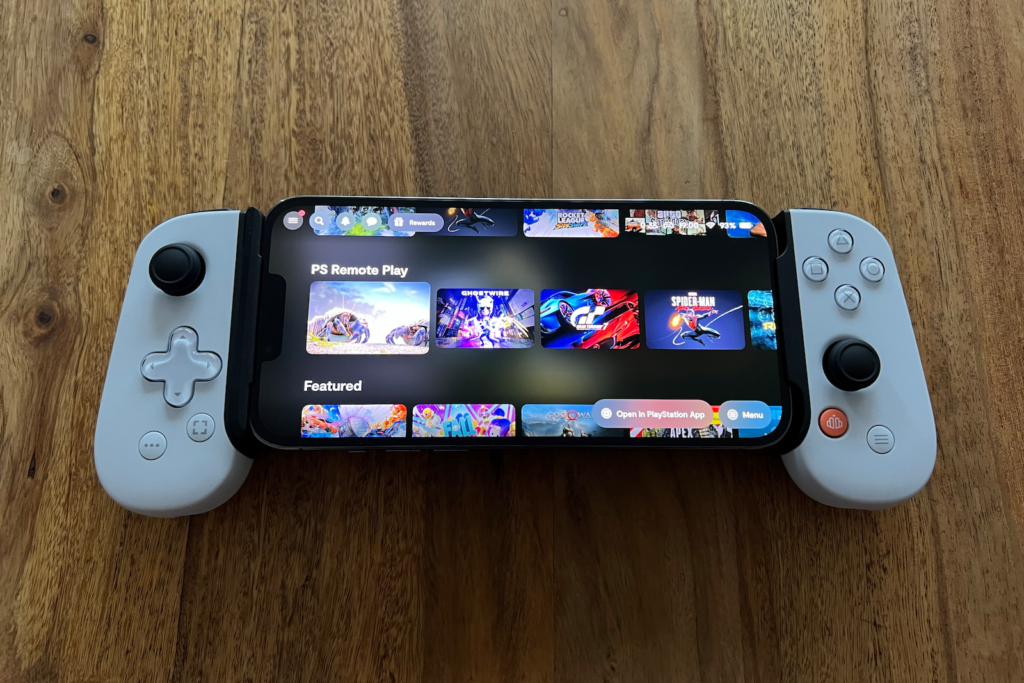
Image: Apfelpatient – Backbone One PlayStation Edition

Backbone app supports party chat

This means you don't have to swipe across the screen, but instead find all supported games in one place that you can install and start using a controller. The App Store and Apple Arcade are full of titles that support controllers, from the popular Sneaky Sasquatch to shooters like Call of Duty Mobile. Classics like GTA can also be played without any problems. But that's not all. If you have friends who also use the controller, you can start a party chat with them using the Backbone app. The controller even has a microphone built in, so you can switch from game to game without interrupting communication, cool right?
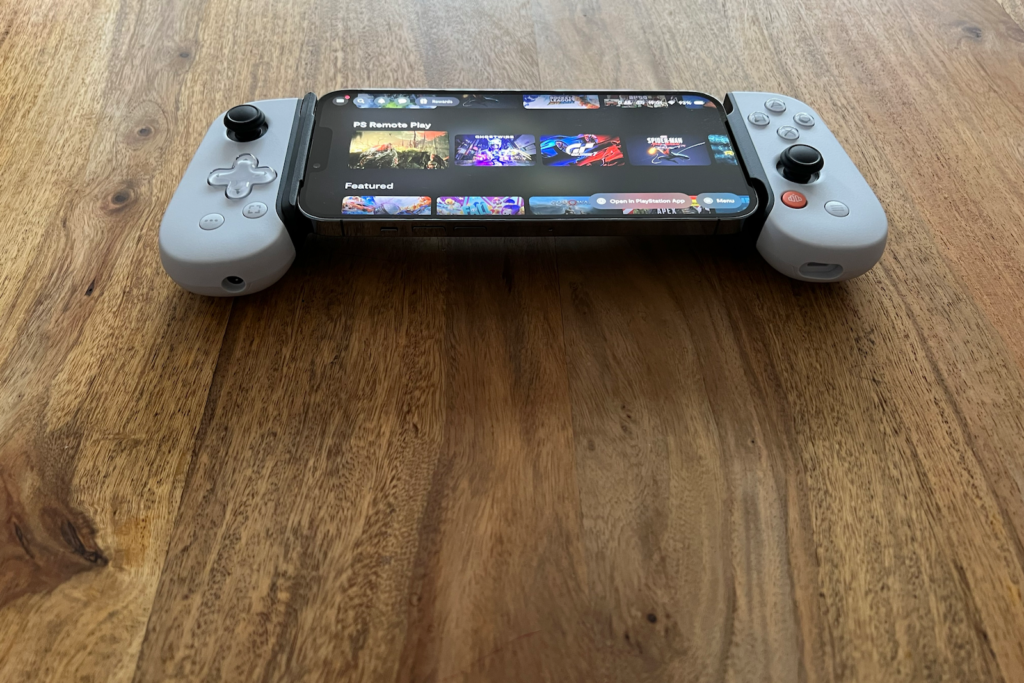
Image: Apfelpatient – Backbone One PlayStation Edition

Additionally, the Backbone One PlayStation Edition (including the regular version) features a gameplay capture button, eliminating the need to access iOS's cumbersome screenshot options to save your highlights.

Who is the new iPhone controller suitable for?

All in all, the Backbone One PlayStation Edition is worth recommending to those who occasionally play extensive games that are more comfortable to control with a controller. So if you are interested, you can now purchase the accessory from Backbone order in the online shopThe controller is priced at 119.99 euros. The package also includes a three-month free trial period for Discord Nitro and a one-month trial period for Apple Arcade. The controller is compatible with all iPhone models, including the iPhone 13. (Image: Backbone)
  • Base One Max: Nomad's high-end MagSafe charger in hands-on
Was this article helpful?
YesNo
Tags: gaming roomiPhone
SendShareSend
Share

Our Amazon Storefront

A handpicked selection of products for iPhone, Mac and more – sorted by topic and updated regularly.

Shop Now

This post contains affiliate links (including Amazon). We earn a small commission on qualifying purchases – at no extra cost to you. Learn more on our Partner Program page.

Previous Post

Apple Watch Series 8: New rumors about the design

Next Post

iPhone 14 & Apple Watch Series 8: Apple prepares event

Milan Jovicic

Milan Jovicic

Milan founded Apfelpatient in 2016 and has been responsible for all editorial content since 2018 – news, rumors, how-to guides and product reviews. Here, Apple devices aren't review units kept for two weeks, they're everyday tools: from iPhone to MacBook Pro, MacBook Air and iMac all the way to Apple Vision Pro, at least one device from every product category is in daily use, many of them replaced every year. Every menu path in a guide is checked on the device before it goes live.

Related posts

iPhone Duo Disadvantages: What I Really Miss From the Pro Max

by Milan Jovicic
November 7, 2026 - 3:19 PM CET
iPhone Duo disadvantages compared: folded iPhone Duo in white next to a dark red iPhone Pro Max, both lying face down on a grey surface

Face ID, Action button, telephoto camera: What I miss after switching from the Pro Max to the iPhone Duo and why Apple Pay slows me down the most.

Read moreDetails

AirPods 5 review: ANC without silicone ear tips

by Milan Jovicic
November 6, 2026 - 00:39 CET
AirPods 5 review: open engraved charging case with both earbuds without silicone tips above it on a dark surface

AirPods 5 review: My experience with ANC without silicone ear tips, fit and phone calls, and when the AirPods Pro are the better choice.

Read moreDetails

iPhone Duo: How I Finally Warmed Up to Widgets

by Milan Jovicic
October 31, 2026 - 2:49 PM CET
iPhone Duo widgets on the Home Screen: unfolded iPhone Duo in landscape on a grey table, app icons on the left, widgets with a match schedule and a stock chart on the right

With the iPhone Duo, I finally use widgets: here's what my Home Screen looks like now and the three settings that keep it tidy.

Read moreDetails

iPhone Duo: My First Impressions After the First Few Days

by Milan Jovicic
October 25, 2026 - 23:02 CET
iPhone Duo unfolded next to an orange iPhone 17 Pro Max, a first impression of the difference in display size

First impressions of the iPhone Duo after switching from the Pro Max: hinge, crease, inner display, speakers and Touch ID in everyday use.

Read moreDetails

iPhone 18 Pro: Nomad Cases Review

by Milan Jovicic
October 10, 2026 - 4:44 PM CEST
Nomad cases iPhone 18 Pro: Modern Leather Case and Traditional Leather Case in Burgundy side by side on a grey surface

Five Nomad cases for the iPhone 18 Pro tested: from the ultra-thin leather back to the Rugged Case with 4.6 metres of drop protection, from 49 euros.

Read moreDetails
Load More

Categories

  • Apple Insights
  • Apple Rumors
  • Apple News
  • Apple Tips & Tricks
  • iPhone news, rumors and tips
  • Mac and MacBook News
  • Reviews
Make Apfelpatient a preferred source One click – and you'll see us more often on Google

About APFELPATIENT

APFELPATIENT brings you the latest Apple news, product updates, guides, reviews and tips across the entire Apple ecosystem — from the iPhone to the Mac to the Apple Vision Pro. From the first rumors to confirmed news: researched responsibly.

Follow Apfelpatient

Facebook Instagram YouTube Threads Threads

Company

  • About Apfelpatient
  • Contact
  • Author Profiles

Community

  • Netiquette
  • Push notifications
  • RSS feed

Legal

  • Legal Notice
  • Privacy Policy
  • Terms of Use
  • Cookie settings
  • Affiliate Program

Resources

  • Sitemap

© 2026 Apfelpatient. All rights reserved.

No result
View All Results
  • Home
  • News
  • Rumors
  • Tips & Tricks
  • Reviews
  • Insights

© 2026 Apfelpatient. All rights reserved. Site map

Change language to Deutsch