

apple patient
  • Home
  • News
  • Rumors
  • Tips & Tricks
  • Reviews
  • Insights
No Result
View All Result
  • iPhone 18
  • iPhone 18 Pro
  • iPhone Duo
  • Apple Watch Series 12
  • Apple Watch Ultra 4
  • AirPods 5
  • iOS 27
  • iPadOS 27
  • macOS
  • MacBook Neo
  • iPhone 17e
  • AirTags
  • iOS 26
  • iPhone 17
  • MacBook Pro
  • iPadOS
  • iMac
  • Mac mini
  • HomePod
  • Apple TV
  • iPad Pro
  • iPhone Air
  • Apple Vision Pro
  • iPhone 16
  • AirPods 4
  • Apple Watch Ultra
  • HomePod Mini
  • MacBook Air
  • iPad
  • AirPods Max
  • AirPods Pro 3
  • Apple Watch Series 3
  • Mac Studio
  • Studio Display
  • iPad Air
  • iPad mini
  • watchOS 27
  • Apple CarPlay
  • Apple Pay
  • watchOS 26
  • Home
  • News
  • Rumors
  • Tips & Tricks
  • Reviews
  • Insights
No Result
View All Result
apple patient
No Result
View All Result
  • iPhone 18
  • iPhone 18 Pro
  • iPhone Duo
  • Apple Watch Series 12
  • Apple Watch Ultra 4
  • AirPods 5
  • iOS 27
  • iPadOS 27
  • macOS
  • MacBook Neo
  • iPhone 17e
  • AirTags
  • iOS 26
  • iPhone 17
  • MacBook Pro
  • iPadOS
  • iMac
  • Mac mini
  • HomePod
  • Apple TV
  • iPad Pro
  • iPhone Air
  • Apple Vision Pro
  • iPhone 16
  • AirPods 4
  • Apple Watch Ultra
  • HomePod Mini
  • MacBook Air
  • iPad
  • AirPods Max
  • AirPods Pro 3
  • Apple Watch Series 3
  • Mac Studio
  • Studio Display
  • iPad Air
  • iPad mini
  • watchOS 27
  • Apple CarPlay
  • Apple Pay
  • watchOS 26

macOS: Why the Mac blocks Terminal commands

Milan Jovicic by Milan Jovicic
June 15, 2026 - 23:26 CEST
in Apple News
0
macOS 26.4 Apple

Image: Apple

WhatsAppFacebookEmail
Threads

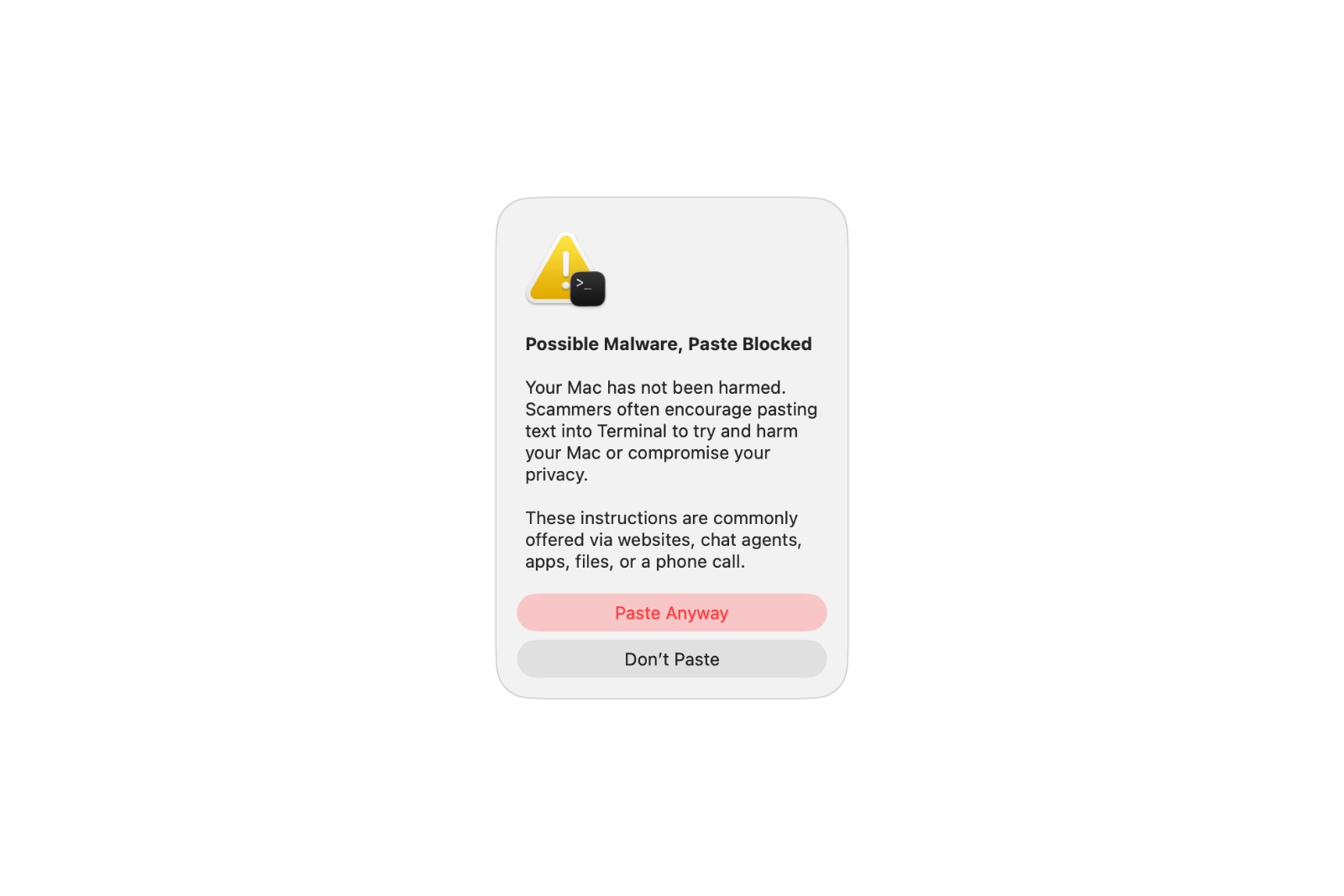
Users who enter a command into the Terminal on macOS have recently been occasionally seeing a warning message – and the process is stopped. A new Apple support document now explains for the first time exactly when these warnings appear and what they mean. Essentially, it's about protection against a particularly insidious scam.

With macOS 26.4, Apple introduced a new security feature that warns users when pasting commands into the Terminal and blocks them if suspicious. Until now, however, it was unclear under what circumstances these warnings would appear. Apple has now clarified this in a newly published support document. The feature joins the existing protection mechanisms that macOS uses to defend against malware – but this time it targets an area that has recently played an increasingly important role in attacks.

When the first warning appears

The mildest of the three warnings indicates potential malware and initially blocks the pasting process. According to Apple, it appears in a very specific situation: It shows up when the Terminal is not used regularly and the command was previously copied from another source – such as a website, a chat agent, or a messaging or email app.

The reason is quite specific: Scammers use these very channels to trick people into entering malicious commands into the Terminal, which can then damage their Mac or compromise their privacy. The warning is intended to prevent anyone from unintentionally executing such a command. Importantly, at this point, no damage has yet occurred to the Mac. Anyone who is absolutely certain that the command originates from a trusted source can still force its execution via a corresponding option – a step that remains explicitly risky when such a warning is present.

When the Mac detects known malware

The two remaining warnings are more severe. They appear as soon as macOS detects known malware in a command or script and blocks it – one when inserting a command, the other when encountering a malicious script. Unlike the first warning, there is no way to continue the process despite these warnings.

Even in these cases, the Mac has not been damaged as long as the command is not executed. If a block is deemed unjustified by the user – for example, because a website was incorrectly classified as fraudulent – Apple offers the option to report this error via a dedicated reporting form.

Why Apple is focusing on the terminal

It's no coincidence that the protection applies specifically to the Terminal. Paste and execute commands bypasses many of the security checks used during normal app installation. Attackers have long relied on tricking users into manually executing Terminal commands by providing instructions on how to circumvent established protection mechanisms like Gatekeeper. With the new warning threshold, Apple is addressing precisely this vulnerability.

In line with this, the support document also refers to Apple's guide on recognizing and avoiding social engineering fraud. The thrust of the attack is therefore clear: the focus is not on a technical vulnerability, but on manipulating the users themselves, who are to be made the actual weak point.

A protective wall announced in advance

With this support document, Apple makes a previously silent feature comprehensible. Those who understand the background can correctly interpret the warnings instead of reflexively dismissing them – and that's precisely where their value lies. Experienced Terminal users will likely rarely encounter these warnings, while inexperienced users will only be notified when a copied command originates from a questionable source. (Image: Apple)

  • iOS 26.5.2: Apple is testing the next minor update
  • iOS 26.6 Beta 2: Apple follows up with the next test version
  • Anthropic disables Claude Fable 5 and Mythos 5 following a US order
  • iOS 27 brings landscape mode back to many Apple apps
  • watchOS 27 brings more speed and a dynamic app overview
  • Widow's Bay: Apple TV renews the surprise hit for a second season
  • WhatsApp is bringing multi-account support more broadly to the iPhone
  • iOS 27: Wi-Fi Assist becomes Connectivity Assist
  • Apple stock falls after WWDC – analysts remain optimistic
  • iOS 27: iPhone now boots into a Mac-like recovery mode
  • Apple and London police are joining forces to combat iPhone theft
  • Apple counters Epic's move against the Supreme Court complaint
  • Tap to Share: iOS 27 brings new merchant feature via NFC
  • Slow Horses: Apple TV shows first look at season 6
  • Apple lists over 250 new features for iOS 27 and other updates
  • Apple and Jon Prosser want to overturn the default judgment
  • WhatsApp will soon require iOS 15.5 on iPhone and iPad
  • FaceTime uses two cameras simultaneously in iOS 27
  • Rosetta 2 ends after macOS 27
  • The Vision Pro Travel Case is disappearing in many countries
  • The iPhone 17 is missing two new Siri features

Make Apfelpatient a preferred source One click – and you'll see us more often on Google
Was this article helpful?
YesNo
Tags: CybersecuritymacOSmacOS 26.4
SendShareSend
Share

Our Amazon Storefront

A handpicked selection of products for iPhone, Mac and more – sorted by topic and updated regularly.

Shop Now

This post contains affiliate links (including Amazon). We earn a small commission on qualifying purchases – at no extra cost to you. Learn more on our Partner Program page.

Previous Post

iPhone 18: Supplier statement supports late launch

Next Post

Why the Siri redesign for iOS 27 took so long

Milan Jovicic

Milan Jovicic

Milan founded Apfelpatient in 2016 and has been responsible for all editorial content since 2018 — news, rumors, guides, and product reviews. Apple devices here are not test units on loan for two weeks but everyday tools: from the iPhone through MacBook Pro, MacBook Air, and iMac to the Apple Vision Pro, at least one device from nearly every product category is in daily use, many of them replaced annually. Every menu path in a guide is verified on the device before it is published.

Related posts

watchOS 27.2: Code reveals new screenshot preview

by Milan Jovicic
September 24, 2026 - 8:36 p.m. CEST
Apple Watch Ultra with an orange band showing the app view, the device getting the new screenshot preview in watchOS 27.2

watchOS 27.2 includes a new screenshot interface for the Apple Watch: preview, share, and delete, just like on the iPhone. It's currently inactive.

Read moreDetails

Apple TV: Peanuts classics free again for Christmas

by Milan Jovicic
September 24, 2026 - 6:43 p.m. CEST
Charlie Brown holding a small Christmas tree under a starry sky in the snow, a scene from A Charlie Brown Christmas, free again on Apple TV

Three classic Peanuts cartoons are back on Apple TV for the holidays, no subscription required. Plus, there are new specials featuring Snoopy and the Fraggle Rocks.

Read moreDetails

The Wanted Man: Hugh Laurie on Apple TV from January

by Milan Jovicic
September 24, 2026 - 6:19 p.m. CEST
Hugh Laurie as crime boss Felix Carmichael in an evening scene from The Wanted Man on Apple TV

The Wanted Man premieres on January 6, 2027 on Apple TV. Hugh Laurie plays a crime boss who wants to escape – the finale is in February.

Read moreDetails

Apple and Qualcomm extend patent license from 2027

by Milan Jovicic
September 24, 2026 - 6:04 p.m. CEST
Back of an iPhone 18 Pro Max in a burgundy case on a grey surface, covered by the renewed Apple Qualcomm patent license

Apple and Qualcomm are extending their patent license from April 2027. Why this has nothing to do with the modem change and affects Germany.

Read moreDetails

iPhone 18 Pro: Update to prevent Face ID restarts is coming

by Milan Jovicic
September 24, 2026 - 1:13 p.m. CEST
iPhone showing the General settings with Software Update, where the fix for the Face ID reboots on iPhone 18 Pro will arrive

Apple has confirmed an update to fix the restarts after failed Face ID recognition on the iPhone 18 Pro and Pro Max. An exchange is not worthwhile.

Read moreDetails
Load More

Categories

  • Apple Insights
  • Apple Rumors
  • Apple News
  • Apple Tips & Tricks
  • iPhone news, rumors and tips
  • Mac and MacBook News
  • Reviews

About APFELPATIENT

APFELPATIENT brings you the latest Apple news, product updates, guides, reviews and tips across the entire Apple ecosystem — from the iPhone to the Mac to the Apple Vision Pro. From the first rumors to confirmed news: researched responsibly.

Follow Apfelpatient

Facebook Instagram YouTube Threads Threads

Company

  • About Apfelpatient
  • Contact
  • Author Profiles

Community

  • Netiquette
  • Push Notifications
  • RSS feed

Legal

  • Legal Notice
  • Privacy Policy
  • Terms of Use
  • Cookie Settings
  • Affiliate Program

Resources

  • Sitemap

© 2026 Apfelpatient. All rights reserved.

No Result
View All Result
  • Home
  • News
  • Rumors
  • Tips & Tricks
  • Reviews
  • Insights

© 2026 Apfelpatient. All rights reserved. Page Directory

Change language to Deutsch



