

apple patient
  • Home
  • News
  • Rumors
  • Tips & Tricks
  • Reviews
  • Insights
No Result
View All Result
  • iPhone 18
  • iPhone 18 Pro
  • iPhone Duo
  • Apple Watch Series 12
  • Apple Watch Ultra 4
  • AirPods 5
  • iOS 27
  • iPadOS 27
  • macOS
  • MacBook Neo
  • iPhone 17e
  • AirTags
  • iOS 26
  • iPhone 17
  • MacBook Pro
  • iPadOS
  • iMac
  • Mac mini
  • HomePod
  • Apple TV
  • iPad Pro
  • iPhone Air
  • Apple Vision Pro
  • iPhone 16
  • AirPods 4
  • Apple Watch Ultra
  • HomePod Mini
  • MacBook Air
  • iPad
  • AirPods Max
  • AirPods Pro 3
  • Apple Watch Series 3
  • Mac Studio
  • Studio Display
  • iPad Air
  • iPad mini
  • watchOS 27
  • Apple CarPlay
  • Apple Pay
  • watchOS 26
  • Home
  • News
  • Rumors
  • Tips & Tricks
  • Reviews
  • Insights
No Result
View All Result
apple patient
No Result
View All Result
  • iPhone 18
  • iPhone 18 Pro
  • iPhone Duo
  • Apple Watch Series 12
  • Apple Watch Ultra 4
  • AirPods 5
  • iOS 27
  • iPadOS 27
  • macOS
  • MacBook Neo
  • iPhone 17e
  • AirTags
  • iOS 26
  • iPhone 17
  • MacBook Pro
  • iPadOS
  • iMac
  • Mac mini
  • HomePod
  • Apple TV
  • iPad Pro
  • iPhone Air
  • Apple Vision Pro
  • iPhone 16
  • AirPods 4
  • Apple Watch Ultra
  • HomePod Mini
  • MacBook Air
  • iPad
  • AirPods Max
  • AirPods Pro 3
  • Apple Watch Series 3
  • Mac Studio
  • Studio Display
  • iPad Air
  • iPad mini
  • watchOS 27
  • Apple CarPlay
  • Apple Pay
  • watchOS 26

iOS 18 and Tap to Cash: The Future of Mobile Payments

Milan Jovicic by Milan Jovicic
June 11, 2024 - 3:14 PM CEST
in Apple News
0
iOS 18

Image: Apple

WhatsAppFacebookEmail
Threads

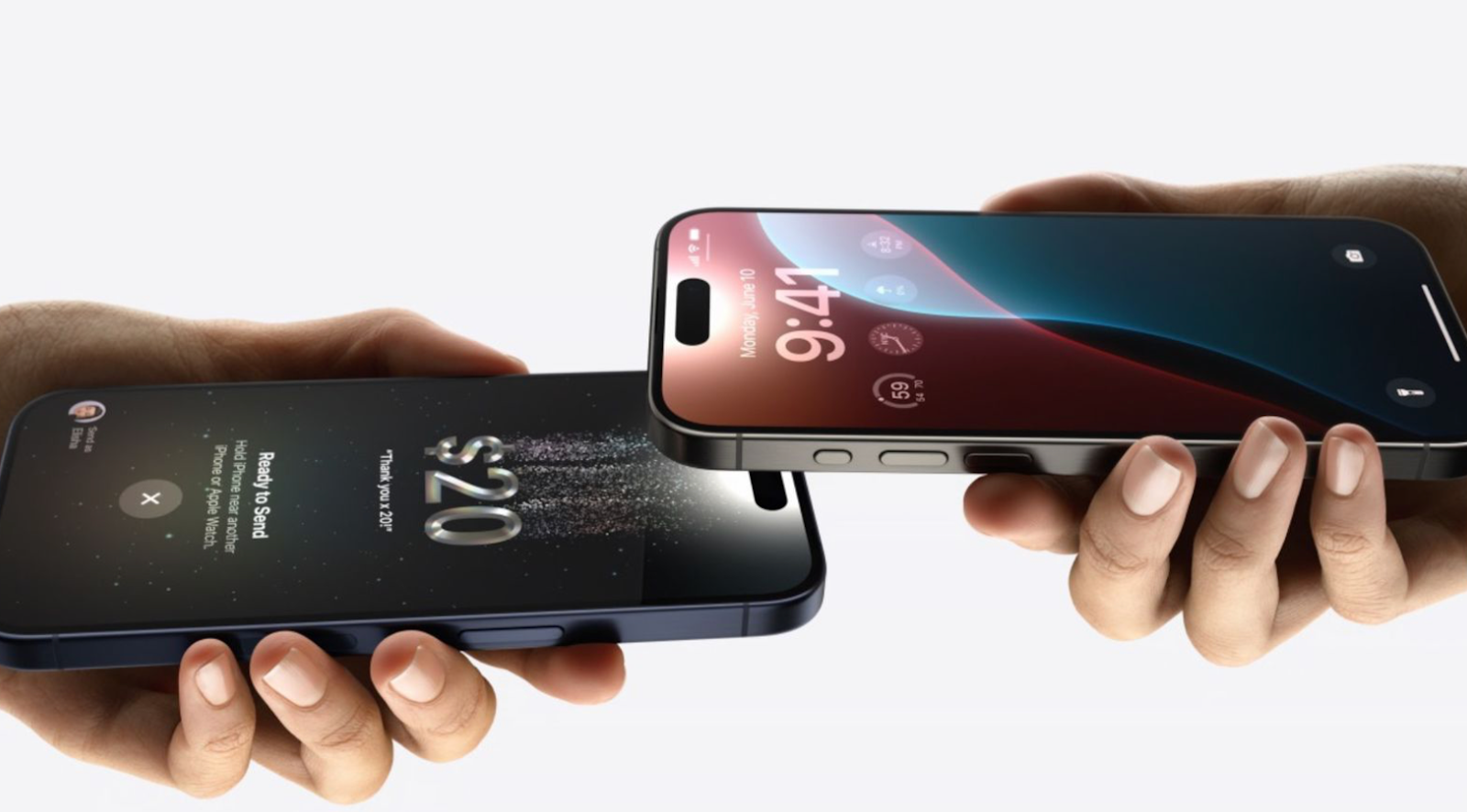
With the release of iOS 18, Apple has once again proven that innovation and ease of use are at the heart of its philosophy. At the WWDC 2024 keynote, the company unveiled numerous updates, including the exciting new feature Tap to Cash. This feature revolutionizes the way we can transfer money and make payments by providing a simple, fast, and secure way to use Apple Cash. In this article, you'll learn everything you need to know about Tap to Cash and the other updates coming to iOS 18.

The increasing digitization of our world demands ever more convenient and secure payment methods. Apple has always been a pioneer in this area, and with Tap to Cash they are setting the standard again. This new feature combines convenience and privacy and makes it easier than ever to transfer money with your iPhone. But that's not all - iOS 18 also brings significant improvements to Apple Wallet and other aspects of the mobile payment experience. Immerse yourself in the world of the latest iOS innovations and discover how they can change your digital life.

What is Tap to Cash?

Tap to Cash is a new feature in iOS 18 that allows users to transfer money by simply tapping two iPhones together. This intuitive method is similar to the already known NameDrop function, which allows contacts to be exchanged by tapping devices. But Tap to Cash goes a step further by using the power of NFC technology to make money transfers easy and secure.

How does Tap to Cash work?

The way Tap to Cash works is very simple: hold your iPhone close to another user's and tap the devices lightly together. Thanks to NFC technology, the money transfer is instantaneous and without the need for any further steps. This method ensures that no sensitive personal data is disclosed, which protects users' privacy. Apple has put a lot of effort into making Tap to Cash both user-friendly and secure.

Advantages of Tap to Cash

Tap to Cash offers a number of advantages:

  • Easy to use: No need to type in information or go through multiple steps. Just tap it.
  • Speed: Immediate transfer of money in real time.
  • Security: Use of proven NFC technology and protection of privacy by avoiding the sharing of personal data.
  • Convenience: Particularly useful in situations where quick and easy payments are required, such as when sharing expenses with friends or paying small amounts in everyday life.

Updates for Apple Wallet

In addition to Tap to Cash, iOS 18 also brings a number of improvements to Apple Wallet:

  • Rewards Cards: You can now view information about your rewards cards directly in the Wallet app, including points and redeemable gifts.
  • Event tickets: Tickets for concerts, theater performances, and other events are now better integrated. You can see seat numbers, directions, and other relevant information right in the Wallet app.
  • Advanced integration: Seamless integration of reward cards and event tickets into Apple Wallet makes it even more convenient and intuitive to use.

iOS 18: Easier and safer payments with Tap to Cash

With iOS 18 and the introduction of Tap to Cash, Apple is once again showing how technology can simplify our lives. The new feature enables quick, easy and secure money transfers by simply tapping iPhones. In addition, the updates to Apple Wallet offer an improved user experience by presenting useful information in a clear manner and making users' everyday lives easier. It is clear that iOS 18 is not just an update, but a big step towards an even more user-friendly and secure digital future. Are you looking for new accessories? Then take a look in our Amazon Storefront - there you will find numerous products from leading providers, also for HomeKit and Co.! (Image: Apple)


  • iOS 18: The revised calculator app in detail
Make Apfelpatient a preferred source One click – and you'll see us more often on Google
Was this article helpful?
YesNo
Tags: Apple ServicesiOSiOS 18
SendShareSend
Share

Our Amazon Storefront

A handpicked selection of products for iPhone, Mac and more – sorted by topic and updated regularly.

Shop Now

This post contains affiliate links (including Amazon). We earn a small commission on qualifying purchases – at no extra cost to you. Learn more on our Partner Program page.

Previous Post

iOS 18: The revised calculator app in detail

Next Post

iOS 18: Hide app labels on the home screen

Milan Jovicic

Milan Jovicic

Milan founded Apfelpatient in 2016 and has been responsible for all editorial content since 2018 — news, rumors, guides, and product reviews. Apple devices here are not test units on loan for two weeks but everyday tools: from the iPhone through MacBook Pro, MacBook Air, and iMac to the Apple Vision Pro, at least one device from nearly every product category is in daily use, many of them replaced annually. Every menu path in a guide is verified on the device before it is published.

Related posts

HomePod mini 2 and Apple TV 4K: Apple code reveals the devices

by Milan Jovicic
September 25, 2026 - 11:08 p.m. CEST
Siri Remote for the Apple TV 4K on a grey stone surface – for the code finding on the HomePod mini 2 and Apple TV 4K

HomePod mini 2 and Apple TV 4K (4th generation): Apple's code reveals five colors, the familiar design, and what applies to Siri AI in this country.

Read moreDetails

iPad mini 8 and iPad 12: Apple code reveals chips and camera

by Milan Jovicic
September 25, 2026 - 10:48 p.m. CEST
Yellow entry-level iPad seen from the back on a grey stone surface – for the code finding on the iPad mini 8 and iPad 12

iPad mini 8 and iPad 12: Apple's code mentions A20 Pro and A19, a new front camera on the mini, and Apple Intelligence for the entry-level iPad.

Read moreDetails

watchOS 27.2: Code reveals new screenshot preview

by Milan Jovicic
September 24, 2026 - 8:36 p.m. CEST
Apple Watch Ultra with an orange band showing the app view, the device getting the new screenshot preview in watchOS 27.2

watchOS 27.2 includes a new screenshot interface for the Apple Watch: preview, share, and delete, just like on the iPhone. It's currently inactive.

Read moreDetails

Apple TV: Peanuts classics free again for Christmas

by Milan Jovicic
September 24, 2026 - 6:43 p.m. CEST
Charlie Brown holding a small Christmas tree under a starry sky in the snow, a scene from A Charlie Brown Christmas, free again on Apple TV

Three classic Peanuts cartoons are back on Apple TV for the holidays, no subscription required. Plus, there are new specials featuring Snoopy and the Fraggle Rocks.

Read moreDetails

The Wanted Man: Hugh Laurie on Apple TV from January

by Milan Jovicic
September 24, 2026 - 6:19 p.m. CEST
Hugh Laurie as crime boss Felix Carmichael in an evening scene from The Wanted Man on Apple TV

The Wanted Man premieres on January 6, 2027 on Apple TV. Hugh Laurie plays a crime boss who wants to escape – the finale is in February.

Read moreDetails
Load More

Categories

  • Apple Insights
  • Apple Rumors
  • Apple News
  • Apple Tips & Tricks
  • iPhone news, rumors and tips
  • Mac and MacBook News
  • Reviews

About APFELPATIENT

APFELPATIENT brings you the latest Apple news, product updates, guides, reviews and tips across the entire Apple ecosystem — from the iPhone to the Mac to the Apple Vision Pro. From the first rumors to confirmed news: researched responsibly.

Follow Apfelpatient

Facebook Instagram YouTube Threads Threads

Company

  • About Apfelpatient
  • Contact
  • Author Profiles

Community

  • Netiquette
  • Push Notifications
  • RSS feed

Legal

  • Legal Notice
  • Privacy Policy
  • Terms of Use
  • Cookie Settings
  • Affiliate Program

Resources

  • Sitemap

© 2026 Apfelpatient. All rights reserved.

No Result
View All Result
  • Home
  • News
  • Rumors
  • Tips & Tricks
  • Reviews
  • Insights

© 2026 Apfelpatient. All rights reserved. Page Directory

Change language to Deutsch


