


apple patient
  • Home
  • News
  • Rumors
  • Tips & Tricks
  • Reviews
  • Insights
No Result
View All Result
  • iPhone 18
  • iOS 27
  • iPadOS 27
  • macOS
  • MacBook Neo
  • iPhone 17e
  • AirTags
  • iOS 26
  • iPhone 17
  • MacBook Pro
  • iPadOS
  • iMac
  • Mac mini
  • HomePod
  • Apple TV
  • iPad Pro
  • iPhone Air
  • Apple Vision Pro
  • iPhone 16
  • AirPods 4
  • Apple Watch Ultra
  • HomePod Mini
  • MacBook Air
  • iPad
  • AirPods Max
  • AirPods Pro 3
  • Apple Watch Series 3
  • Mac Studio
  • Studio Display
  • iPad Air
  • iPad mini
  • watchOS 27
  • Apple CarPlay
  • Apple Pay
  • watchOS 26
  • Home
  • News
  • Rumors
  • Tips & Tricks
  • Reviews
  • Insights
No Result
View All Result
apple patient
No Result
View All Result

iOS 18.4: These three changes improve the Apple TV app

Milan Jovicic by Milan Jovicic
March 10, 2025 - 9:33 PM CET
in Apple News
0
iOS 18.4 Apple TV App

Image: Apple

WhatsAppFacebookEmail
Threads

With iOS 18.4 and tvOS 18.4, Apple is bringing some small but useful updates to the Apple TV app. While the changes are not revolutionary, they do make using the app more convenient. Anyone who uses Apple TV+ regularly will especially notice the improvements to the user interface.

Apple TV+ is becoming increasingly popular. Series such as Severance, which reached a new viewing record in the second season, are particularly driving increasing user numbers. To further optimize the viewing experience, Apple has integrated some improvements into the TV app with iOS 18.4 and tvOS 18.4. These changes mainly affect the user interface. The app remains functionally the same, but some important elements have been revised to make them easier to find and more intuitive to use.

The three most important new features in the Apple TV app with iOS 18.4

Larger plus button for featured titles

The Apple TV app has a carousel with featured series and films. If you wanted to add a title to your watchlist, you previously had to click on a small plus button in the top right corner. In iOS 18.4, this button is significantly larger and placed right next to the play button. This makes the function easier to find and quicker to use. Adding to the watchlist is now more convenient, especially if you want to discover new series or films.
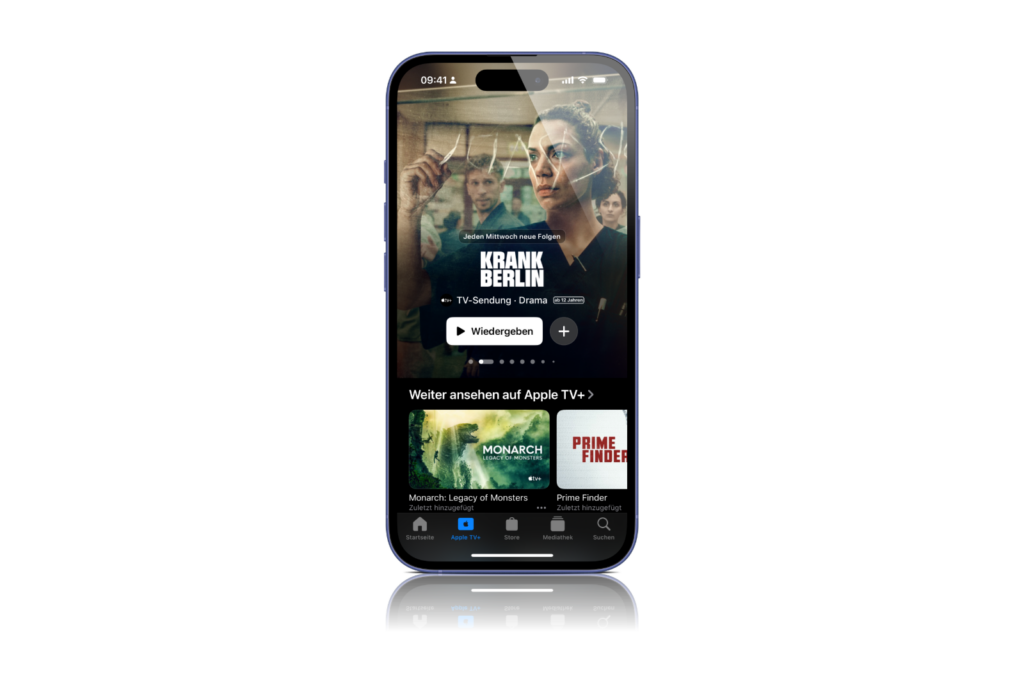
Apple TV App iOS 18.4
Image: Apfelptient

Better overview of the release schedule of episodes

Until now, information about new episodes was often only displayed in the description text below the series title. This was not particularly clear. In iOS 18.4, the release schedule now has its own section. A banner appears above the series title with information about when new episodes will be released. One example is the Apple drama Krank Berlin, which now directly displays "New episodes every Wednesday". This change provides better orientation. Users no longer have to look laboriously in the description, but instead get the information at a glance.

Updated fonts and icons

Apple has also revised the design of the TV app. The icons for categories such as "Movies Spotlight" and "Sports" have been updated, and the fonts throughout the app are now more modern. The changes are not drastic, but they provide a fresher look and clearer navigation. The fonts are easier to read, and the revised icons make the user interface more intuitive.

iOS 18.4 improves the user-friendliness of the Apple TV app

Even though iOS 18.4 does not bring any new features to the Apple TV app, the changes make sense. The app remains the same in its structure, but the greater visibility of buttons and improved readability make it easier to use. Apple TV+ still costs 9.99 euros per month and offers series hits such as Ted Lasso, Severance, The Morning Show, Silo and Shrinking. With iOS 18.4, the streaming experience on iPhone, iPad and Apple TV 4K is a bit better. Anyone who uses Apple TV+ regularly will be happy about these small improvements. The best products for you: Our Amazon Storefront offers a wide range of accessories, including for HomeKit. (Image: Apple)

  • iOS 18.4 Beta 3 now available – All information about the update
  • iOS 19 brings the biggest design overhaul since iOS 7
  • iOS 18.4 is coming in April – All new features at a glance

Make Apfelpatient a preferred source One click – and you'll see us more often on Google
Was this article helpful?
YesNo
Tags: Apple ServicesiOSiOS 18.4
SendShareSend
Share

Our Amazon Storefront

A handpicked selection of products for iPhone, Mac and more – sorted by topic and updated regularly.

Shop Now

This post contains affiliate links (including Amazon). We earn a small commission on qualifying purchases – at no extra cost to you. Learn more on our Partner Program page.

Previous Post

iOS 19 brings the biggest design overhaul since iOS 7

Next Post

iOS 18.4: HomeKit update becomes mandatory for all users

Milan Jovicic

Milan Jovicic

Milan founded Apfelpatient in 2016 and has been responsible for all editorial content since 2018 — news, rumors, guides, and product reviews. Apple devices here are not test units on loan for two weeks but everyday tools: from the iPhone through MacBook Pro, MacBook Air, and iMac to the Apple Vision Pro, at least one device from nearly every product category is in daily use, many of them replaced annually. Every menu path in a guide is verified on the device before it is published.

Symbolic image for Apple government affairs: the glass entrance cube of the Apple Store on Fifth Avenue in New York at dusk

Apple hires new head of government relations

August 12, 2026 - 8:44 PM CEST
Key art for the Apple TV series Pluribus showing a screaming woman against a yellow background, with Pluribus season 2 about to begin filming

Pluribus: Gilligan plans at least three seasons

August 12, 2026 - 8:27 PM CEST
The iPhone 17 lineup in five colors seen from the back, whose successor is expected to adopt the smaller iPhone 18 Dynamic Island from the Pro models

iPhone 18: Smaller Dynamic Island already in the base model

August 12, 2026 - 8:13 PM CEST

About APFELPATIENT

APFELPATIENT brings you the latest Apple news, product updates, guides, reviews and tips across the entire Apple ecosystem — from the iPhone to the Mac to the Apple Vision Pro. From the first rumors to confirmed news: researched responsibly.

Follow Apfelpatient

Facebook Instagram YouTube Threads Threads

Company

  • About Apfelpatient
  • Contact
  • Author Profiles

Community

  • Netiquette
  • Push Notifications
  • RSS feed

Legal

  • Legal Notice
  • Privacy Policy
  • Terms of Use
  • Cookie Settings
  • Affiliate Program

Resources

  • Sitemap

© 2026 Apfelpatient. All rights reserved.

No Result
View All Result
  • Home
  • News
  • Rumors
  • Tips & Tricks
  • Reviews
  • Insights

© 2026 Apfelpatient. All rights reserved. Page Directory

Change language to Deutsch



