


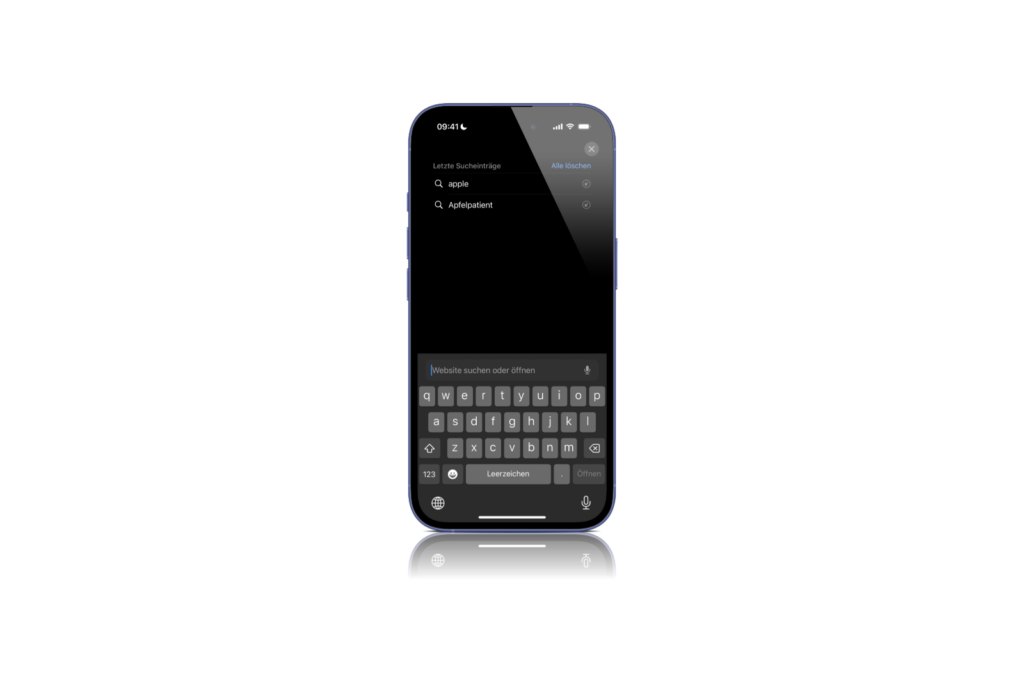
With iOS 18.4, Apple is making a small but potentially controversial change to Safari. As soon as you open a new tab and type in the search field, your current search history is displayed directly. This feature makes it easier to access previous searches, but could also become a privacy issue if you share your device with others. Previously, Safari displayed the personalized start page when you opened a new tab without revealing your previous history. Now Apple is bringing this into clearer focus. There is currently no option to deactivate it, but it remains to be seen whether Apple will adapt the function in a later version.
Apple continues to develop Safari with each new iOS version to make using the browser more efficient. With iOS 18.4 Beta 1, the integration of search history is intended to help users access searches they have already performed more quickly. But not everyone will welcome this change. In the past, Apple has repeatedly tested functions and responded to user feedback. It remains to be seen whether the display of search history will be widely accepted or lead to many complaints. Those who value privacy will have to make do with workarounds for the time being.
What exactly changes with iOS 18.4?
Until iOS 18.3.1, the view of a new tab remained on the personalized Safari homepage. If a new search was performed, suggestions appeared based on past searches or popular websites. However, the history itself was not displayed prominently. With iOS 18.4, this changes. As soon as you open a new tab and tap in the search field, Safari automatically displays the most recent searches. This feature is intended to make it easier to quickly access content that has already been searched for. While some users see this as a practical improvement, it is a problem for others. If you share your iPhone or iPad with someone, that person can immediately see your recent search history. There is no direct way to disable this display in the current beta version of iOS 18.4.
Why might this be problematic?
The innovation in Safari brings with it advantages and disadvantages.
Advantages:
- You can find previous searches faster without having to type again
- If you often search for the same terms, you save time
- The feature makes Safari easier to use for users who rely on recurring searches
Disadvantages:
- Anyone who has access to your device can see your recent search history instantly
- Apple currently offers no way to disable the display of search history
- If you value data protection, you must manually delete your history or use private mode
It can be particularly problematic if you pass your device on to someone, whether it's family, friends or colleagues. Even if you lend your iPhone to someone for a short time, perhaps to look something up or use another app, that person could take a look at your recent searches.
Is there a way to hide the search history?
Since Apple currently does not offer an option to disable the feature directly, there are only a few workarounds:
- Use private mode
• In private mode, Safari does not save search queries
• Ideal if you do not want your searches to be saved long-term - Clear your search history regularly
• Under Safari → History you can delete your entire search history by selecting “Clear All”
• This prevents previous searches from appearing in new tabs - Use an alternative browser
• If you don't like the new feature, you can switch to other browsers like Chrome or Firefox
• These offer more flexible settings for dealing with search histories
Will Apple revise the feature?
iOS updates usually go through several beta versions before they are finally released. It's possible that Apple will make adjustments based on user feedback. One possibility would be an additional setting that allows you to disable the display of history. If the new Safari feature bothers you, keep an eye on the upcoming beta updates. There may soon be a solution for users who want more control over their privacy.
iOS 18.4: Apple changes the search function – with mixed reactions
With iOS 18.4, Apple is making a small but relevant change to Safari. The automatic display of search history can be a useful addition for some users, but an undesirable privacy risk for others. If you regularly share your device with others, you should either activate private mode or delete your search history manually. It remains to be seen whether Apple will respond to user feedback and add an option to deactivate the function. Until then, users have to work with the existing options to protect their privacy. Looking for the best accessories? Visit our Amazon Storefront and discover a variety of products from top providers, including for HomeKit! (Image: Apple)





