This article may contain affiliate links. Learn more on our Partner Program page.
Those who connect four HomePods to the new Apple TV 4K don't have to settle for the factory settings. Software version 27.2 includes dedicated controls for home theater setups, including one for the volume of the rear speakers.
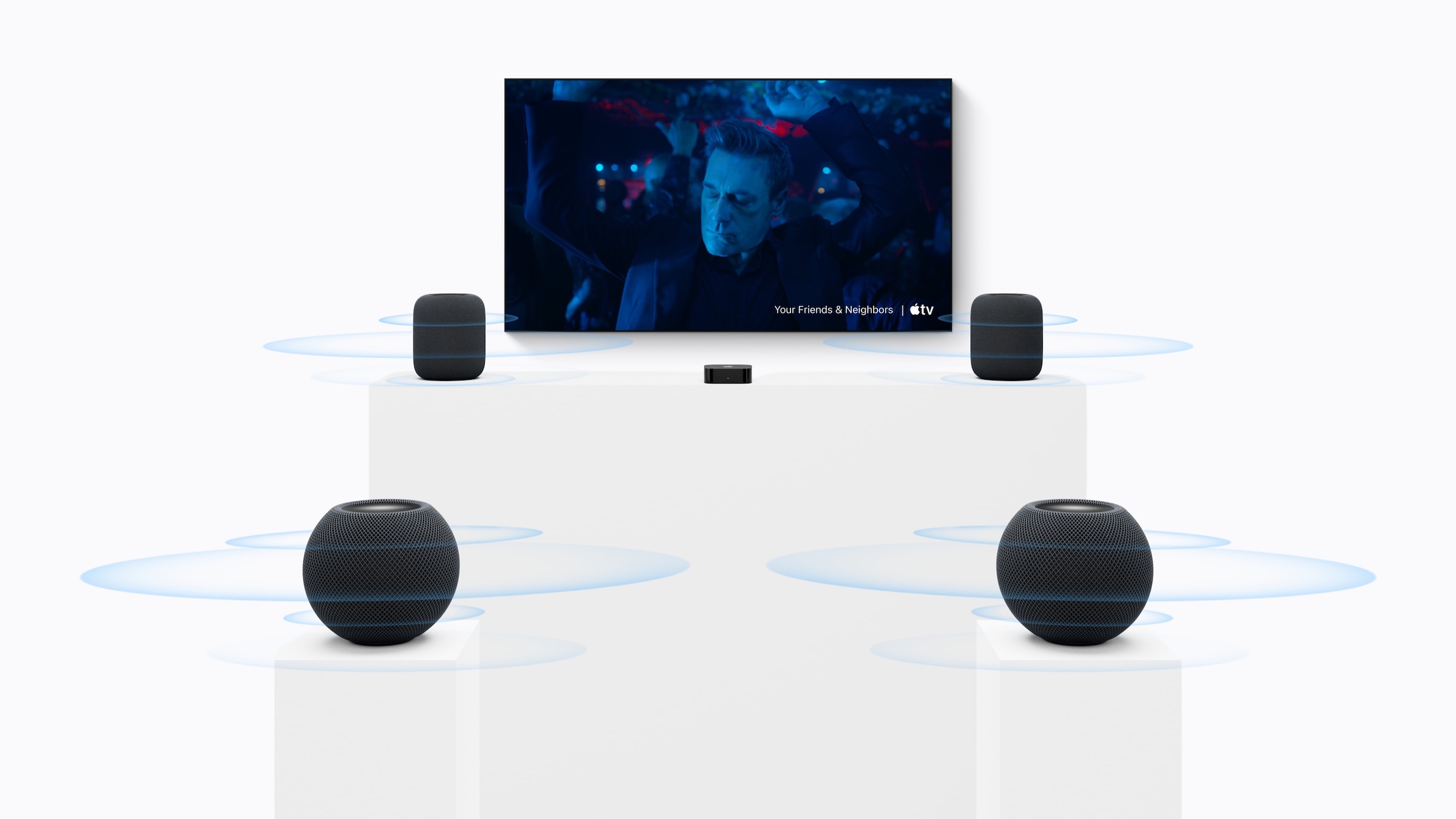
With software version 27.2, four HomePods can be paired with the fourth-generation Apple TV 4K to create a surround sound system with Party Mode. Leaker pdfu has now demonstrated how to customize the home theater setup after initial configuration, including a short video clip. The options appear once four HomePods are set up with the new Apple TV.
The basis for this is the Release Candidate that Apple distributed to developers on Monday. The terminology is taken from the English version. The requirement remains the fourth-generation Apple TV 4K, which will be available in stores on November 13th.
Key Facts at a Glance
- In a home theater with four HomePods, you can choose between surround sound and party mode for the whole room.
- For surround sound, there are two controls: spatial stereo mix and level of the rear speakers.
- The level of the rear speakers can be adjusted from -8 to +8 dB in increments of 0.5 dB.
- The party mode does not have its own sound options.
Two operating modes to choose from
The first option is to select the operating mode. In the English menu, it's called "Speaker Mode" and offers "Surround Sound" or "Whole Room Audio," meaning classic home cinema with front and rear speakers, or party mode where both pairs play in stereo.
You'll get new audio controls when you set up four HomePods with the new Apple TV. Speaker Mode: Surround Sound or Whole Room Audio. Specifically for Surround Sound: • Spatialize Stereo: Control whether to play a spatially processed mix for video and music. As reported in September, when disabled, normal stereo plays on the front speakers, while rear speakers receive an empty mix. Defaults to On for Video and Music. • Surround Level: Adjust the rear pair relative to the fronts. Supports −8 dB through +8 dB, in 0.5 dB steps. Defaults to Normal (0 db). There are no audio options for Whole Room Audio, as it uses stereo channels for both speaker pairs. The channels are assigned diagonally: front-left and rear-right share the left channel, while front-right and rear-left share the right channel.
— pdfu (@itspdfu) October 19, 2026
In party mode, there are no additional controls. The channels are fixed in a crisscross pattern: the front left and rear right channels share the left channel, and the front right and rear left channels share the right channel.
The controls for surround sound operation
Two settings are available in surround mode.
| Position (in English) | Effect | Standard |
|---|---|---|
| Spatialize Stereo | It plays stereo content spatially processed through all four speakers, separately for video and music. | A |
| Surround Level | Adjusts the rear speakers relative to the front speakers, from -8 to +8 dB in 0.5 dB steps. | Normal (0 dB) |
With spatial mixing turned off, normal stereo sound only comes from the front speakers, while the rear speakers remain silent. This matches the behavior already observed in the second beta of tvOS 27.2, where menus and game sounds only came from the front.
The volume level, with a range of 16 dB and a step size of 33, including the basic setting, allows for fine-tuning of the rear pair to the room, for example, if two HomePod mini 2 speakers are positioned behind the sofa closer to the ears than the larger speakers by the TV.
The finishing touches that home cinema buyers expect
I consider the level control the more important of the two settings. Rear speakers are rarely positioned at the ideal distance in a living room, and without a control, you'd be reliant on the automatic calibration that Apple promises for the system. This allows you to make adjustments if the rear effects seem too dominant or too quiet.
When it comes to spatial stereo mixing, it depends on the content. If you prefer to hear music as it was mixed, you can turn it off for music and leave it on for movies. If you're planning a home theater with four HomePods, it's worth trying out both options with your own music after setting everything up.
Would you leave the spatial mix enabled for music, or would you prefer to listen to classic stereo from the front? Feel free to disagree in the comments.