

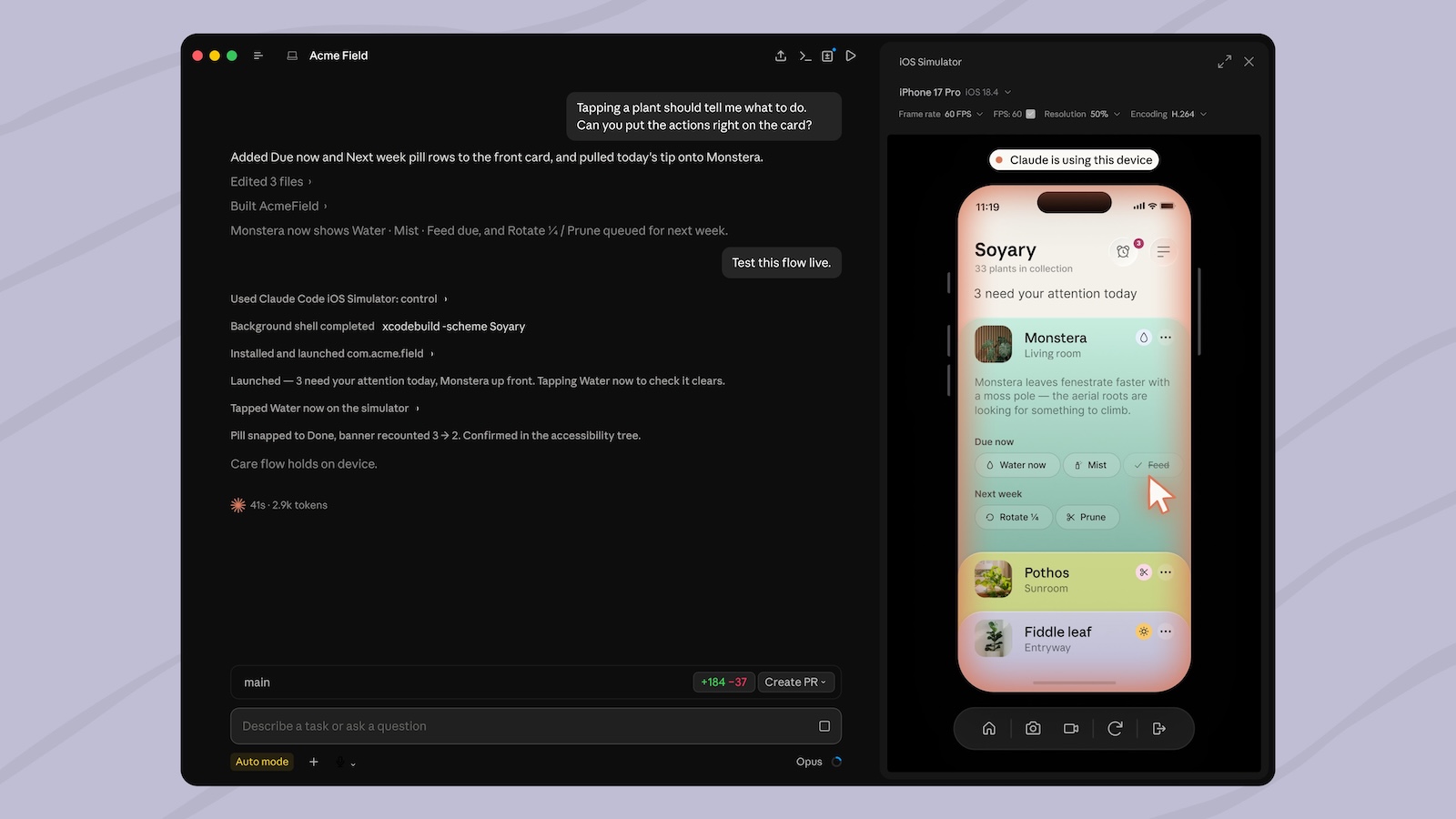
An AI assistant that not only writes an iOS app but also launches it, types through it, and even checks it itself: That's exactly what Claude Code can now do in Apple's iOS Simulator. Anthropic has extended the desktop app with a window that directly controls the simulator – live and without having to use screen controls. The feature is available now as a public beta.
Over the past few months, Apple has gradually opened its development environment to external AI models – culminating in the AI frameworks in Xcode 27, which bring language models from multiple vendors directly into the editor. Anthropic, with its latest update to Claude Code, takes the opposite approach: Instead of integrating with Xcode, the desktop app places Apple's iOS Simulator in a separate window alongside the chat history. There, the assistant builds, installs, and launches an app, taps its way through the interface, and reads the screen to verify its changes. For Mac developers, this brings testing closer to writing code.
What the simulator does in the Claude code window
The simulator window opens automatically whenever Claude Code builds, installs, launches, or tests an app. It streams the device screen live alongside the conversation, allowing you to follow the entire process. If you want to test a specific view, you can specify it in the task—for example, "run on iPhone SE"—whereupon the assistant will build and launch that simulated device.
While the assistant is working, the window remains interactive: you can tap and swipe through the app yourself while Claude Code continues to run. Both control the same simulated device; a notification above the screen indicates when the assistant is currently operating it. Up to four such simulator windows can be opened per session, each permanently belonging to the session that started it. Devices that Claude Code itself has started up are automatically shut down by the app as soon as they are no longer needed - when exiting the session, archiving it, or ten minutes after disconnecting.
Direct control instead of screen control
The technical core of the update lies in how the window interacts with the simulator. It directly controls the simulated devices, bypassing the usual screen control where a model operates the Mac like a human using a mouse pointer. The screen is therefore not taken over, and other windows remain visible.
The practical advantage: Because only the simulated device is addressed, the window doesn't require the macOS permissions for accessibility and screen recording that actual screen control demands. Claude Code can still access the simulator via the command line using the traditional screen control method – direct access is reserved for the desktop app.
macOS, Xcode, and local sessions only
Simulator integration requires Apple's own tool, which is not included in the desktop app. macOS is required – the iOS Simulator does not run on Windows or Linux – as well as an Xcode installation with the iOS platform configured to provide the simulated devices. The window only works in local sessions; in cloud and SSH sessions, Claude Code runs on a remote machine that cannot access the simulators on the Mac.
One clear limitation remains: the function only works with simulators, not with real hardware. A physical iPhone or iPad cannot be controlled this way – for that, developers still have to launch the app on the device from within Xcode and describe the result or share it as a screenshot in the conversation.
Screenshots go to Anthropic
Before accessing a simulated device for the first time, the desktop app requests permission; this permission is granted once per device and covers both control and taking screenshots. These screenshots are transmitted to Anthropic and stored according to the conversation's standard retention settings. Anthropic therefore strongly advises against logging into real accounts on a device using the assistant.
Two actions are not governed by a one-time consent request, but rather by the session's chosen permission mode: opening a URL on the device, because this allows data to leave the device, and building the app, because this involves running project-specific scripts on the Mac. Simulator access can be disabled in the settings; organizations can block it completely via a managed setting or an isolated virtual machine policy.
Two ways AI is entering iOS development
Apple and model providers are approaching AI-powered app development from two different angles. Apple embeds the models directly into Xcode: Since Xcode 26, ChatGPT and Claude, as well as custom or local models, can be used directly in the editor. Xcode 26.3 added agent-based assistants that process the code via Apple's built-in API server. This parallel opening to external tools contrasts with Anthropic's approach with this update – here, the AI resides outside of Xcode and adds a visible test and verification loop in the simulator.
For now, the feature remains a public beta, tied to macOS and an Xcode installation, and limited to simulators. The remarkable aspect isn't so much that a model writes code - many tools can do that - but that it can view the running output itself and build upon it. With this, Anthropic is further expanding its tools for specific workflows, following the recent launch of Claude Cowork on iPhone, iPad, and the web. (Image: Anthropic)
- Masimo: Apple fails in its appeal against the 634 million dollar ruling
- iOS 27: Code reveals locking mechanism for leased iPhones
- Hide email address: Apple closes the security gap
- Apple patent: Future iMac could get a carrying handle and dock
- Women in Blue: Apple TV shows the trailer for the second season
- iOS 26.6 prepares the iPhone for iOS 27
- TSMC raises chip prices: Apple could become more expensive
- iOS 27 Beta 4: All new features at a glance
- App Store: New apps are doubling, downloads are stagnating





