
Apfelpatient
  • Home
  • News
  • Rumors
  • Tips & Tricks
  • Reviews
  • Insights
No result
View All Results
  • iPhone 18
  • iPhone 18 Pro
  • iPhone Duo
  • Apple Home
  • Siri AI
  • HomePod
  • HomePod mini
  • HomePod mini 2
  • MacBook Pro
  • Apple TV 4K
  • Apple Watch Series 12
  • Apple Watch Ultra 4
  • AirPods 5
  • iOS 27
  • iPadOS 27
  • macOS
  • MacBook Neo
  • iPhone 17e
  • AirTags
  • iOS 26
  • iPhone 17
  • iPadOS
  • iMac
  • Mac mini
  • Apple TV
  • iPad Pro
  • iPhone Air
  • Apple Vision Pro
  • iPhone 16
  • AirPods 4
  • Apple Watch Ultra
  • MacBook Air
  • iPad
  • AirPods Max
  • AirPods Pro 3
  • Mac Studio
  • Studio Display
  • iPad Air
  • iPad mini
  • watchOS 27
  • Apple CarPlay
  • Apple Pay
  • watchOS 26
  • Home
  • News
  • Rumors
  • Tips & Tricks
  • Reviews
  • Insights
No result
View All Results
Apfelpatient
No result
View All Results
  • iPhone 18
  • iPhone 18 Pro
  • iPhone Duo
  • Apple Home
  • Siri AI
  • HomePod
  • HomePod mini
  • HomePod mini 2
  • MacBook Pro
  • Apple TV 4K
  • Apple Watch Series 12
  • Apple Watch Ultra 4
  • AirPods 5
  • iOS 27
  • iPadOS 27
  • macOS
  • MacBook Neo
  • iPhone 17e
  • AirTags
  • iOS 26
  • iPhone 17
  • iPadOS
  • iMac
  • Mac mini
  • Apple TV
  • iPad Pro
  • iPhone Air
  • Apple Vision Pro
  • iPhone 16
  • AirPods 4
  • Apple Watch Ultra
  • MacBook Air
  • iPad
  • AirPods Max
  • AirPods Pro 3
  • Mac Studio
  • Studio Display
  • iPad Air
  • iPad mini
  • watchOS 27
  • Apple CarPlay
  • Apple Pay
  • watchOS 26
Sponsored by Bear

Bear: These five features make up the notes app

Milan Jovicic by Milan Jovicic
September 24, 2021 - 9:32 p.m. CEST
in Apple News
0
Bear App

Image: Bear

WhatsAppFacebookEmail
Threads

This article may contain affiliate links. Learn more on our Partner Program page.

Make Apfelpatient a preferred source One click – and you'll see us more often on Google

Are you bored with Apple's Notes app? Don't worry, there are plenty of other options out there - for example Bear. Today we'll introduce you to five features that make the app special.

Bear is a note-taking app for iOS, iPadOS, watchOS and macOS - nothing earth-shattering so far. However, the developers have integrated many things that make it different from the pre-installed note-taking app. Below we show you the five most exciting features of Bear.

tagging system

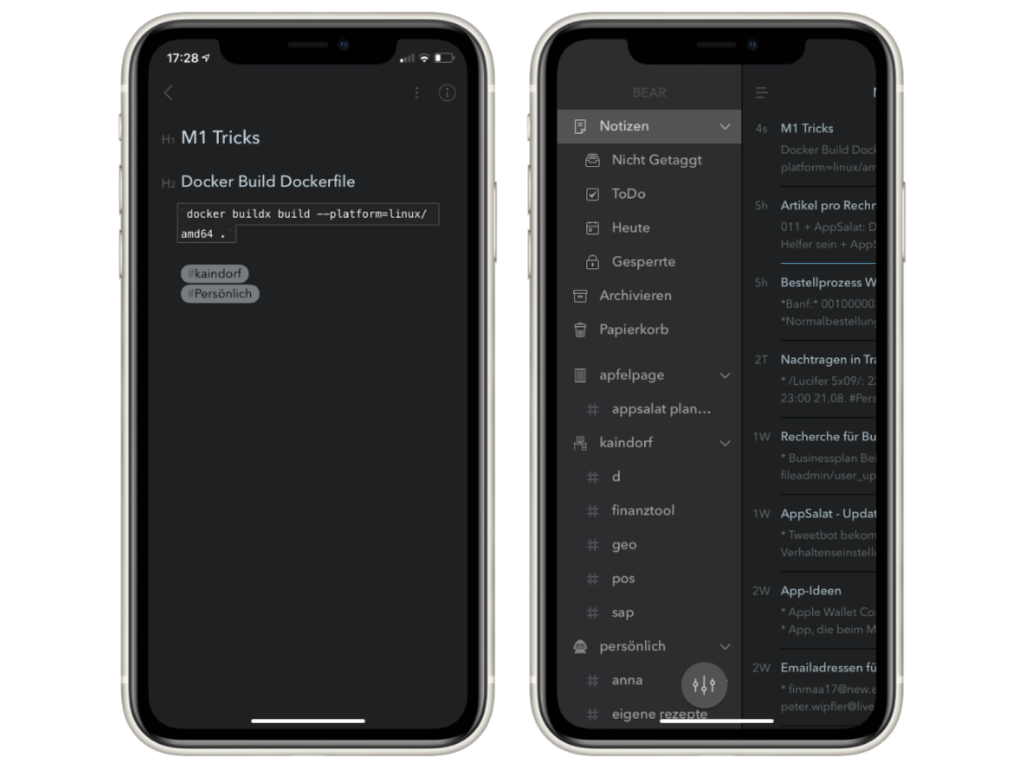
In Bear, notes are managed using so-called tags, which can be thought of as folders in the Files app or Finder. Assigning a note to a tag is really simple; you just write a hash symbol (“#”) anywhere.
Bear Notes app
Image: Bear

You have a lot of flexibility when using tags. You can place them anywhere in the note, which allows you to create an even finer structure in your notes. They can also be nested, which has the advantage that large areas can be divided into small sections if necessary. Bear also comes with some predefined tags:

  • Untagged contains all items without a tag
  • Notes in To Do have at least one checkbox
  • Today includes everything that was created or last edited today
  • Locked includes all notes that have been locked with a password and Touch ID or Face ID.

And thanks to iCloud, the entire structure is synchronized between all devices.

Encryption

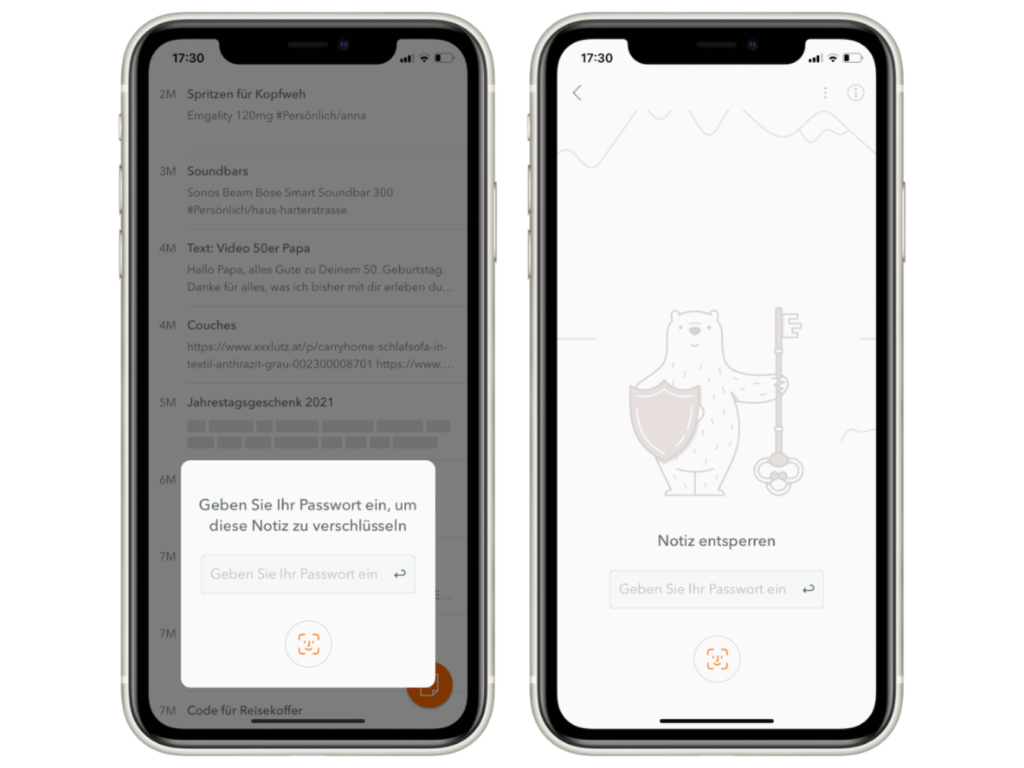
Bear allows you to protect individual notes with a password and Touch ID or Face ID. A strong password is required for this, and a password hint can also be entered optionally. If you now want to view a locked note, verification is necessary. The process is described in more detail here. This is what the end user sees.
Bear Notes app
Image: Bear

However, there is a complicated encryption process behind it that Bear created together with the security experts at Cossack Labs. An important component of this is the "Secure Enclave". Since the data is handled in a completely separate area, it is more difficult for hackers to access it.

Secure Enclave: This is the mini-processor of Apple devices (or part of the main processor in the M1 and A processors) on which sensitive data is processed. In Macs with an Intel chip, these are the T1 and T2 chips.

Two other important parts are the iCloud keychain and the generation of AES-GCM-256 keys. When assigning the password, another secret key is generated, which must also be present when accessing the locked note. This is done automatically, so you don't have to do anything in this regard. This may sound complicated for the average user - in the end it simply means that the content in Bear is really safely stored. If you are interested in the topic, you can find further details in the article by Cossack Labs.

High adaptability

In Bear you can edit pretty much every aspect of the appearance. This starts with the themes. On the one hand, these are relatively common, such as "High Contrast" or "Dark Graphite", but on the other hand there are also more unusual variants, such as "Panic Mode" or "Solarized Dark". If you want, the app icon also adapts to the selected color scheme. The typography can also be adjusted to your own wishes. In addition to the font size, line height and paragraph spacing, you can also choose a font. Avenir Next is active by default, otherwise there is also:

  • Helvetica Neue
  • Menlo
  • Georgia
  • Courier
  • Open Dyslexic

Taking notes with Markdown

In Bear, notes are created using a modified version of Markdown. But what is that? Markdown was developed to enable documents to be formatted quickly, easily and consistently. In addition, thanks to Markdown, it is possible to recognize the final format of a document (for example, a blog post for a website) before it is published.
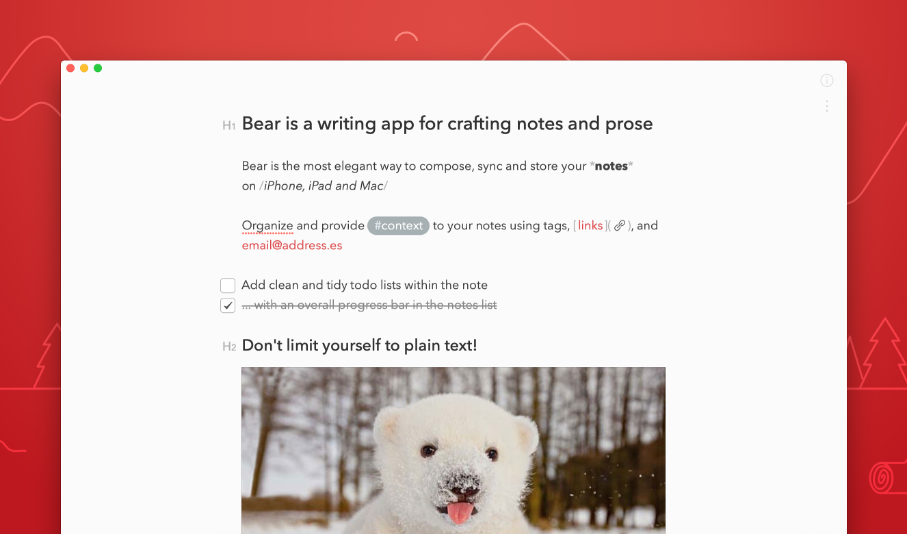
Bear Notes app
Image: Bear

Formatting works by placing specific characters around the designated text areas. "_Hello Apfelpatient!_", for example, formats the greeting in italics. There are also some small helpers to get you started. In the editor view, there is an area where you can select the formats with a click. The so-called "backlinks" are also useful. By inserting two square brackets and writing the title of a note, a link to it is created. Attachments in the form of images, documents, or PDFs are also accepted by the editor. These are displayed nicely within the document. Incidentally, a preview appears with a click. Drawings can also be attached. These can be created with either the Apple Pencil or your finger.

export options

Once the text has been entered for the first time, it is possible to export the results. The appropriate file format should be available for each intended use. The formats include:

  • plain text
  • Markdown
  • PDF
  • JPG
  • HTML
  • RTF
  • and Word.

We like the fact that the font and all other properties of the document are retained in the export. This gives you a lot of flexibility when it comes to sharing your notes.

Bear: Conclusion

Bear is probably the best designed note app in the App Store. It's not for nothing that the app won a design award from Apple. In addition, Bear's appearance can be completely customized to your own wishes using themes. We also liked the adaptability of the text area. Creating and formatting notes is very quick and easy using Markdown. Whether you're a Markdown pro or a newbie, everyone should be able to get along well with the writing area. You can get Bear for iOS, watchOS, iPadOS and macOS as a free downloadFor 1.49 euros per month or 15.99 euros per year you can activate synchronization with iCloud, all available themes and the numerous export options. (Image: Bear)


  • iOS 15: How to return to the old Safari design
Was this article helpful?
YesNo
Tags: App StoreiOSiPadOSmacOSwatchOS
SendShareSend
Share

Our Amazon Storefront

A handpicked selection of products for iPhone, Mac and more – sorted by topic and updated regularly.

Shop Now

This post contains affiliate links (including Amazon). We earn a small commission on qualifying purchases – at no extra cost to you. Learn more on our Partner Program page.

Previous Post

iPhone 13 models: Battery life in the test

Next Post

iPhone 13 Pro: ProMotion display raises questions

Milan Jovicic

Milan Jovicic

Milan founded Apfelpatient in 2016 and has been responsible for all editorial content since 2018 – news, rumors, how-to guides and product reviews. Here, Apple devices aren't review units kept for two weeks, they're everyday tools: from iPhone to MacBook Pro, MacBook Air and iMac all the way to Apple Vision Pro, at least one device from every product category is in daily use, many of them replaced every year. Every menu path in a guide is checked on the device before it goes live.

Related posts

Apple TV: New Fraggles special starts on December 4th

by Milan Jovicic
November 10, 2026 - 7:25 PM CET
Fraggles special on Apple TV: Key art for "Fraggle Rock: A Holiday Gift" with five Fraggles gathered around a glowing snow globe in a wintry cave.

Apple TV is showing the trailer for „Fraggle Rock: A Big Gift“. The holiday special starts on December 4th, also with a German dub.

Read moreDetails

Apple Arcade: Football Manager 27 and LEGO DUPLO

by Milan Jovicic
November 10, 2026 - 7:15 PM CET
Apple Arcade Football Manager 27 and LEGO DUPLO: Artwork for LEGO DUPLO Playtime with two figures, a dog, a red car and colourful DUPLO bricks.

Apple Arcade: Football Manager 27 Touch is here, and on December 3rd LEGO DUPLO, Prince of Persia and two other games will follow in German.

Read moreDetails

Apple TV: Sign language is coming to the app

by Milan Jovicic
November 10, 2026 - 18:57 CET
Apple TV sign language: A screen shows a scene from "Being Heumann" with an on-screen interpreter, in front of it Apple TV 4K and the Siri Remote.

The Apple TV app is getting sign language support: Starting November 13th, the feature will launch with "Being Heumann", initially only in ASL and BSL instead of DGS.

Read moreDetails

Apple: Class action lawsuit over Google deal allowed in Canada

by Milan Jovicic
November 10, 2026 - 1:34 PM CET
Apple class action Canada: unfolded iPhone Duo on a wooden table, the Settings app shows Google selected as the search engine, with Yahoo, Bing, DuckDuckGo and Ecosia below

A court in Canada has allowed a class-action lawsuit against Apple. The allegation: Apple accepted payment from Google to avoid competition.

Read moreDetails

iOS 27.2.1 closes a vulnerability in iMessage group conversations

by Milan Jovicic
November 9, 2026 - 23:23 CET
iOS 27.2.1 security vulnerabilities: Messages app icon with a speech bubble on a graphite gradient

Strangers could join iMessage group conversations: iOS 27.2.1 closes the vulnerability and fixes pairing errors with Bluetooth and AirPlay.

Read moreDetails
Load More

Categories

  • Apple Insights
  • Apple Rumors
  • Apple News
  • Apple Tips & Tricks
  • iPhone news, rumors and tips
  • Mac and MacBook News
  • Reviews
Make Apfelpatient a preferred source One click – and you'll see us more often on Google

About APFELPATIENT

APFELPATIENT brings you the latest Apple news, product updates, guides, reviews and tips across the entire Apple ecosystem — from the iPhone to the Mac to the Apple Vision Pro. From the first rumors to confirmed news: researched responsibly.

Follow Apfelpatient

Facebook Instagram YouTube Threads Threads

Company

  • About Apfelpatient
  • Contact
  • Author Profiles

Community

  • Netiquette
  • Push notifications
  • RSS feed

Legal

  • Legal Notice
  • Privacy Policy
  • Terms of Use
  • Cookie settings
  • Affiliate Program

Resources

  • Sitemap

© 2026 Apfelpatient. All rights reserved.

No result
View All Results
  • Home
  • News
  • Rumors
  • Tips & Tricks
  • Reviews
  • Insights

© 2026 Apfelpatient. All rights reserved. Site map

Change language to Deutsch