

apple patient
  • Home
  • News
  • Rumors
  • Tips & Tricks
  • Reviews
  • Insights
No Result
View All Result
  • iPhone 18
  • iPhone 18 Pro
  • iPhone Duo
  • Apple Watch Series 12
  • Apple Watch Ultra 4
  • AirPods 5
  • iOS 27
  • iPadOS 27
  • macOS
  • MacBook Neo
  • iPhone 17e
  • AirTags
  • iOS 26
  • iPhone 17
  • MacBook Pro
  • iPadOS
  • iMac
  • Mac mini
  • HomePod
  • Apple TV
  • iPad Pro
  • iPhone Air
  • Apple Vision Pro
  • iPhone 16
  • AirPods 4
  • Apple Watch Ultra
  • HomePod Mini
  • MacBook Air
  • iPad
  • AirPods Max
  • AirPods Pro 3
  • Apple Watch Series 3
  • Mac Studio
  • Studio Display
  • iPad Air
  • iPad mini
  • watchOS 27
  • Apple CarPlay
  • Apple Pay
  • watchOS 26
  • Home
  • News
  • Rumors
  • Tips & Tricks
  • Reviews
  • Insights
No Result
View All Result
apple patient
No Result
View All Result
  • iPhone 18
  • iPhone 18 Pro
  • iPhone Duo
  • Apple Watch Series 12
  • Apple Watch Ultra 4
  • AirPods 5
  • iOS 27
  • iPadOS 27
  • macOS
  • MacBook Neo
  • iPhone 17e
  • AirTags
  • iOS 26
  • iPhone 17
  • MacBook Pro
  • iPadOS
  • iMac
  • Mac mini
  • HomePod
  • Apple TV
  • iPad Pro
  • iPhone Air
  • Apple Vision Pro
  • iPhone 16
  • AirPods 4
  • Apple Watch Ultra
  • HomePod Mini
  • MacBook Air
  • iPad
  • AirPods Max
  • AirPods Pro 3
  • Apple Watch Series 3
  • Mac Studio
  • Studio Display
  • iPad Air
  • iPad mini
  • watchOS 27
  • Apple CarPlay
  • Apple Pay
  • watchOS 26

Apple releases major iWork update – Pages, Numbers & Keynote get new features

Milan Jovicic by Milan Jovicic
March 28, 2019 - 9:26 PM CET
in Apple News
0
Image: Apple

Image: Apple

WhatsAppFacebookEmail
Threads

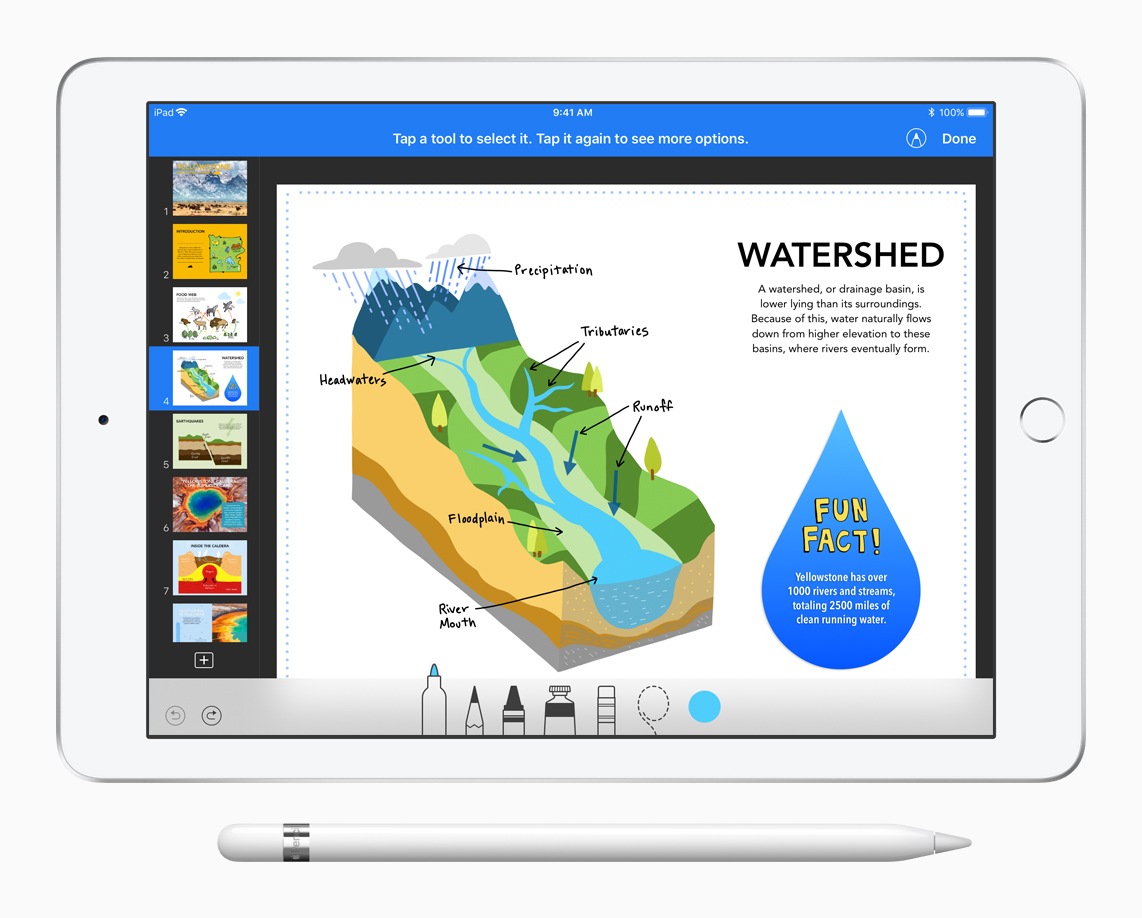
It was announced by Apple last week - a major update for iWork promises new features and improvements for Pages, Numbers and Keynote. Apple Pencil support has also been integrated into Keynote.

The user can draw a path with their finger or optionally with the Apple Pencil and then animate it so that it moves on the slide. Another new feature is the ability to insert action effects into presentations. This includes moving, rotating and scaling. GIF files are also supported. The new iWork update also brings some interesting new features to Pages. There is now a new table of contents that makes navigation between documents and books easier. In addition, some iCloud improvements have been added.

In addition, users will now be able to create placeholders for images - this should prevent the page from having to be reformatted when images are replaced. The collaboration function has also been significantly improved. In addition to Pages and Keynote, Numbers has also received some optimizations. The update will allow more precise adjustments to the number and size of table rows and columns in the format area. The update for Pages, Numbers and Keynote is also available for macOS users. Both the iOS and macOS versions of the iWork applications are available free of charge to all users.

All new features at a glance:

Pages:

• Use the new table of contents to easily navigate documents or books.
• Add a table of contents to a page in a word processing document.
• Save your own shapes for use in other documents and access them from any device via iCloud.
• Create templates for new documents and access them from any device via iCloud.
• Create image placeholders to easily replace images without affecting the formatting of your page.
• Switch between word processing and page layout in your document.
• Benefit from better performance when collaborating on documents.
• Edit grouped objects while collaborating.
• Use the vertical writing style in languages such as Chinese, Japanese and Korean throughout your document or in individual text boxes.

Numbers:

• Make precise changes to the number and size of table rows and columns in the Format pane.
• Benefit from performance and usage improvements with smart categories.
• Save your own shapes for use in other spreadsheets and access them from any device using iCloud.
• Create templates for new spreadsheets and access them from any device with iCloud.
• Use maximum magnification levels of up to 400 %.
• Make improvements to importing Excel and comma-separated value files.
• Create image placeholders to easily replace images without affecting the formatting of your spreadsheet.
• Benefit from better performance when collaborating on spreadsheets.
• Edit grouped objects while collaborating.
• Take advantage of support for vertical text in shapes and text boxes in languages such as Chinese, Japanese, and Korean.


Keynote:

• Use your finger or Apple Pencil to draw a path to animate an object and move it on the slide.
• Enhance presentations with action effects such as moving, rotating and scaling.
• Create and share an animated GIF file by exporting one or more slides.
• Edit presenter notes while presenting or testing a presentation.
• Save your own shapes for use in other presentations and access them from any device using iCloud.
• Create themes for new presentations and access them from any device using iCloud.
• Now better display slides with custom, wider aspect ratios in the Slide Navigator, Light Table, and Presenter Monitor.
• Create image placeholders to easily replace images without affecting the formatting of your slide.
• Benefit from better performance when collaborating on presentations.
• Edit grouped objects while collaborating.
• Take advantage of support for vertical text in shapes and text boxes in languages such as Chinese, Japanese, and Korean.

Don't want to miss any more news? Then subscribe to our Telegram channel here
Make Apfelpatient a preferred source One click – and you'll see us more often on Google
Was this article helpful?
YesNo
Tags: iOSiWorkKeynotemacOS
SendShare4Send
Share

Our Amazon Storefront

A handpicked selection of products for iPhone, Mac and more – sorted by topic and updated regularly.

Shop Now

This post contains affiliate links (including Amazon). We earn a small commission on qualifying purchases – at no extra cost to you. Learn more on our Partner Program page.

Previous Post

Apple Patent: How underwater photos with iPhones could be better

Next Post

iPhone 2019: Blueprint to show iPhone 11

Milan Jovicic

Milan Jovicic

Milan founded Apfelpatient in 2016 and has been responsible for all editorial content since 2018 — news, rumors, guides, and product reviews. Apple devices here are not test units on loan for two weeks but everyday tools: from the iPhone through MacBook Pro, MacBook Air, and iMac to the Apple Vision Pro, at least one device from nearly every product category is in daily use, many of them replaced annually. Every menu path in a guide is verified on the device before it is published.

Related posts

HomePod mini 2 and Apple TV 4K: Apple code reveals the devices

by Milan Jovicic
September 25, 2026 - 11:08 p.m. CEST
Siri Remote for the Apple TV 4K on a grey stone surface – for the code finding on the HomePod mini 2 and Apple TV 4K

HomePod mini 2 and Apple TV 4K (4th generation): Apple's code reveals five colors, the familiar design, and what applies to Siri AI in this country.

Read moreDetails

iPad mini 8 and iPad 12: Apple code reveals chips and camera

by Milan Jovicic
September 25, 2026 - 10:48 p.m. CEST
Yellow entry-level iPad seen from the back on a grey stone surface – for the code finding on the iPad mini 8 and iPad 12

iPad mini 8 and iPad 12: Apple's code mentions A20 Pro and A19, a new front camera on the mini, and Apple Intelligence for the entry-level iPad.

Read moreDetails

watchOS 27.2: Code reveals new screenshot preview

by Milan Jovicic
September 24, 2026 - 8:36 p.m. CEST
Apple Watch Ultra with an orange band showing the app view, the device getting the new screenshot preview in watchOS 27.2

watchOS 27.2 includes a new screenshot interface for the Apple Watch: preview, share, and delete, just like on the iPhone. It's currently inactive.

Read moreDetails

Apple TV: Peanuts classics free again for Christmas

by Milan Jovicic
September 24, 2026 - 6:43 p.m. CEST
Charlie Brown holding a small Christmas tree under a starry sky in the snow, a scene from A Charlie Brown Christmas, free again on Apple TV

Three classic Peanuts cartoons are back on Apple TV for the holidays, no subscription required. Plus, there are new specials featuring Snoopy and the Fraggle Rocks.

Read moreDetails

The Wanted Man: Hugh Laurie on Apple TV from January

by Milan Jovicic
September 24, 2026 - 6:19 p.m. CEST
Hugh Laurie as crime boss Felix Carmichael in an evening scene from The Wanted Man on Apple TV

The Wanted Man premieres on January 6, 2027 on Apple TV. Hugh Laurie plays a crime boss who wants to escape – the finale is in February.

Read moreDetails
Load More

Categories

  • Apple Insights
  • Apple Rumors
  • Apple News
  • Apple Tips & Tricks
  • iPhone news, rumors and tips
  • Mac and MacBook News
  • Reviews

About APFELPATIENT

APFELPATIENT brings you the latest Apple news, product updates, guides, reviews and tips across the entire Apple ecosystem — from the iPhone to the Mac to the Apple Vision Pro. From the first rumors to confirmed news: researched responsibly.

Follow Apfelpatient

Facebook Instagram YouTube Threads Threads

Company

  • About Apfelpatient
  • Contact
  • Author Profiles

Community

  • Netiquette
  • Push Notifications
  • RSS feed

Legal

  • Legal Notice
  • Privacy Policy
  • Terms of Use
  • Cookie Settings
  • Affiliate Program

Resources

  • Sitemap

© 2026 Apfelpatient. All rights reserved.

No Result
View All Result
  • Home
  • News
  • Rumors
  • Tips & Tricks
  • Reviews
  • Insights

© 2026 Apfelpatient. All rights reserved. Page Directory

Change language to Deutsch

