

apple patient
  • Home
  • News
  • Rumors
  • Tips & Tricks
  • Reviews
  • Insights
No Result
View All Result
  • iPhone 18
  • iPhone 18 Pro
  • iPhone Duo
  • Apple Watch Series 12
  • Apple Watch Ultra 4
  • AirPods 5
  • iOS 27
  • iPadOS 27
  • macOS
  • MacBook Neo
  • iPhone 17e
  • AirTags
  • iOS 26
  • iPhone 17
  • MacBook Pro
  • iPadOS
  • iMac
  • Mac mini
  • HomePod
  • Apple TV
  • iPad Pro
  • iPhone Air
  • Apple Vision Pro
  • iPhone 16
  • AirPods 4
  • Apple Watch Ultra
  • HomePod Mini
  • MacBook Air
  • iPad
  • AirPods Max
  • AirPods Pro 3
  • Apple Watch Series 3
  • Mac Studio
  • Studio Display
  • iPad Air
  • iPad mini
  • watchOS 27
  • Apple CarPlay
  • Apple Pay
  • watchOS 26
  • Home
  • News
  • Rumors
  • Tips & Tricks
  • Reviews
  • Insights
No Result
View All Result
apple patient
No Result
View All Result
  • iPhone 18
  • iPhone 18 Pro
  • iPhone Duo
  • Apple Watch Series 12
  • Apple Watch Ultra 4
  • AirPods 5
  • iOS 27
  • iPadOS 27
  • macOS
  • MacBook Neo
  • iPhone 17e
  • AirTags
  • iOS 26
  • iPhone 17
  • MacBook Pro
  • iPadOS
  • iMac
  • Mac mini
  • HomePod
  • Apple TV
  • iPad Pro
  • iPhone Air
  • Apple Vision Pro
  • iPhone 16
  • AirPods 4
  • Apple Watch Ultra
  • HomePod Mini
  • MacBook Air
  • iPad
  • AirPods Max
  • AirPods Pro 3
  • Apple Watch Series 3
  • Mac Studio
  • Studio Display
  • iPad Air
  • iPad mini
  • watchOS 27
  • Apple CarPlay
  • Apple Pay
  • watchOS 26

Apple Invitations now available – All information about the app

Milan Jovicic by Milan Jovicic
February 4, 2025 - 17:21 CET
in Apple News
0
Apple Invitations app

Image: Apple

WhatsAppFacebookEmail
Threads

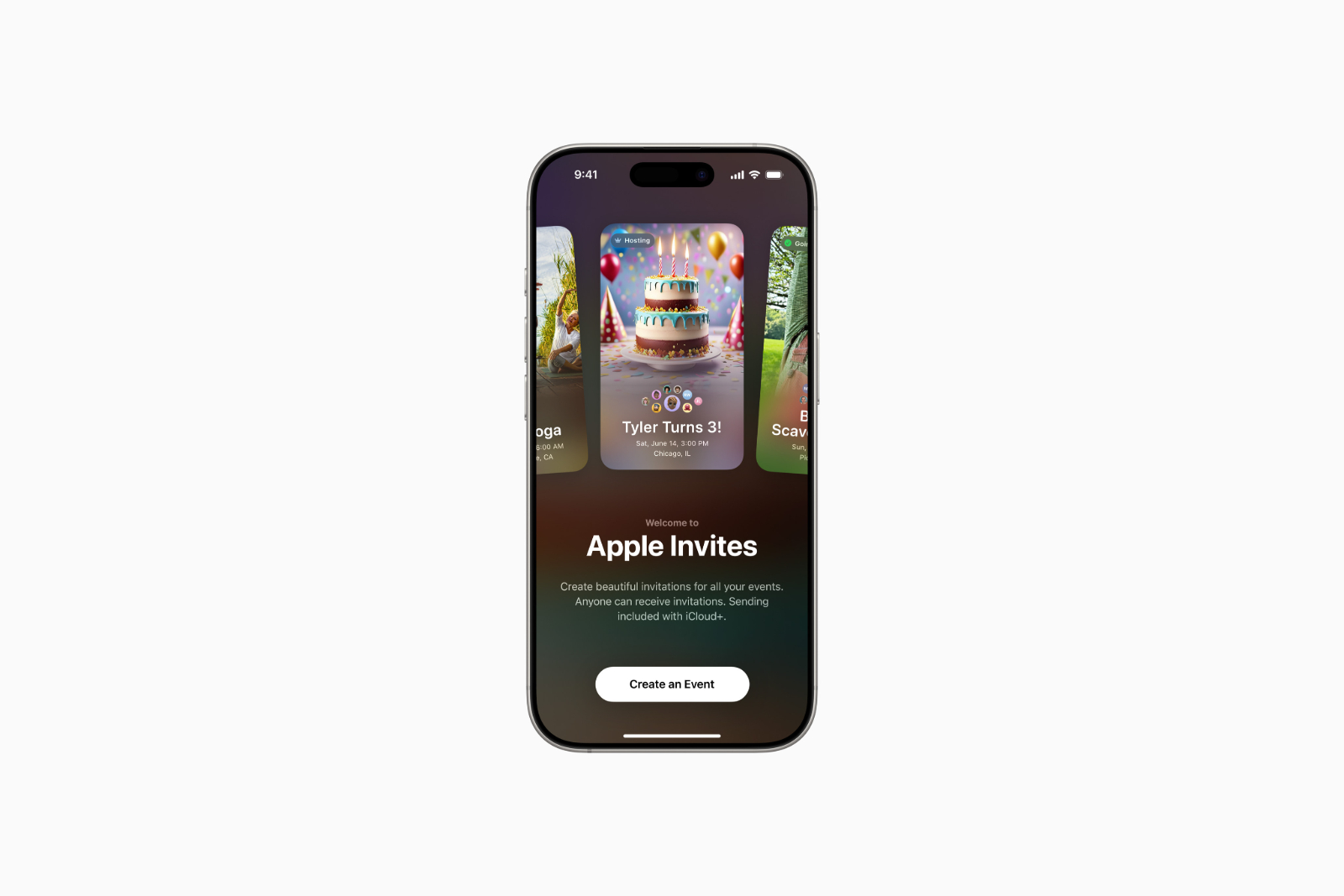
Apple has introduced a new app that makes creating and managing invitations much easier. With Apple Invitations, users can create individually designed invitation cards for a variety of occasions, manage guests, and even capture shared memories in the form of photos and videos. The app is now available for free in the App Store and can also be used on the web at icloud.com/invites. This new application combines various functions from iCloud, Apple Music, and Apple Maps, providing an integrated solution for digital invitations. Users without Apple devices can also receive and respond to invitations, making the app particularly versatile.

With Apple Invitations, the Cupertino company is expanding its digital offering with an app that fits seamlessly into the existing Apple ecosystem. Events are not only easier to organize, but also become a digital experience thanks to various interactive elements. Apple emphasizes that the app was designed so that the invitation process is not only straightforward but also visually appealing. Users can choose from a variety of design options and access advanced features such as map integration, weather forecasts or shared playlists.

Features and Benefits of Apple Invitations

Individual design of invitations

The app allows you to personalize invitations by either uploading your own images or using pre-made designs from a curated gallery. The gallery contains backgrounds for various occasions, from birthdays to business events. In addition, Apple Intelligence technology supports the creative process. Image Playground allows users to create their own images for invitations using artificial intelligence. The texts of the invitations can also be optimized using the integrated writing tools.
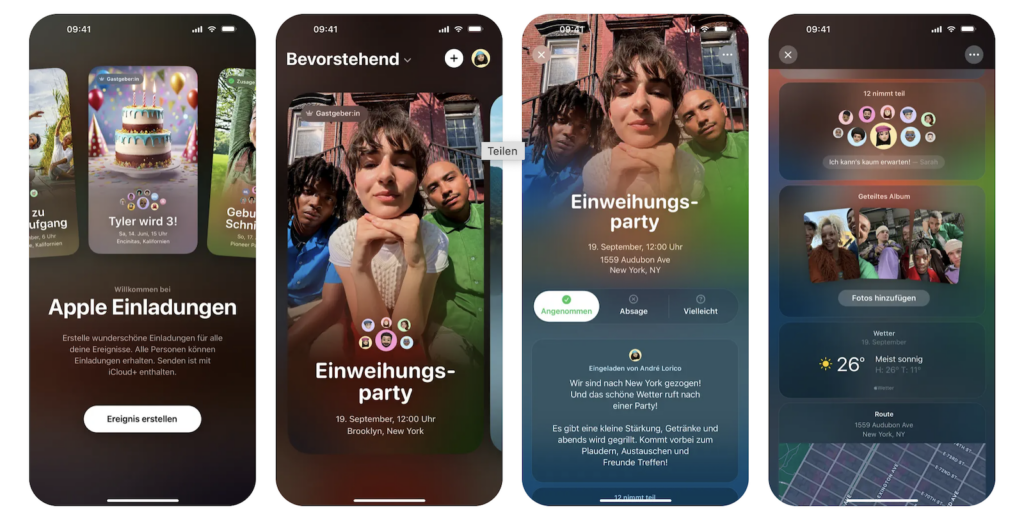
Image: Apple

Easy management of events

Hosts have full control over their event at all times. They can:

  • Share invitations via link
  • Track guest feedback in real time
  • Customize the preview for guests, including venue and background image

Apple Maps displays the exact location of the event and the route to it. At the same time, integration with Apple Weather ensures that guests can see the weather forecast for the day of the event directly in the invitation.

Interactive functions for guests

Guests also benefit from the app's functions. They can:

  • Accept or decline directly in the app or on the web
  • Upload photos and videos to a shared album
  • If you use Apple Music, create a playlist for the event together

What's particularly practical is that the app is not limited to Apple users. Even people without an Apple device or iCloud account can receive and respond to invitations.

Advanced features for iCloud+ subscribers

In addition to the standard features, Apple Invitations offers some exclusive features for iCloud+ subscribers. These include:

  • Expanded storage to store large media collections in iCloud
  • Private Relay, a privacy feature for safe surfing
  • Hide My Email, a feature that generates random email addresses for more privacy
  • HomeKit Secure Video, an encrypted solution for managing security videos
  • Custom email domains to create personalized iCloud addresses
  • Family Sharing to share iCloud+ with up to five other people

Availability and compatibility

Apple Invitations is now available for free download from the App Store for all iPhone models with iOS 18 or later. Alternatively, the app can be used via the web. Some features are not available in all regions or languages. Apple provides further information on its official website.

Apple Invitations: More than just an invitation card

Apple Invitations makes planning and holding events much easier. The app offers a modern solution for digital invitations and integrates functions that go far beyond simply sending invitation cards. Thanks to the connection to iCloud, Apple Maps and Apple Music, every invitation becomes an interactive experience. Guests can not only find out about the venue and the weather, but also actively participate in the event by sharing media or creating a shared playlist. Apple goes one step further with this application and makes it even easier for users to organize private or business events professionally. The app could quickly establish itself as the standard for digital invitations - to the App Store! (Image: Apple)

  • WhatsApp: New scheduling feature for individual chats comingt
  • Apple Music presents Kendrick Lamar at Super Bowl LIX
  • Apple Music Replay 2025 is here – Your music in retrospect

Make Apfelpatient a preferred source One click – and you'll see us more often on Google
Was this article helpful?
YesNo
Tags: Apple ServicesApple invitationsiCloud
SendShareSend
Share

Our Amazon Storefront

A handpicked selection of products for iPhone, Mac and more – sorted by topic and updated regularly.

Shop Now

This post contains affiliate links (including Amazon). We earn a small commission on qualifying purchases – at no extra cost to you. Learn more on our Partner Program page.

Previous Post

Apple leak confirms: iCloud+ gets new feature [U]

Next Post

Apple patent shows: iPhone could soon control everything automatically

Milan Jovicic

Milan Jovicic

Milan founded Apfelpatient in 2016 and has been responsible for all editorial content since 2018 — news, rumors, guides, and product reviews. Apple devices here are not test units on loan for two weeks but everyday tools: from the iPhone through MacBook Pro, MacBook Air, and iMac to the Apple Vision Pro, at least one device from nearly every product category is in daily use, many of them replaced annually. Every menu path in a guide is verified on the device before it is published.

Related posts

HomePod mini 2 and Apple TV 4K: Apple code reveals the devices

by Milan Jovicic
September 25, 2026 - 11:08 p.m. CEST
Siri Remote for the Apple TV 4K on a grey stone surface – for the code finding on the HomePod mini 2 and Apple TV 4K

HomePod mini 2 and Apple TV 4K (4th generation): Apple's code reveals five colors, the familiar design, and what applies to Siri AI in this country.

Read moreDetails

iPad mini 8 and iPad 12: Apple code reveals chips and camera

by Milan Jovicic
September 25, 2026 - 10:48 p.m. CEST
Yellow entry-level iPad seen from the back on a grey stone surface – for the code finding on the iPad mini 8 and iPad 12

iPad mini 8 and iPad 12: Apple's code mentions A20 Pro and A19, a new front camera on the mini, and Apple Intelligence for the entry-level iPad.

Read moreDetails

watchOS 27.2: Code reveals new screenshot preview

by Milan Jovicic
September 24, 2026 - 8:36 p.m. CEST
Apple Watch Ultra with an orange band showing the app view, the device getting the new screenshot preview in watchOS 27.2

watchOS 27.2 includes a new screenshot interface for the Apple Watch: preview, share, and delete, just like on the iPhone. It's currently inactive.

Read moreDetails

Apple TV: Peanuts classics free again for Christmas

by Milan Jovicic
September 24, 2026 - 6:43 p.m. CEST
Charlie Brown holding a small Christmas tree under a starry sky in the snow, a scene from A Charlie Brown Christmas, free again on Apple TV

Three classic Peanuts cartoons are back on Apple TV for the holidays, no subscription required. Plus, there are new specials featuring Snoopy and the Fraggle Rocks.

Read moreDetails

The Wanted Man: Hugh Laurie on Apple TV from January

by Milan Jovicic
September 24, 2026 - 6:19 p.m. CEST
Hugh Laurie as crime boss Felix Carmichael in an evening scene from The Wanted Man on Apple TV

The Wanted Man premieres on January 6, 2027 on Apple TV. Hugh Laurie plays a crime boss who wants to escape – the finale is in February.

Read moreDetails
Load More

Categories

  • Apple Insights
  • Apple Rumors
  • Apple News
  • Apple Tips & Tricks
  • iPhone news, rumors and tips
  • Mac and MacBook News
  • Reviews

About APFELPATIENT

APFELPATIENT brings you the latest Apple news, product updates, guides, reviews and tips across the entire Apple ecosystem — from the iPhone to the Mac to the Apple Vision Pro. From the first rumors to confirmed news: researched responsibly.

Follow Apfelpatient

Facebook Instagram YouTube Threads Threads

Company

  • About Apfelpatient
  • Contact
  • Author Profiles

Community

  • Netiquette
  • Push Notifications
  • RSS feed

Legal

  • Legal Notice
  • Privacy Policy
  • Terms of Use
  • Cookie Settings
  • Affiliate Program

Resources

  • Sitemap

© 2026 Apfelpatient. All rights reserved.

No Result
View All Result
  • Home
  • News
  • Rumors
  • Tips & Tricks
  • Reviews
  • Insights

© 2026 Apfelpatient. All rights reserved. Page Directory

Change language to Deutsch



