

apple patient
  • Home
  • News
  • Rumors
  • Tips & Tricks
  • Reviews
  • Insights
No Result
View All Result
  • iPhone 18
  • iPhone 18 Pro
  • iPhone Duo
  • Apple Watch Series 12
  • Apple Watch Ultra 4
  • AirPods 5
  • iOS 27
  • iPadOS 27
  • macOS
  • MacBook Neo
  • iPhone 17e
  • AirTags
  • iOS 26
  • iPhone 17
  • MacBook Pro
  • iPadOS
  • iMac
  • Mac mini
  • HomePod
  • Apple TV
  • iPad Pro
  • iPhone Air
  • Apple Vision Pro
  • iPhone 16
  • AirPods 4
  • Apple Watch Ultra
  • HomePod Mini
  • MacBook Air
  • iPad
  • AirPods Max
  • AirPods Pro 3
  • Apple Watch Series 3
  • Mac Studio
  • Studio Display
  • iPad Air
  • iPad mini
  • watchOS 27
  • Apple CarPlay
  • Apple Pay
  • watchOS 26
  • Home
  • News
  • Rumors
  • Tips & Tricks
  • Reviews
  • Insights
No Result
View All Result
apple patient
No Result
View All Result
  • iPhone 18
  • iPhone 18 Pro
  • iPhone Duo
  • Apple Watch Series 12
  • Apple Watch Ultra 4
  • AirPods 5
  • iOS 27
  • iPadOS 27
  • macOS
  • MacBook Neo
  • iPhone 17e
  • AirTags
  • iOS 26
  • iPhone 17
  • MacBook Pro
  • iPadOS
  • iMac
  • Mac mini
  • HomePod
  • Apple TV
  • iPad Pro
  • iPhone Air
  • Apple Vision Pro
  • iPhone 16
  • AirPods 4
  • Apple Watch Ultra
  • HomePod Mini
  • MacBook Air
  • iPad
  • AirPods Max
  • AirPods Pro 3
  • Apple Watch Series 3
  • Mac Studio
  • Studio Display
  • iPad Air
  • iPad mini
  • watchOS 27
  • Apple CarPlay
  • Apple Pay
  • watchOS 26

Version 3.1 with new AR features: Apple updates Clips

Milan Jovicic by Milan Jovicic
April 26, 2021 - 9:33 PM CEST
in Apple News
0
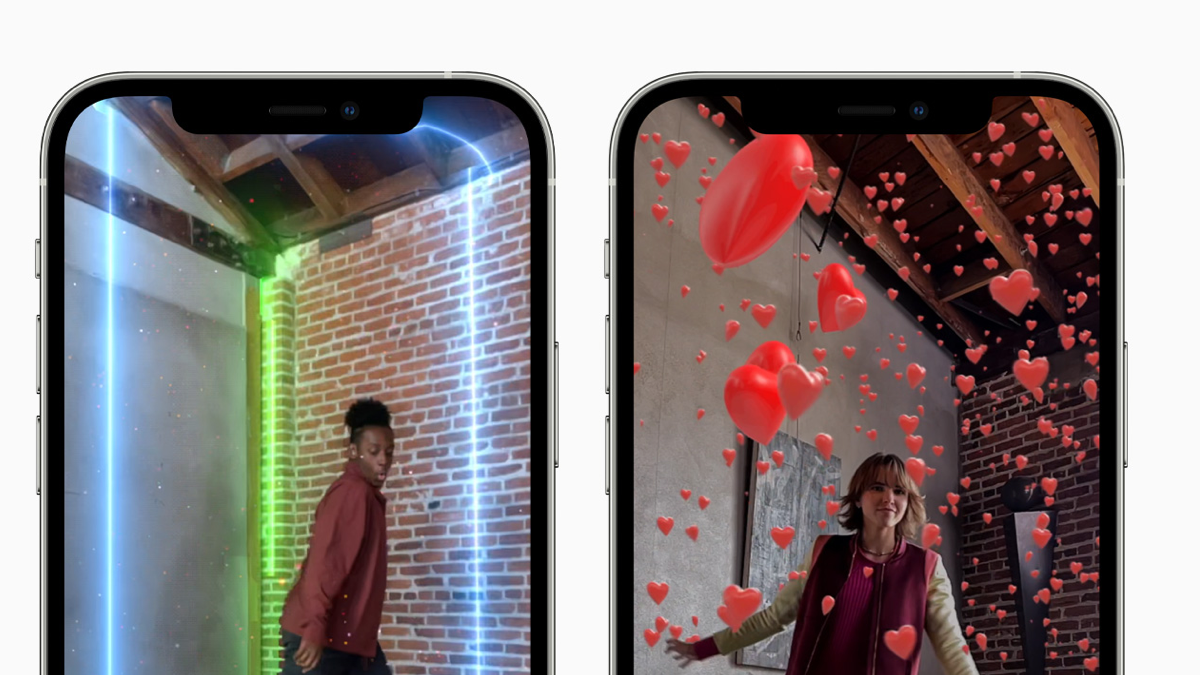
Clips 3.1

Image: Apple

WhatsAppFacebookEmail
Threads

Apple released iOS 14.5 and Co. this evening. Now the company has also announced an update for its own AR application Clips.

With Clips version 3.1, users can scan a room with the LiDAR scanner on iPhone 12 Pro and iPad Pro models to apply fun, engaging video effects that change their world. The company has now explained this in a press release. announcement:

The cutting-edge LiDAR scanner on select iPhone and iPad models, first introduced on iPad Pro last year, enables groundbreaking depth sensing capabilities never before possible on a mobile device. This breakthrough technology measures the distance of light and uses a scene's pixel depth information to deliver faster, more realistic augmented reality (AR) experiences. Combined with tight integration between Apple's hardware and software, Clips 3.1 now enables users to capture amazing videos with magical effects that conform to the shape of a room and the objects within it.

Accordingly, the following devices benefit from the update:

  • iPad Pro 2020
  • iPad Pro 2021
  • iPhone 12 Pro & iPhone 12 Pro Max

Clips 3.1 brings seven new AR effects
Clips 3.1
Image: Apple

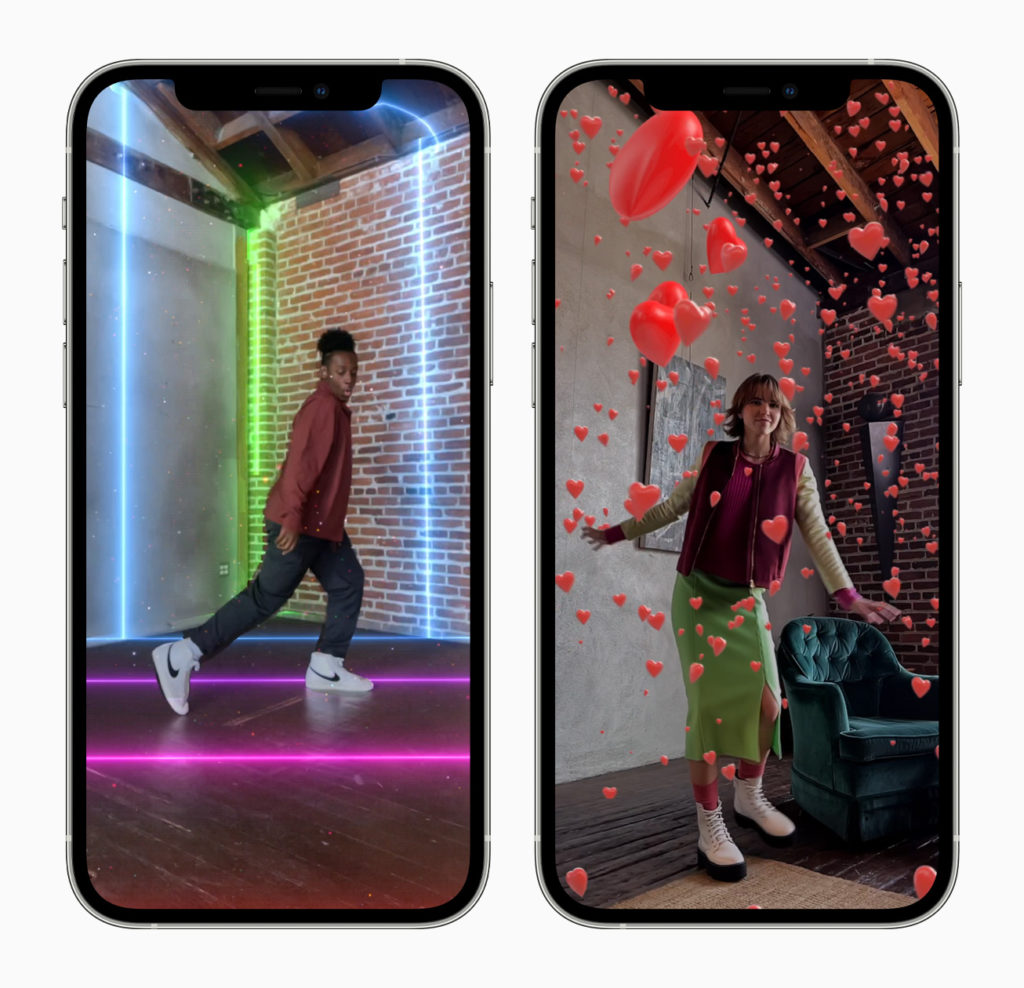
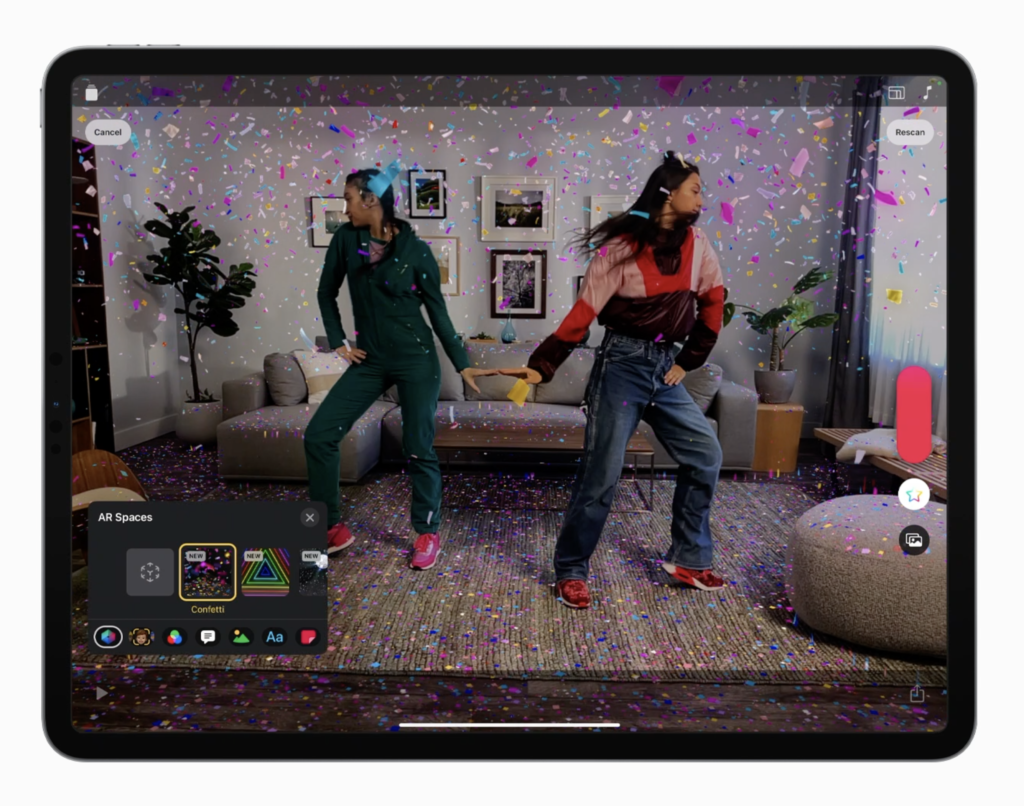
In version 3.1, AR Spaces allow users to scan a room and see a live preview of effects that bring dynamic lighting, falling objects and immersive scenes to life. According to Apple, seven AR effects are available:

  • Prism: Bands of rainbow light scan the walls, floors and objects in a room.
  • Confetti: Celebratory confetti showers fall and collect on flat surfaces.
  • Disco: Bright lights reflect from the disco ball hanging from the ceiling of the room.
  • Dance floor: Colorful light tiles dance in patterns across the floor.
  • Sparkle: Golden glitter emoji and white glitter fill the room.
  • Stardust: Magical trails of starlight orbit and follow a person in the video.
  • Hearts: Floating heart balloons bubble in the room.

Apple is promising monthly updates in the future. The announcement states:

Clips now offers even more creative content options with monthly updates. Users can expect regular updates to the Clips library with filters, live titles, text, stickers, and posters related to seasonal events and cultural trends. Additionally, opt-in notifications are now available in Clips 3.1, keeping the user updated when new content is available.

Clips 3.1 is available today as a free update in App Store Available for iPhone and iPod touch with iOS 14.5 or later or iPad with iPadOS 14.5.
Clips 3.1
Image: Apple

Since the version is currently being rolled out, it may take some time before it is available to all users. Below we have listed the update description verbatim. (Image: Apple)

  • iOS 14.5: How to control app tracking on iPhone

Update description:

  • Add a new dimension to your videos with AR Environments, an augmented reality (AR) feature that uses the LiDAR scanner to create realistic effects that conform to the contours of your space.
  • Choose from seven AR environments including ribbons of rainbow light, festive confetti volleys, magical stardust, a pulsating dance floor, and more.
  • Capture a person with AR Environments and watch animated effects adapt to them and the space.
  • Combine AR environments with text labels, stickers and emojis to add an even more personal touch to your videos.
  • When you use Clips on iPad and use mirroring to a second display, you can switch between viewing your video alone and the entire interface.
  • Select multiple projects at once to quickly delete or duplicate them.
  • Edit text in posters and labels when iPhone is in landscape mode.
  • Get notified when new stickers, posters, and effects are released in Clips.
  • AR environments require an iPhone 12 Pro, iPhone 12 Pro Max, or iPad Pro (2020 or later).

Make Apfelpatient a preferred source One click – and you'll see us more often on Google
Was this article helpful?
YesNo
Tags: App StoreiOSiPadOS
SendShareSend
Share

Our Amazon Storefront

A handpicked selection of products for iPhone, Mac and more – sorted by topic and updated regularly.

Shop Now

This post contains affiliate links (including Amazon). We earn a small commission on qualifying purchases – at no extra cost to you. Learn more on our Partner Program page.

Previous Post

Bypass malware protection: macOS 11.3 closes security hole

Next Post

Interview: Apple talks about iMac 2021 design

Milan Jovicic

Milan Jovicic

Milan founded Apfelpatient in 2016 and has been responsible for all editorial content since 2018 — news, rumors, guides, and product reviews. Apple devices here are not test units on loan for two weeks but everyday tools: from the iPhone through MacBook Pro, MacBook Air, and iMac to the Apple Vision Pro, at least one device from nearly every product category is in daily use, many of them replaced annually. Every menu path in a guide is verified on the device before it is published.

Related posts

Apple vs. OpenAI: OpenAI wants to overturn Apple's new expert opinions

by Milan Jovicic
September 26, 2026 - 10:49 CEST
Symbolic image for the Apple OpenAI lawsuit: illustrated file folder showing the case number on a dark blue background

Apple vs. OpenAI: The defendants want Apple's new expert opinions dismissed. Former employee Chang Liu explains the damaging news.

Read moreDetails

HomePod mini 2 and Apple TV 4K: Apple code reveals the devices

by Milan Jovicic
September 25, 2026 - 11:08 p.m. CEST
Siri Remote for the Apple TV 4K on a grey stone surface – for the code finding on the HomePod mini 2 and Apple TV 4K

HomePod mini 2 and Apple TV 4K (4th generation): Apple's code reveals five colors, the familiar design, and what applies to Siri AI in this country.

Read moreDetails

iPad mini 8 and iPad 12: Apple code reveals chips and camera

by Milan Jovicic
September 25, 2026 - 10:48 p.m. CEST
Yellow entry-level iPad seen from the back on a grey stone surface – for the code finding on the iPad mini 8 and iPad 12

iPad mini 8 and iPad 12: Apple's code mentions A20 Pro and A19, a new front camera on the mini, and Apple Intelligence for the entry-level iPad.

Read moreDetails

watchOS 27.2: Code reveals new screenshot preview

by Milan Jovicic
September 24, 2026 - 8:36 p.m. CEST
Apple Watch Ultra with an orange band showing the app view, the device getting the new screenshot preview in watchOS 27.2

watchOS 27.2 includes a new screenshot interface for the Apple Watch: preview, share, and delete, just like on the iPhone. It's currently inactive.

Read moreDetails

Apple TV: Peanuts classics free again for Christmas

by Milan Jovicic
September 24, 2026 - 6:43 p.m. CEST
Charlie Brown holding a small Christmas tree under a starry sky in the snow, a scene from A Charlie Brown Christmas, free again on Apple TV

Three classic Peanuts cartoons are back on Apple TV for the holidays, no subscription required. Plus, there are new specials featuring Snoopy and the Fraggle Rocks.

Read moreDetails
Load More

Categories

  • Apple Insights
  • Apple Rumors
  • Apple News
  • Apple Tips & Tricks
  • iPhone news, rumors and tips
  • Mac and MacBook News
  • Reviews

About APFELPATIENT

APFELPATIENT brings you the latest Apple news, product updates, guides, reviews and tips across the entire Apple ecosystem — from the iPhone to the Mac to the Apple Vision Pro. From the first rumors to confirmed news: researched responsibly.

Follow Apfelpatient

Facebook Instagram YouTube Threads Threads

Company

  • About Apfelpatient
  • Contact
  • Author Profiles

Community

  • Netiquette
  • Push Notifications
  • RSS feed

Legal

  • Legal Notice
  • Privacy Policy
  • Terms of Use
  • Cookie Settings
  • Affiliate Program

Resources

  • Sitemap

© 2026 Apfelpatient. All rights reserved.

No Result
View All Result
  • Home
  • News
  • Rumors
  • Tips & Tricks
  • Reviews
  • Insights

© 2026 Apfelpatient. All rights reserved. Page Directory

Change language to Deutsch



