
apple patient
  • Home
  • News
  • Rumors
  • Tips & Tricks
  • Reviews
  • Insights
No Result
View All Result
  • iPhone 18
  • iOS 27
  • iPadOS 27
  • macOS
  • MacBook Neo
  • iPhone 17e
  • AirTags
  • iOS 26
  • iPhone 17
  • MacBook Pro
  • iPadOS
  • iMac
  • Mac mini
  • HomePod
  • Apple TV
  • iPad Pro
  • iPhone Air
  • Apple Vision Pro
  • iPhone 16
  • AirPods 4
  • Apple Watch Ultra
  • HomePod Mini
  • MacBook Air
  • iPad
  • AirPods Max
  • AirPods Pro 3
  • Apple Watch Series 3
  • Mac Studio
  • Studio Display
  • iPad Air
  • iPad mini
  • watchOS 27
  • Apple CarPlay
  • Apple Pay
  • watchOS 26
  • Home
  • News
  • Rumors
  • Tips & Tricks
  • Reviews
  • Insights
No Result
View All Result
apple patient
No Result
View All Result

macOS Catalina: Bug can fill up storage space [UPDATE]

Milan Jovicic by Milan Jovicic
29. April 2020 - 00:57 CEST
in Apple News
0
Anapa, Russia - February 22, 2020: Backgrounds MacOS Catalina on screen MacBook Pro 16 and iPhone 11 in the table man hand. MacBook Pro 16 and iPhone 11 was created and developed by the Apple inc.

Anapa, Russia - February 22, 2020: Backgrounds MacOS Catalina on screen MacBook Pro 16 and iPhone 11 in the table man hand. MacBook Pro 16 and iPhone 11 was created and developed by the Apple inc.

WhatsAppFacebookEmail
Threads

The well-known macOS application “Image Capture” seems to harbor a well-known bug under macOS Catalina. This can quickly fill up the free storage space when importing photos. [UPDATE: See below]

The pre-installed "Image Capture" application has been prone to errors in the past. With the help of this app, users can quickly and easily import images and videos from other devices. But now the storage space can suffer as a result. In the worst case, the bug can fill up the hard drive. This is what the developers of NeoFinder report. According to the article, however, only users who import images from an iPhone or iPad are affected. NeoFinder explains the whole thing as follows:

Each image receives an empty file

If you connect an iPhone or iPad to your Mac and use Image Capture to transfer the photos taken with the device to the Mac, you have the option to convert the HEIC photos captured by iOS into more standard JPG files. To do this, you must turn off the Keep Originals option in the settings for that iOS device. Apple's Image Capture will then convert the HEIF files to JPG format once they're copied to your Mac.

The problem discovered by the NeoFinder team is that the Mac under macOS Catalina adds around 1.5 MB of empty data to each converted image, which makes the imported files larger for no reason. This means that a small hard drive can quickly fill up with large amounts of images. Either way, it's a pretty annoying problem. According to NeoFinder, Apple has already been informed of the error. This means that an update should follow soon. If you don't want to wait until then and have been caught by the bug, you can download the latest Beta version of Graphic Converter that can remove the data garbage. (Photo by Denys Prykhodov / Bigstockphoto)

Update from April 30, 2020

After we published this article yesterday and drew attention to the bug, the NeoFinder team contacted us and shared their latest findings. According to them, the problem seems to be much more serious than initially thought. This means that the error affects all Mac applications that can transfer images from iOS to the Mac, including Adobe Lightroom, Affinity Photo, Apple's own older iPhoto, as well as Aperture and the old PhaseOne MediaPro. But how can that be? NeoFinder has determined in further analysis that the bug is deep in the ImageCaptureCore framework of macOS. Since this framework must be used by developers to transfer images from digital cameras and iOS devices, logically all applications in this area are affected. There is one exception, however. 

macOS update only helps to a limited extent

According to NeoFinder, Apple's "Photos" app is spared from this because it uses an unknown framework that only Apple has access to. According to the letter, a macOS update will fix the error but will not undo the damage. This means that the additional data that already exists cannot be removed by a patch. Those affected can, however, access the cataloging tool from NeoFinder This will receive an update (version 7.5.2) on Monday, May 4th, and will be able to detect and remove such additional data. 
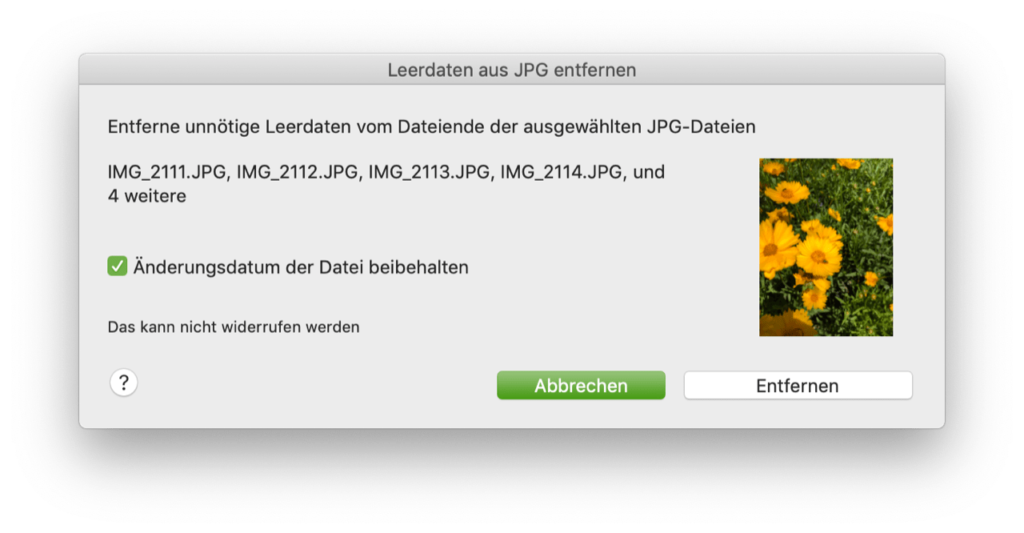
  • Image: NeoFinder
  • Image: NeoFinder
Images: NeoFinder
  • Apple responds to vulnerabilities in emails
Make Apfelpatient a preferred source One click – and you'll see us more often on Google
Was this article helpful?
YesNo
Source: Lemkesoft
Via: NeoFinder
Tags: macOSmacOS Catalina 10.15
SendShareSend
Share

Our Amazon Storefront

A handpicked selection of products for iPhone, Mac and more – sorted by topic and updated regularly.

Shop Now

This post contains affiliate links (including Amazon). We earn a small commission on qualifying purchases – at no extra cost to you. Learn more on our Partner Program page.

Previous Post

COVID-19: Apple & Google – how the partnership came about

Next Post

Apple makes Siri voice more natural

Milan Jovicic

Milan Jovicic

Milan founded Apfelpatient in 2016 and has been responsible for all editorial content since 2018 — news, rumors, guides, and product reviews. Apple devices here are not test units on loan for two weeks but everyday tools: from the iPhone through MacBook Pro, MacBook Air, and iMac to the Apple Vision Pro, at least one device from nearly every product category is in daily use, many of them replaced annually. Every menu path in a guide is verified on the device before it is published.

Ted Lasso standing beside a coach in the empty AFC Richmond stadium while Apple has yet to decide on Ted Lasso season 5

Ted Lasso Season 5: Apple still sees plenty of stories

August 12, 2026 - 10:11 PM CEST
Concept design of the iPhone Ultra in its unfolded state with a large inner display

iPhone Ultra (iPhone Fold): All rumors and facts at a glance

August 12, 2026 - 9:32 PM CEST
Five iPhone models in different colors side by side, one from the front showing the Dynamic Island, which is expected to be smaller on the iPhone 18.

iPhone 18: All the rumors at a glance

August 12, 2026 - 9:24 PM CEST

About APFELPATIENT

APFELPATIENT brings you the latest Apple news, product updates, guides, reviews and tips across the entire Apple ecosystem — from the iPhone to the Mac to the Apple Vision Pro. From the first rumors to confirmed news: researched responsibly.

Follow Apfelpatient

Facebook Instagram YouTube Threads Threads

Company

  • About Apfelpatient
  • Contact
  • Author Profiles

Community

  • Netiquette
  • Push Notifications
  • RSS feed

Legal

  • Legal Notice
  • Privacy Policy
  • Terms of Use
  • Cookie Settings
  • Affiliate Program

Resources

  • Sitemap

© 2026 Apfelpatient. All rights reserved.

No Result
View All Result
  • Home
  • News
  • Rumors
  • Tips & Tricks
  • Reviews
  • Insights

© 2026 Apfelpatient. All rights reserved. Page Directory

Change language to Deutsch