Apfelpatient
  • Home
  • News
  • Rumors
  • Tips & Tricks
  • Reviews
  • Insights
No result
View All Results
  • iPhone 18
  • iPhone 18 Pro
  • iPhone Duo
  • Apple Home
  • Siri AI
  • HomePod
  • HomePod mini
  • HomePod mini 2
  • MacBook Pro
  • Apple TV 4K
  • Apple Watch Series 12
  • Apple Watch Ultra 4
  • AirPods 5
  • iOS 27
  • iPadOS 27
  • macOS
  • MacBook Neo
  • iPhone 17e
  • AirTags
  • iOS 26
  • iPhone 17
  • iPadOS
  • iMac
  • Mac mini
  • Apple TV
  • iPad Pro
  • iPhone Air
  • Apple Vision Pro
  • iPhone 16
  • AirPods 4
  • Apple Watch Ultra
  • MacBook Air
  • iPad
  • AirPods Max
  • AirPods Pro 3
  • Mac Studio
  • Studio Display
  • iPad Air
  • iPad mini
  • watchOS 27
  • Apple CarPlay
  • Apple Pay
  • watchOS 26
  • Home
  • News
  • Rumors
  • Tips & Tricks
  • Reviews
  • Insights
No result
View All Results
Apfelpatient
No result
View All Results
  • iPhone 18
  • iPhone 18 Pro
  • iPhone Duo
  • Apple Home
  • Siri AI
  • HomePod
  • HomePod mini
  • HomePod mini 2
  • MacBook Pro
  • Apple TV 4K
  • Apple Watch Series 12
  • Apple Watch Ultra 4
  • AirPods 5
  • iOS 27
  • iPadOS 27
  • macOS
  • MacBook Neo
  • iPhone 17e
  • AirTags
  • iOS 26
  • iPhone 17
  • iPadOS
  • iMac
  • Mac mini
  • Apple TV
  • iPad Pro
  • iPhone Air
  • Apple Vision Pro
  • iPhone 16
  • AirPods 4
  • Apple Watch Ultra
  • MacBook Air
  • iPad
  • AirPods Max
  • AirPods Pro 3
  • Mac Studio
  • Studio Display
  • iPad Air
  • iPad mini
  • watchOS 27
  • Apple CarPlay
  • Apple Pay
  • watchOS 26

macOS 27.3: Code reveals stricter disk full access

Milan Jovicic by Milan Jovicic
November 8, 2026 - 23:51 CET
in Apple News, Mac and MacBook News
0
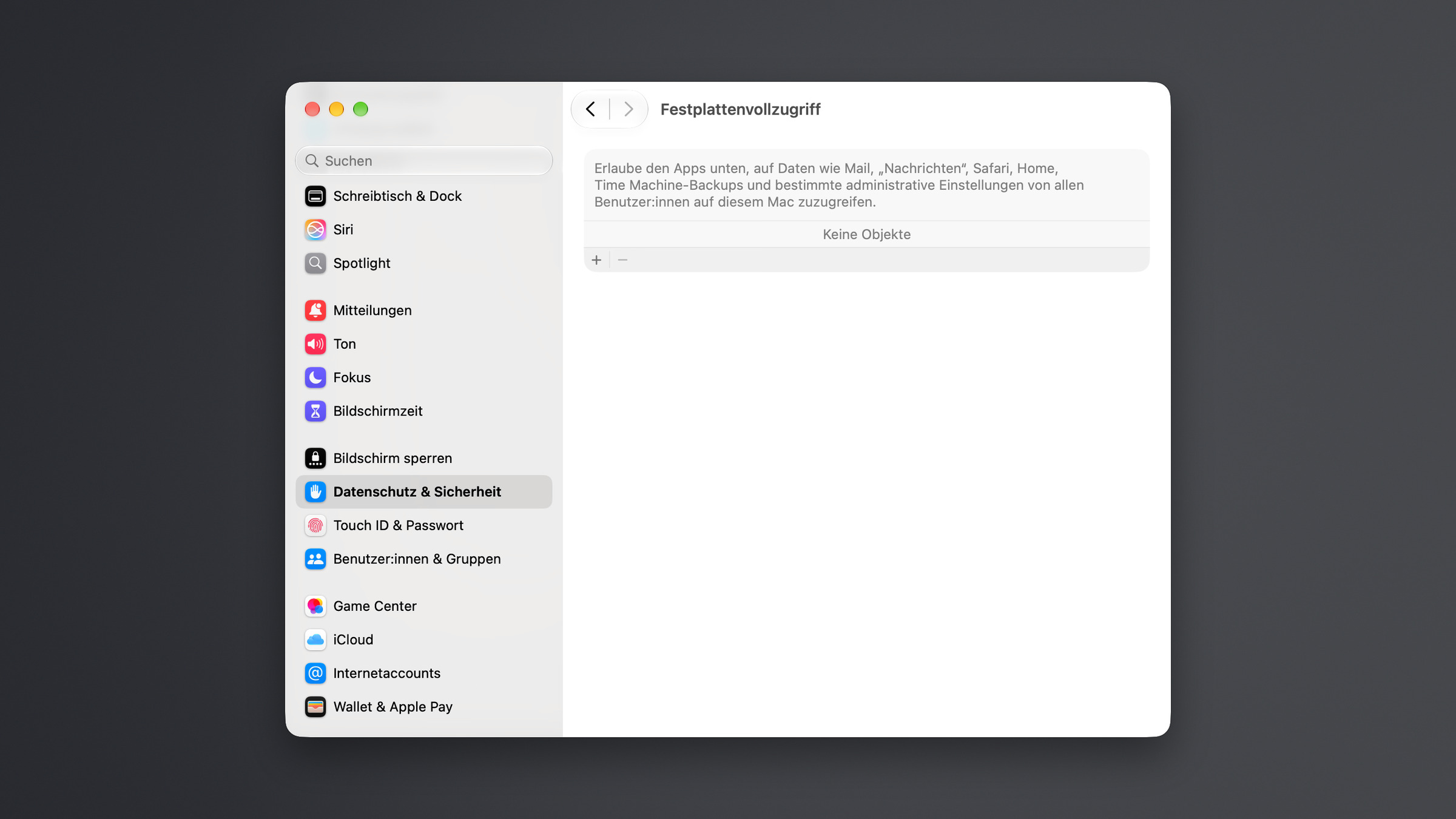
Full Disk Access under Privacy & Security in System Settings with no apps listed, which macOS 27.3 is set to tighten

Image: Apfelpatient

WhatsAppFacebookEmail
Threads

This article may contain affiliate links. Learn more on our Partner Program page.

Make Apfelpatient a preferred source One click – and you'll see us more often on Google

In early October, Apple announced that it would only grant full disk access on Macs after a very explicit action. The company didn't specify what this action would entail. The first beta of macOS 27.3 now contains code that provides an initial answer – still disabled, but surprisingly concrete.

The changes were discovered by code analyst pdfu, who examined the first beta of macOS 27.3 and described his findings regarding full disk access on X. They relate precisely to the permission that Apple addressed in its developer announcement of October 2nd.

Apple had announced stricter controls for full disk access, citing the growing risks posed by AI agents as the reason for the haste. Granting this access opens almost the entire Mac to an app, including emails, messages, and browsing history. Apple did not specify the version, timing, or expiration date, only the target:

In the future, we will introduce additional controls so that users who truly want to grant an app this exceptional level of access can only do so through a very explicit action.

The code in the macOS 27.3 beta shows how Apple could implement this. The discovery of the feature in the code is documented, not the exact time when Apple might activate the change.

Key Facts at a Glance

  • The first beta of macOS 27.3 includes a feature change that prevents apps from automatically being added to the list for disk full access.
  • Users would then have to add an app themselves via the „Add“ button or by dragging and dropping it from the „Programs“ folder.
  • There are currently no additional warnings or dialogue options, but the name of the functional switch suggests otherwise.
  • Also new in the code is a feature for sharing individual folders called „Private Folders”.
  • In Beta 1, the function switch is deactivated; for users, nothing changes for the time being.

How an app gets on the list today

If an app wants to read a protected file without full disk access, macOS does not ask the user for permission. The system denies access and stores this denial in the database where it manages data permissions.

This causes the app to appear under System Settings > Privacy & Security > Full Disk Access, with the switch turned off. Many apps use this tactic: After such an access attempt, they appear in the list and prompt the user to open the settings and toggle the switch.

More than this one switch is not needed for full access today.

What the code changes in macOS 27.3

With the new feature enabled, macOS no longer saves these automatic rejections. The app will then not appear in the list automatically. Users who want to grant it full disk access must add it manually – either by clicking the „Add“ button (+) below the list or by dragging the app from the Applications folder.

The functional switch, in its current version, does not include any further warnings or dialog boxes. However, its name contains the word for warning, suggesting that such messages will be included in later beta versions. According to pdfu, it is disabled in Beta 1.

„Private Folders” as a narrower release

macOS 27.3 also includes a new permission called „Private Folders.” It's set up like full disk access, but applies folder by folder. According to pdfu, it's not yet fully integrated.

The new feature also applies here: If it's active, macOS won't save automatic denials for these folders either. This could make permissions a more restrictive alternative to full disk access. An app would then have access to specific folders instead of almost the entire Mac.

One more step is no protection

I consider the change a sensible first step, but not yet the very explicit action Apple announced. An app can still guide users through the settings with instructions; in the future, it will only have to explain how to add the app via „Add“ or drag it into the list. This adds one step, but doesn't change the fact that ultimately, a single permission opens emails, messages, and browsing history.

More significant is the „Private Folders” feature. Sharing per folder would allow an app to access only the portion it needs for its task. Since both changes rely on the same functionality, I expect Apple to activate them together, rather than the stricter full disk access permission alone.

Until then, everything remains the same on your Mac. If an app with the switch enabled is in your list, it already has full access.

Is an extra step via „Add“ enough of a hurdle for you – or would you only grant an AI agent access if you could restrict it to specific folders? Let us know in the comments how far you would allow an agent to go on your Mac.


Was this article helpful?
YesNo
Tags: macOSmacOS 27macOS 27.3
SendShareSend
Share

Our Amazon Storefront

A handpicked selection of products for iPhone, Mac and more – sorted by topic and updated regularly.

Shop Now

This post contains affiliate links (including Amazon). We earn a small commission on qualifying purchases – at no extra cost to you. Learn more on our Partner Program page.

Previous Post

iOS 28: Apple gives engineers more time for new ideas

Milan Jovicic

Milan Jovicic

Milan founded Apfelpatient in 2016 and has been responsible for all editorial content since 2018 – news, rumors, how-to guides and product reviews. Here, Apple devices aren't review units kept for two weeks, they're everyday tools: from iPhone to MacBook Pro, MacBook Air and iMac all the way to Apple Vision Pro, at least one device from every product category is in daily use, many of them replaced every year. Every menu path in a guide is checked on the device before it goes live.

Related posts

MacBook Neo 2: All the rumors at a glance

by Milan Jovicic
November 7, 2026 - 3:02 PM CET
MacBook Neo 2: the current MacBook Neo in Citrus seen from behind, opened on a grey table in front of a light wall

MacBook Neo 2: All the rumors about the A19 Pro, 12 GB RAM, colors, price and market launch – and why the touchscreen is off the table.

Read moreDetails

Apple vs. DOJ: Evidence gathering takes four months longer

by Milan Jovicic
November 7, 2026 - 00:06 CET
Symbolic image for Apple DOJ case: illustrated file folder showing the case number on a dark blue background

The taking of evidence in the US antitrust case will now continue until May 2027. There is also a dispute with Samsung, Epic and Garmin over documents.

Read moreDetails

Apple Store extends return period until January 8th

by Milan Jovicic
November 6, 2026 - 23:37 CET
Apple Store return period: sales floor of an Apple Store with tables full of MacBooks and iPhones, with the Pickup counter for collections in the background

Christmas purchases from the Apple Store can be returned until January 8, 2027. The delivery date is decisive, not the order date.

Read moreDetails

iPhone Duo: Over 100,000 adapted apps already available in the App Store

by Milan Jovicic
November 6, 2026 - 7:20 PM CET
iPhone Duo apps: unfolded iPhone Duo in a folio with kickstand, showing the Home Screen with apps and a music widget on the inner display

Apple lists more than 100,000 apps for the iPhone Duo in the App Store. What's behind that number and what does it mean for everyday life?

Read moreDetails

MacBook Pro: How to turn off the illuminated Apple logo

by Milan Jovicic
November 6, 2026 - 3:52 PM CET
Turning off the MacBook Pro Apple logo: two open MacBook Pro models in black and silver, one behind the other, front view

The Apple logo lights up on the MacBook Pro with a PROLED XDR display. Here's how to turn the backlighting off and on again using Terminal.

Read moreDetails
Load More

Leave a Reply Cancel reply

Required fields are marked with * marked.

By submitting, you consent to the storage of your comment along with your name, email address and IP address. Details are available in our privacy policy.

Categories

  • Apple Insights
  • Apple Rumors
  • Apple News
  • Apple Tips & Tricks
  • iPhone news, rumors and tips
  • Mac and MacBook News
  • Reviews
Make Apfelpatient a preferred source One click – and you'll see us more often on Google

About APFELPATIENT

APFELPATIENT brings you the latest Apple news, product updates, guides, reviews and tips across the entire Apple ecosystem — from the iPhone to the Mac to the Apple Vision Pro. From the first rumors to confirmed news: researched responsibly.

Follow Apfelpatient

Facebook Instagram YouTube Threads Threads

Company

  • About Apfelpatient
  • Contact
  • Author Profiles

Community

  • Netiquette
  • Push notifications
  • RSS feed

Legal

  • Legal Notice
  • Privacy Policy
  • Terms of Use
  • Cookie settings
  • Affiliate Program

Resources

  • Sitemap

© 2026 Apfelpatient. All rights reserved.

No result
View All Results
  • Home
  • News
  • Rumors
  • Tips & Tricks
  • Reviews
  • Insights

© 2026 Apfelpatient. All rights reserved. Site map

Change language to Deutsch