

apple patient
  • Home
  • News
  • Rumors
  • Tips & Tricks
  • Reviews
  • Insights
No Result
View All Result
  • iPhone 18
  • iPhone 18 Pro
  • iPhone Duo
  • Apple Watch Series 12
  • Apple Watch Ultra 4
  • AirPods 5
  • iOS 27
  • iPadOS 27
  • macOS
  • MacBook Neo
  • iPhone 17e
  • AirTags
  • iOS 26
  • iPhone 17
  • MacBook Pro
  • iPadOS
  • iMac
  • Mac mini
  • HomePod
  • Apple TV
  • iPad Pro
  • iPhone Air
  • Apple Vision Pro
  • iPhone 16
  • AirPods 4
  • Apple Watch Ultra
  • HomePod Mini
  • MacBook Air
  • iPad
  • AirPods Max
  • AirPods Pro 3
  • Apple Watch Series 3
  • Mac Studio
  • Studio Display
  • iPad Air
  • iPad mini
  • watchOS 27
  • Apple CarPlay
  • Apple Pay
  • watchOS 26
  • Home
  • News
  • Rumors
  • Tips & Tricks
  • Reviews
  • Insights
No Result
View All Result
apple patient
No Result
View All Result
  • iPhone 18
  • iPhone 18 Pro
  • iPhone Duo
  • Apple Watch Series 12
  • Apple Watch Ultra 4
  • AirPods 5
  • iOS 27
  • iPadOS 27
  • macOS
  • MacBook Neo
  • iPhone 17e
  • AirTags
  • iOS 26
  • iPhone 17
  • MacBook Pro
  • iPadOS
  • iMac
  • Mac mini
  • HomePod
  • Apple TV
  • iPad Pro
  • iPhone Air
  • Apple Vision Pro
  • iPhone 16
  • AirPods 4
  • Apple Watch Ultra
  • HomePod Mini
  • MacBook Air
  • iPad
  • AirPods Max
  • AirPods Pro 3
  • Apple Watch Series 3
  • Mac Studio
  • Studio Display
  • iPad Air
  • iPad mini
  • watchOS 27
  • Apple CarPlay
  • Apple Pay
  • watchOS 26

iOS 26.1: Swipe gesture replaces tap to stop alarm

Milan Jovicic by Milan Jovicic
October 6, 2025 - 10:25 PM CEST
in Apple News
0
iOS 26.1 Beta 2 Alarm Clock

Image: Apfelpatient

WhatsAppFacebookEmail
Threads

With iOS 26.1, Apple is making a small but notable change to the iPhone alarm clock. In the second beta version of the update, the design of the alarm function has been adjusted to solve a common problem: accidentally turning off the alarm. The adjustment affects both the alarm clock and the timer, changing how they are stopped.

For years, the iPhone alarm clock has been a reliable morning companion, but its operation hasn't always been ideal. Many users, half asleep, have unconsciously tapped "Stop" instead of "Snooze," thereby deactivating the alarm completely. Apple has addressed this issue and integrated a new operating concept into iOS 26.1. The change is subtle but effective, ensuring that alarms are more consciously dismissed.

The new alarm clock design in iOS 26.1

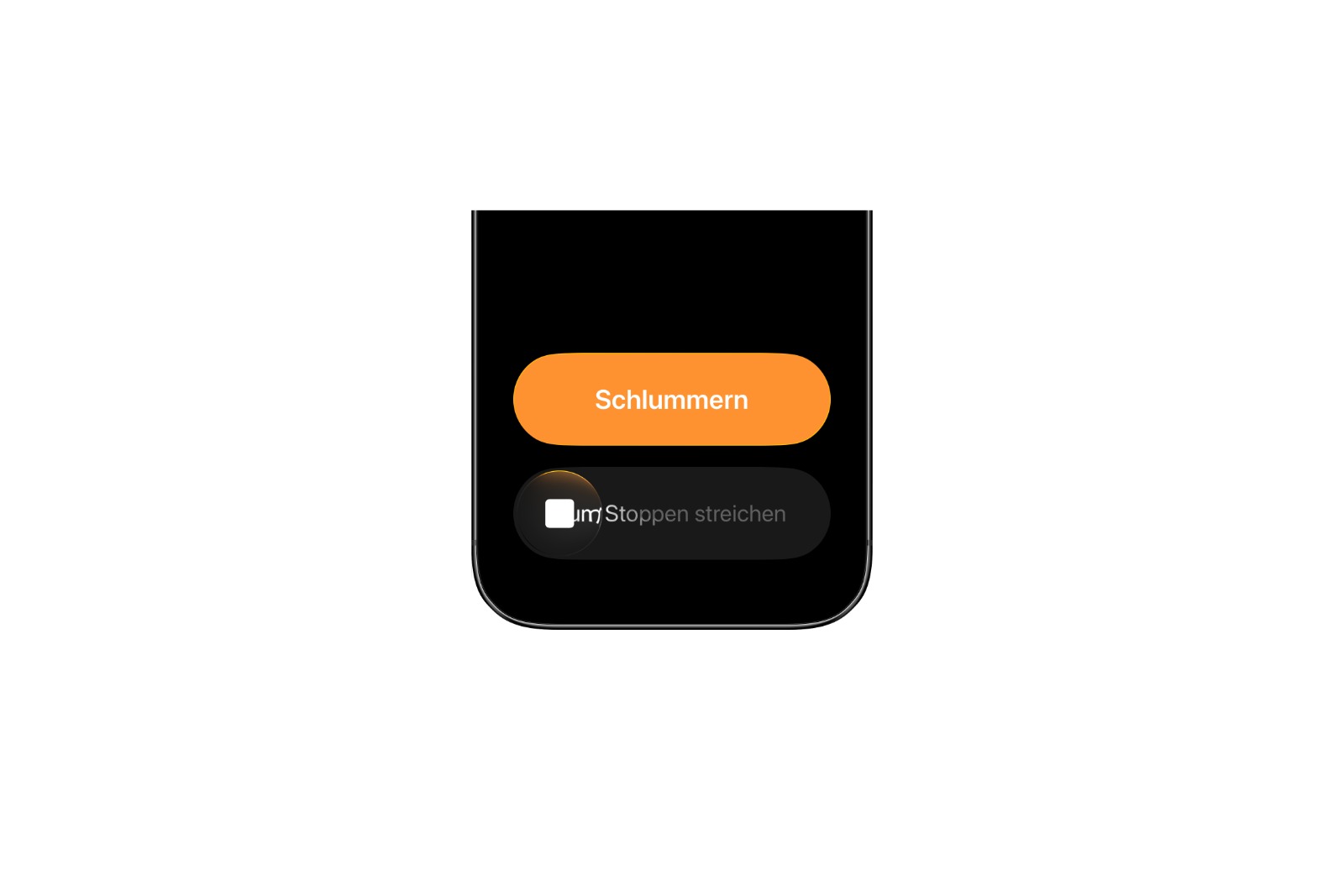
In iOS 26.1 Beta 2, Apple changed the way an alarm is turned off. Whereas previously a simple tap on the "Stop" button was sufficient, a swipe gesture is now required. Tapping is still possible, but now only serves to activate the snooze function. If you want to completely dismiss the alarm, you have to consciously swipe. This change is intended to prevent an alarm from being accidentally snoozed if you're not yet fully awake. In the previous version of iOS 26, an inaccurate touch was enough to completely stop the alarm. With the new swipe gesture, this is no longer so easy.

Improved usability without design disruption

Despite the changed function, the appearance remains largely the same. The "Snooze" and "Stop" controls are still the same size and located in the same place. Apple has thus retained the familiar look while slightly tweaking the operating logic. The updated design ensures greater security without fundamentally changing the user experience. In older versions like iOS 18, the "Snooze" and "Stop" buttons were smaller and further apart. This made operation imprecise and more likely led to incorrect operations. With iOS 26.1, Apple has found a middle ground: a familiar layout, but an action that requires more deliberate execution.
Image: Apfelpatient

Uniform behavior also with the timer

The change affects not only the classic alarm clock, but also the timer. In iOS 26.1 Beta 2, the same swipe gesture is used to stop a running timer. With this, Apple is introducing a unified user interface for all time-based functions on the iPhone. This standardization ensures a consistent user experience and makes controlling alarms and timers more intuitive overall.

  • iOS 26.1 Update: When it will be released and what will change

iOS 26.1 Beta 2: Apple shows strength in the details

With iOS 26.1, Apple isn't introducing a major innovation, but rather a thoughtful adjustment that can improve everyday life. The new swipe gesture for turning off alarms and timers prevents alarms from being accidentally deactivated. The design remains familiar, and the functionality is becoming more secure. This change demonstrates how Apple pays attention to practical improvements, even in small details. iOS 26.1 thus brings more reliability to the morning start – without fundamentally changing users' habits. The best products for you: Our Amazon Storefront offers a wide selection of accessories, including those for HomeKit. (Image: Apfelpatient)

  • iPadOS 26.1 Beta 2: Slide Over celebrates its comeback on the iPad
  • Apple is building up John Ternus – will he be the next CEO?
  • WhatsApp: Introduction of usernames is getting closer
  • Apple Q4 2025: Results to be presented on October 30
  • Apple removes climate-neutral label – but goals remain the same
  • iPhone 17 series surprises with strong demand and records
  • Disney+ announces redesign of the app for iOS and tvOS

Make Apfelpatient a preferred source One click – and you'll see us more often on Google
Was this article helpful?
YesNo
Tags: iOSiOS 26.1
SendShareSend
Share

Our Amazon Storefront

A handpicked selection of products for iPhone, Mac and more – sorted by topic and updated regularly.

Shop Now

This post contains affiliate links (including Amazon). We earn a small commission on qualifying purchases – at no extra cost to you. Learn more on our Partner Program page.

Previous Post

iPadOS 26.1 Beta 2: Slide Over celebrates its comeback on the iPad

Next Post

iPad Pro & MacBook Pro: Supply bottlenecks point to update

Milan Jovicic

Milan Jovicic

Milan founded Apfelpatient in 2016 and has been responsible for all editorial content since 2018 — news, rumors, guides, and product reviews. Apple devices here are not test units on loan for two weeks but everyday tools: from the iPhone through MacBook Pro, MacBook Air, and iMac to the Apple Vision Pro, at least one device from nearly every product category is in daily use, many of them replaced annually. Every menu path in a guide is verified on the device before it is published.

Related posts

watchOS 27.2: Code reveals new screenshot preview

by Milan Jovicic
September 24, 2026 - 8:36 p.m. CEST
Apple Watch Ultra with an orange band showing the app view, the device getting the new screenshot preview in watchOS 27.2

watchOS 27.2 includes a new screenshot interface for the Apple Watch: preview, share, and delete, just like on the iPhone. It's currently inactive.

Read moreDetails

Apple TV: Peanuts classics free again for Christmas

by Milan Jovicic
September 24, 2026 - 6:43 p.m. CEST
Charlie Brown holding a small Christmas tree under a starry sky in the snow, a scene from A Charlie Brown Christmas, free again on Apple TV

Three classic Peanuts cartoons are back on Apple TV for the holidays, no subscription required. Plus, there are new specials featuring Snoopy and the Fraggle Rocks.

Read moreDetails

The Wanted Man: Hugh Laurie on Apple TV from January

by Milan Jovicic
September 24, 2026 - 6:19 p.m. CEST
Hugh Laurie as crime boss Felix Carmichael in an evening scene from The Wanted Man on Apple TV

The Wanted Man premieres on January 6, 2027 on Apple TV. Hugh Laurie plays a crime boss who wants to escape – the finale is in February.

Read moreDetails

Apple and Qualcomm extend patent license from 2027

by Milan Jovicic
September 24, 2026 - 6:04 p.m. CEST
Back of an iPhone 18 Pro Max in a burgundy case on a grey surface, covered by the renewed Apple Qualcomm patent license

Apple and Qualcomm are extending their patent license from April 2027. Why this has nothing to do with the modem change and affects Germany.

Read moreDetails

iPhone 18 Pro: Update to prevent Face ID restarts is coming

by Milan Jovicic
September 24, 2026 - 1:13 p.m. CEST
iPhone showing the General settings with Software Update, where the fix for the Face ID reboots on iPhone 18 Pro will arrive

Apple has confirmed an update to fix the restarts after failed Face ID recognition on the iPhone 18 Pro and Pro Max. An exchange is not worthwhile.

Read moreDetails
Load More

Categories

  • Apple Insights
  • Apple Rumors
  • Apple News
  • Apple Tips & Tricks
  • iPhone news, rumors and tips
  • Mac and MacBook News
  • Reviews

About APFELPATIENT

APFELPATIENT brings you the latest Apple news, product updates, guides, reviews and tips across the entire Apple ecosystem — from the iPhone to the Mac to the Apple Vision Pro. From the first rumors to confirmed news: researched responsibly.

Follow Apfelpatient

Facebook Instagram YouTube Threads Threads

Company

  • About Apfelpatient
  • Contact
  • Author Profiles

Community

  • Netiquette
  • Push Notifications
  • RSS feed

Legal

  • Legal Notice
  • Privacy Policy
  • Terms of Use
  • Cookie Settings
  • Affiliate Program

Resources

  • Sitemap

© 2026 Apfelpatient. All rights reserved.

No Result
View All Result
  • Home
  • News
  • Rumors
  • Tips & Tricks
  • Reviews
  • Insights

© 2026 Apfelpatient. All rights reserved. Page Directory

Change language to Deutsch



