

apple patient
  • Home
  • News
  • Rumors
  • Tips & Tricks
  • Reviews
  • Insights
No Result
View All Result
  • iPhone 18
  • iOS 27
  • iPadOS 27
  • macOS
  • MacBook Neo
  • iPhone 17e
  • AirTags
  • iOS 26
  • iPhone 17
  • MacBook Pro
  • iPadOS
  • iMac
  • Mac mini
  • HomePod
  • Apple TV
  • iPad Pro
  • iPhone Air
  • Apple Vision Pro
  • iPhone 16
  • AirPods 4
  • Apple Watch Ultra
  • HomePod Mini
  • MacBook Air
  • iPad
  • AirPods Max
  • AirPods Pro 3
  • Apple Watch Series 3
  • Mac Studio
  • Studio Display
  • iPad Air
  • iPad mini
  • watchOS 27
  • Apple CarPlay
  • Apple Pay
  • watchOS 26
  • Home
  • News
  • Rumors
  • Tips & Tricks
  • Reviews
  • Insights
No Result
View All Result
apple patient
No Result
View All Result

Double Tap: The highlight in watchOS 10.1 Beta 2

Milan Jovicic by Milan Jovicic
3. October 2023 - 21:26 CEST
in Apple News
0
Apple Watch Ultra 2 watchOS 10.1 Beta

Image: Apple

WhatsAppFacebookEmail
Threads

Apple has once again raised the bar in the world of smart wearables. With the release of the second beta version of watchOS 10.1, the technology giant is launching a newly announced feature - "Double Tap". This function has been specially developed for your Apple Watch Series 9 and your Apple Watch Ultra 2 and promises a revolutionary user experience.

In recent years, your Apple Watch has become an indispensable companion for health and technology enthusiasts. With each new generation, Apple brings exciting features to the market to improve usability and functionality. The latest updatewatchOS 10.1 Beta 2, adds an exciting new way to control your smartwatch - the "Double Tap". This feature is a testament to Apple's commitment to innovation and ease of use.

What is Double Tap?

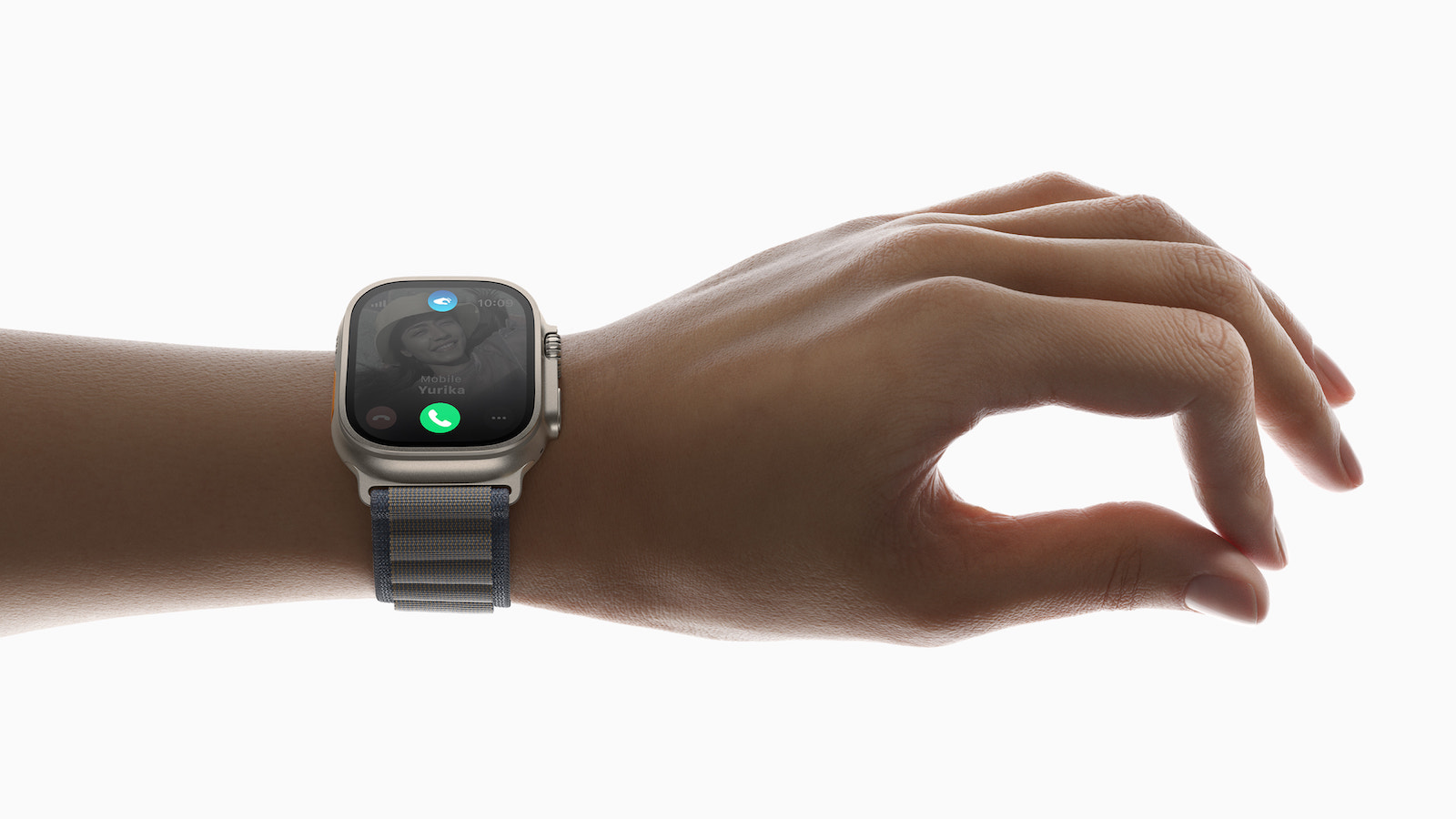
Double Tap is a unique feature developed specifically for your Apple Watch Series 9 and Apple Watch Ultra 2. It allows you to operate your watch with just one hand by tapping your index finger and thumb together. The sensors on your Apple Watch recognize these fine movements and interpret them as touches on the display.

Practical applications

The double-tap gesture opens up a variety of practical applications. With just one tap, you can answer or end phone calls, stop timers, play or pause music and mute or turn off alarms. This function offers a remarkable increase in efficiency for your daily use of your Apple Watch and makes it even more user-friendly.

Restriction to certain models

It is important to note that Double Tap is only available for your Apple Watch Series 9 and your Apple Watch Ultra 2. These models are equipped with the powerful S9 chip, which makes the function possible in the first place. Users of older Apple Watch models will not be able to use this function as the required hardware is not available.

The future of your Apple Watch with watchOS 10.1

With the introduction of watchOS 10.1 Beta 2 and the groundbreaking Double Tap feature, Apple is once again setting the standard in the world of smartwatches. This innovative way to operate your Apple Watch with just one hand will significantly improve the usability and functionality of your watch. If you own an Apple Watch Series 9 or an Apple Watch Ultra 2, this is yet another reason to be excited about your smart investment. Apple proves once again that it not only values design and quality but also continuous innovation in wearable technology. (Image: Apple)


  • watchOS 10.1 Beta: NameDrop - The new function in detail
Make Apfelpatient a preferred source One click – and you'll see us more often on Google
Was this article helpful?
YesNo
Tags: Apple WatchwatchOSwatchOS 10.1
SendShareSend
Share

Our Amazon Storefront

A handpicked selection of products for iPhone, Mac and more – sorted by topic and updated regularly.

Shop Now

This post contains affiliate links (including Amazon). We earn a small commission on qualifying purchases – at no extra cost to you. Learn more on our Partner Program page.

Previous Post

iOS 17.1 & Co.: Apple releases second beta

Next Post

iOS 17.1 Beta 2: The new features at a glance

Milan Jovicic

Milan Jovicic

Milan founded Apfelpatient in 2016 and has been responsible for all editorial content since 2018 — news, rumors, guides, and product reviews. Apple devices here are not test units on loan for two weeks but everyday tools: from the iPhone through MacBook Pro, MacBook Air, and iMac to the Apple Vision Pro, at least one device from nearly every product category is in daily use, many of them replaced annually. Every menu path in a guide is verified on the device before it is published.

Customers crowding an Apple Store as the US smartphone market lost five percent in sales during the second quarter

US smartphone market shrinks, iPhone 18 expected to be more expensive

August 12, 2026 - 23:47 CEST
Ted Lasso standing beside a coach in the empty AFC Richmond stadium while Apple has yet to decide on Ted Lasso season 5

Ted Lasso Season 5: Apple still sees plenty of stories

August 12, 2026 - 10:11 PM CEST
Concept design of the iPhone Ultra in its unfolded state with a large inner display

iPhone Ultra (iPhone Fold): All rumors and facts at a glance

August 12, 2026 - 9:32 PM CEST

About APFELPATIENT

APFELPATIENT brings you the latest Apple news, product updates, guides, reviews and tips across the entire Apple ecosystem — from the iPhone to the Mac to the Apple Vision Pro. From the first rumors to confirmed news: researched responsibly.

Follow Apfelpatient

Facebook Instagram YouTube Threads Threads

Company

  • About Apfelpatient
  • Contact
  • Author Profiles

Community

  • Netiquette
  • Push Notifications
  • RSS feed

Legal

  • Legal Notice
  • Privacy Policy
  • Terms of Use
  • Cookie Settings
  • Affiliate Program

Resources

  • Sitemap

© 2026 Apfelpatient. All rights reserved.

No Result
View All Result
  • Home
  • News
  • Rumors
  • Tips & Tricks
  • Reviews
  • Insights

© 2026 Apfelpatient. All rights reserved. Page Directory

Change language to Deutsch


