


Apple Vision Pro continues to evolve. With the upcoming update to visionOS 2.4, the device will receive a number of new functions that significantly expand the possibilities of spatial computing. The main focus is on the introduction of Apple Intelligence, a series of AI-supported tools that make everyday life easier and use even more intuitive. The update also brings new apps, an improved guest function and the Apple Vision Pro app for the iPhone. Particularly interesting is the new Spatial Gallery, which offers a curated selection of 3D content. Apple is thus pursuing the goal of further expanding the boundaries of augmented reality and spatial computing.
Since the launch of Apple Vision Pro in February 2024, it has become clear that spatial computing can be much more than just a gimmick. Vision Pro is not only an immersive experience for movies or games, but also a powerful tool for productivity and creativity. With the update to visionOS 2.4 and the introduction of Apple Intelligence, features are now being added that significantly improve the handling of text, images and AI-supported answers. At the same time, Apple is expanding the Vision Pro ecosystem with a new iPhone app and an optimized way to share content with others.
Apple Intelligence: Artificial Intelligence for the Apple Vision Pro
Apple Intelligence will be available in beta on Vision Pro in April, initially with US English support. The AI features are integrated into various areas and help to edit text more efficiently, create images and respond to messages more quickly.
Writing tools for better texts
The new Writing Tools offer various ways to edit texts:
- Rewrite allows you to rewrite texts with a customizable tone – more professional, friendlier or more concise.
- Proofread analyzes grammar, sentence structure and word choice and suggests corrections.
- Summarize generates summaries of texts in various formats.
- Compose uses ChatGPT to create complete texts based on short specifications.
These features are available not only in Mail and Notes, but also in third-party apps.
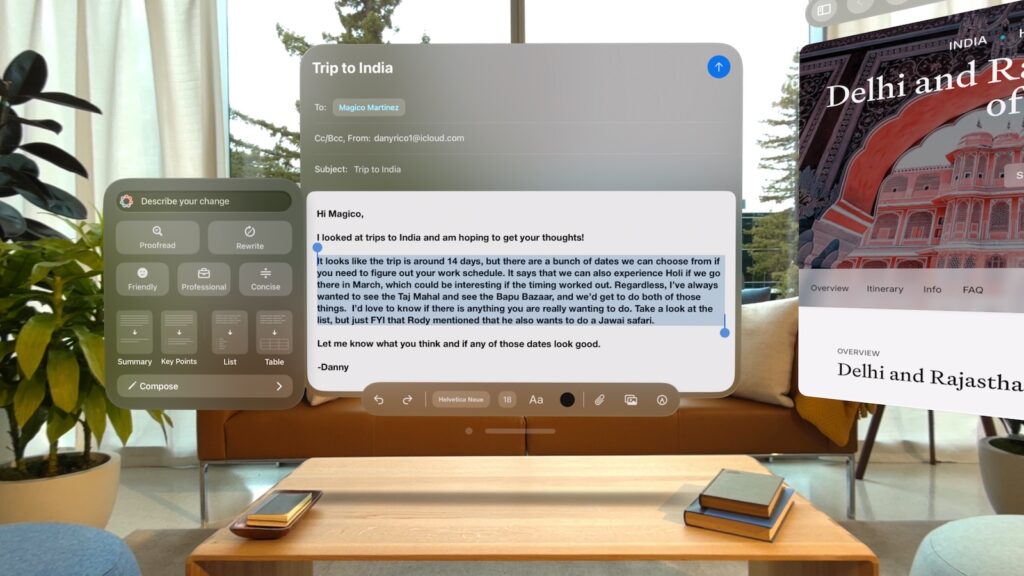
Image Playground for AI-generated images
Image Playground lets users create images from a variety of themes using text input, including costumes, locations, and accessories. Users can even personalize images with photos from their own library. The tool is integrated directly into Messages, Freeform, and Keynote, and is available as a standalone app for Vision Pro.
Genmoji: Create your own emojis
With Genmoji, you can generate custom emojis. Users can simply enter a description or use voice input to specify what the emoji should look like. The created emojis can be inserted into messages, shared as stickers or sent as Tapback.
Intelligent replies and photo functions
The new Smart Reply features in Messages and Mail suggest quick replies based on the context. This saves typing and makes replying much more efficient. In the Photos app, the "Create a Memoir" feature enables the automatic creation of short films from saved images and videos. Apple Intelligence recognizes the appropriate content and arranges it with a suitable soundtrack and narrative. An improved natural language search in the Photos app also makes it easier to find specific images or videos using simple text descriptions.
New features and apps for Vision Pro
In addition to Apple Intelligence, visionOS 2.4 brings new applications and optimizations that further improve the Vision Pro experience.
Spatial Gallery: Exclusive 3D content
Spatial Gallery gives users access to a curated collection of spatial photos, videos and panoramas. This content comes from artists, photographers, filmmakers and brands such as Cirque du Soleil, Red Bull and Porsche. At launch, exclusive content on Apple Originals such as Severance and Shrinking as well as special experiences from art, sports and travel will be available. Apple plans to expand the content regularly.
Apple Vision Pro app for the iPhone
With the new Apple Vision Pro app for iPhones, users can manage apps and games for Vision Pro and discover new content. The app appears automatically on devices updated to iOS 18.4 and with a Vision Pro, or can be downloaded from the App Store. The app features:
- An overview of available apps and games
- Recommendations for spatial content in Apple TV and Spatial Gallery
- A My Vision Pro page with tips and support information
Optimized guest user function
Previously, guests could only use Vision Pro with a limited selection of features. With visionOS 2.4, the experience becomes more flexible:
- Guest sessions can be started with a nearby iPhone or iPad
- View Mirroring with AirPlay allows you to mirror the use of Vision Pro on another screen
- Eye and hand tracking settings are now saved for up to 30 days
This makes it easier to share Vision Pro with friends, family or colleagues without each user having to set up the device again.
Availability and Regions
- Apple Intelligence will be released as a beta version in April, initially only for devices with US English Siri language settings.
- Spatial Gallery is being rolled out in several countries, including Germany, USA, UK, Japan and France.
- The Apple Vision Pro app for iPhones will be released with iOS 18.4.
- Vision Pro demos are still available to book at Apple Stores.
visionOS 2.4 makes Apple Vision Pro more powerful than ever
The update to visionOS 2.4 makes Apple Vision Pro significantly more powerful. The introduction of Apple Intelligence offers many new functions for text creation, image editing and smart interactions, while new apps such as Spatial Gallery and the Vision Pro app for iPhone expand the experience. Thanks to the optimized guest function, Vision Pro is also easier to share with others. Overall, with this update, Apple shows that spatial computing is not just a future concept, but already a powerful tool for productivity and entertainment. Time for new accessories? Visit our Amazon Storefront and discover a wide range of products from leading manufacturers, including for HomeKit! (Image: Apple)





