Apfelpatient
  • Home
  • News
  • Rumors
  • Tips & Tricks
  • Reviews
  • Insights
No result
View All Results
  • iPhone 18
  • iPhone 18 Pro
  • iPhone Duo
  • Apple Home
  • Siri AI
  • HomePod
  • HomePod mini
  • HomePod mini 2
  • MacBook Pro
  • Apple TV 4K
  • Apple Watch Series 12
  • Apple Watch Ultra 4
  • AirPods 5
  • iOS 27
  • iPadOS 27
  • macOS
  • MacBook Neo
  • iPhone 17e
  • AirTags
  • iOS 26
  • iPhone 17
  • iPadOS
  • iMac
  • Mac mini
  • Apple TV
  • iPad Pro
  • iPhone Air
  • Apple Vision Pro
  • iPhone 16
  • AirPods 4
  • Apple Watch Ultra
  • MacBook Air
  • iPad
  • AirPods Max
  • AirPods Pro 3
  • Mac Studio
  • Studio Display
  • iPad Air
  • iPad mini
  • watchOS 27
  • Apple CarPlay
  • Apple Pay
  • watchOS 26
  • Home
  • News
  • Rumors
  • Tips & Tricks
  • Reviews
  • Insights
No result
View All Results
Apfelpatient
No result
View All Results
  • iPhone 18
  • iPhone 18 Pro
  • iPhone Duo
  • Apple Home
  • Siri AI
  • HomePod
  • HomePod mini
  • HomePod mini 2
  • MacBook Pro
  • Apple TV 4K
  • Apple Watch Series 12
  • Apple Watch Ultra 4
  • AirPods 5
  • iOS 27
  • iPadOS 27
  • macOS
  • MacBook Neo
  • iPhone 17e
  • AirTags
  • iOS 26
  • iPhone 17
  • iPadOS
  • iMac
  • Mac mini
  • Apple TV
  • iPad Pro
  • iPhone Air
  • Apple Vision Pro
  • iPhone 16
  • AirPods 4
  • Apple Watch Ultra
  • MacBook Air
  • iPad
  • AirPods Max
  • AirPods Pro 3
  • Mac Studio
  • Studio Display
  • iPad Air
  • iPad mini
  • watchOS 27
  • Apple CarPlay
  • Apple Pay
  • watchOS 26

All new features in iOS 16.1 Beta 1

Milan Jovicic by Milan Jovicic
September 15, 2022 - 8:18 p.m. CEST
in Apple News
0
iOS 16.1 update

Photo by Brandon Romanchuk / Bigstockphoto

WhatsAppFacebookEmail
Threads

This article may contain affiliate links. Learn more on our Partner Program page.

Make Apfelpatient a preferred source One click – and you'll see us more often on Google

Although iOS 16 was only released on Monday, Apple is already testing the next update to the operating system. iOS 16.1 was distributed to developers on Wednesday evening and introduces a handful of new features worth mentioning.

When you tap "Customize" on the Lock screen, iOS 16.1 lets you choose whether to customize either the Lock screen or the Home screen. This makes it easier to customize the look of your iPhone from one place without having to go through multiple steps.

iOS 16.1: Matter support

iOS 16.1 introduces a new "Matter Accessories" section in the Settings app under "General," indicating that Apple is preparing for the fall launch of the Matter smart home standard. Clicking the "Matter Accessories" section will display all Matter accessories added to a connected service. Matter will enable interoperability between smart devices from different companies, allowing HomeKit, Alexa, and Google Assistant devices to work together. In the update's release notes, Apple explains that pairing Matter accessories requires a profile to be installed on your device first. There are also currently several other known issues with the Matter standard, for which workarounds are available on Apple's website.

  • If you remove Apple Home from the Matter Connected Services accessory menu in Home, the accessory tile is not removed.
  • You may receive a warning to turn on Wi-Fi when pairing a Matter accessory.
  • The accessory details may not open if a Matter accessory is unreachable.
  • You may not be able to pair a Matter ECM code using the Matter Support Framework Pairing API.
  • You may see uncertified notifications when pairing Matter accessories.
  • You may not be able to pair a Matter accessory if it is already paired with a third-party ecosystem.
  • The device initiating the pairing must use the same iCloud account as the Home Hub. Only the owner of a home, not an invited user, can pair Matter accessories.

Charging with clean energy

In iOS 16.1, there's a switch to enable "Clean Energy Charging" in the Battery section of the Settings app. Clean Energy Charging attempts to reduce your carbon footprint by selectively charging when electricity with lower carbon emissions is available. Apple says it will still fully charge your iPhone before you need to use it, depending on how you charge it daily. The feature can also be disabled if desired. It appears to be enabled by default when updating to iOS 16.1. Note: This feature is currently only available in the US.

iOS 16.1: Live Activities API

iOS 16.1 reinstates the Live Activities API, which was available to developers for testing during the iOS 16 beta. iPhone users currently cannot access Live Activities because there are no apps that support it, but developers can start implementing support.

  • iOS 16.1: Apple confirms introduction of Live Activities

delete wallet app

With iOS 16.1, there is an option to completely remove the Wallet app from the iPhone. In iOS 16 and earlier versions of iOS, the app could be removed from the home screen but not deleted. From now on, it can be removed completely if you don't want to use Apple Pay or other Wallet features. This option is being introduced as Apple faces a lawsuit accusing the company of violating antitrust laws by making Apple Pay the only available mobile wallet for tap-to-pay payments on the iPhone.

Battery percentage display in the status bar

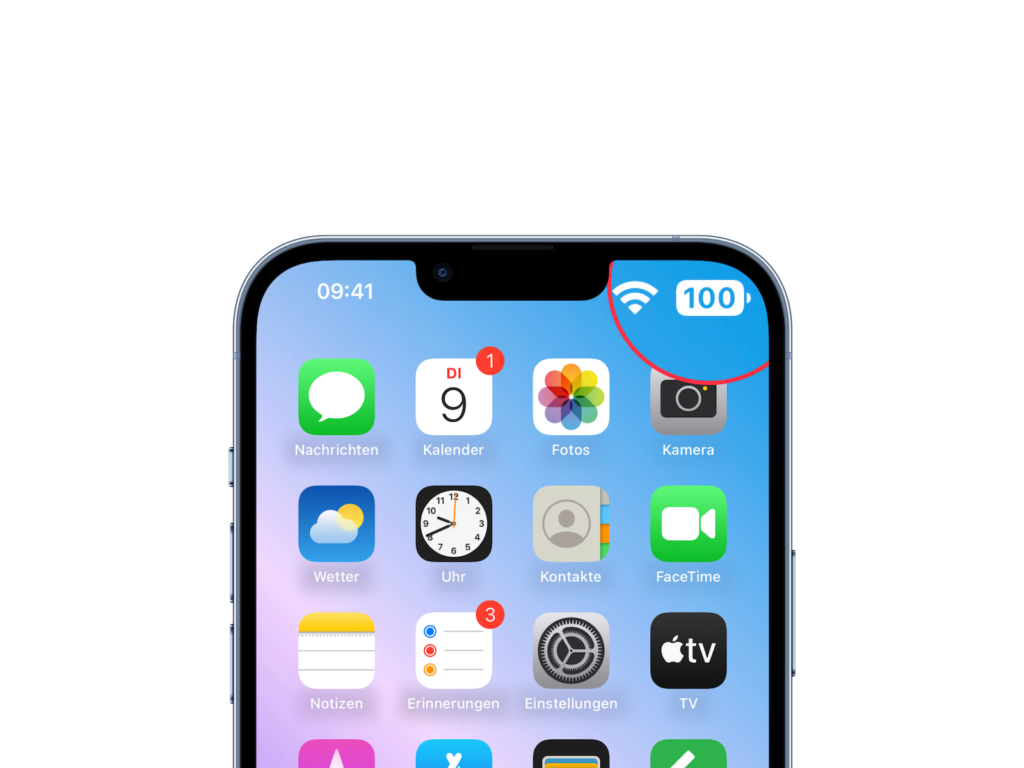
iOS 16.1 adds a battery percentage indicator to the battery icon in the status bar on the iPhone XR, iPhone 11, iPhone 12 mini, and iPhone 13 mini, which did not yet support this feature in iOS 16.
iOS 16.1
Image: Apfelpatient

Screenshot UI

When you close the screenshot editing tool, there's an updated interface in the top right corner that offers the options to delete a screenshot, copy and delete, or save. This menu used to be at the bottom of the iPhone. The new implementation is sleeker and less intrusive, as it no longer takes up the bottom part of the display. If anything else comes up in the next few days, leaks in the code are discovered, or anything similar, we'll of course write about it as always. (Photo by Brandon Romanchuk / Bigstockphoto)
  • Apple releases iOS 16.0.1 for iPhone 14 and 14 Pro models
Was this article helpful?
YesNo
Tags: iOSiOS 16iOS 16.1iPadiPadOSiPadOS 16iPadOS 16.1iPhone
SendShareSend
Share

Our Amazon Storefront

A handpicked selection of products for iPhone, Mac and more – sorted by topic and updated regularly.

Shop Now

This post contains affiliate links (including Amazon). We earn a small commission on qualifying purchases – at no extra cost to you. Learn more on our Partner Program page.

Previous Post

iPhone 14 emergency satellite function: Apple wants to expand feature

Next Post

iPhone 14 series, Apple Watch Series 8 & more: Available now

Milan Jovicic

Milan Jovicic

Milan founded Apfelpatient in 2016 and has been responsible for all editorial content since 2018 – news, rumors, how-to guides and product reviews. Here, Apple devices aren't review units kept for two weeks, they're everyday tools: from iPhone to MacBook Pro, MacBook Air and iMac all the way to Apple Vision Pro, at least one device from every product category is in daily use, many of them replaced every year. Every menu path in a guide is checked on the device before it goes live.

Related posts

Apple Support Community: After 28 years, it's over

by Milan Jovicic
November 11, 2026 - 06:06 CET
Apple Support Community: Memoji portraits in colored circles surrounded by app icons such as Photos, Music, iCloud and Home

Apple is closing the Apple Support Community on November 20th. New posts are already blocked; after 28 years, the help forum is ending.

Read moreDetails

MacBook Pro PROLED XDR teardown: 5 out of 10 points

by Milan Jovicic
November 11, 2026 - 00:36 CET
MacBook Pro PROLED XDR Teardown: Two open MacBook Pros in Space Black and Silver, one behind the other, with a background image of light stripes on the displays.

iFixit gives the MacBook Pro with PROLED XDR a score of 5 out of 10. The touchscreen is fine, but the illuminated Apple logo is a problem.

Read moreDetails

iPhone supplier Tata: Three workers die in India

by Milan Jovicic
November 11, 2026 - 00:06 CET
iPhone supplier Tata: Unfolded iPhone Duo in landscape on a grey surface, its display showing Apple Maps with the city of Hosur.

Three temporary workers have died at the Tata Electronics factory in Hosur, which manufactures iPhone components. Authorities are reviewing safety regulations.

Read moreDetails

AirPods: Apple rolls out new firmware 9B47

by Milan Jovicic
November 10, 2026 - 11:24 PM CET
AirPods firmware 9B47: White AirPods Max 2 with case seen from above on a grey surface, with the iPhone Duo in a blue Folio above them.

New AirPods firmware 9B47 for AirPods Pro 2, Pro 3, AirPods 4, 5 and Max 2: Which version was valid before and how to check for the update.

Read moreDetails

Apple TV: New Fraggles special starts on December 4th

by Milan Jovicic
November 10, 2026 - 7:25 PM CET
Fraggles special on Apple TV: Key art for "Fraggle Rock: A Holiday Gift" with five Fraggles gathered around a glowing snow globe in a wintry cave.

Apple TV is showing the trailer for „Fraggle Rock: A Big Gift“. The holiday special starts on December 4th, also with a German dub.

Read moreDetails
Load More

Categories

  • Apple Insights
  • Apple Rumors
  • Apple News
  • Apple Tips & Tricks
  • iPhone news, rumors and tips
  • Mac and MacBook News
  • Reviews
Make Apfelpatient a preferred source One click – and you'll see us more often on Google

About APFELPATIENT

APFELPATIENT brings you the latest Apple news, product updates, guides, reviews and tips across the entire Apple ecosystem — from the iPhone to the Mac to the Apple Vision Pro. From the first rumors to confirmed news: researched responsibly.

Follow Apfelpatient

Facebook Instagram YouTube Threads Threads

Company

  • About Apfelpatient
  • Contact
  • Author Profiles

Community

  • Netiquette
  • Push notifications
  • RSS feed

Legal

  • Legal Notice
  • Privacy Policy
  • Terms of Use
  • Cookie settings
  • Affiliate Program

Resources

  • Sitemap

© 2026 Apfelpatient. All rights reserved.

No result
View All Results
  • Home
  • News
  • Rumors
  • Tips & Tricks
  • Reviews
  • Insights

© 2026 Apfelpatient. All rights reserved. Site map

Change language to Deutsch