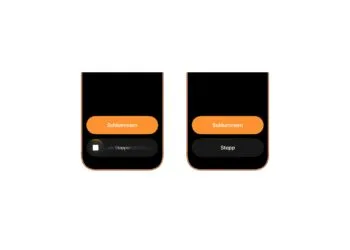
iOS 26.1: Reactivate the classic stop button on the alarm clock
iOS 26.1 changes how alarms are stopped. The slider replaces the button – but there's a setting that overrides it...

iOS is Apple's operating system for the iPhone and one of the most widely used mobile operating systems in the world. Unveiled in June 2007 alongside the original iPhone and renamed from iPhone OS to iOS in 2010, the system is introduced every year at WWDC in June and ships in fall with the new iPhones. Since 2025, Apple synchronizes the version numbers of all its operating systems with the calendar year. iOS brings central features such as Home and Lock Screen customization, Dynamic Island, StandBy, Live Activities, Apple Intelligence, the Liquid Glass design, privacy features like Mail Privacy Protection and App Tracking Transparency, FaceTime, iMessage, Wallet, Apple Pay, and deep integration with iCloud, Apple Watch, AirPods, Mac, iPad, Apple TV and Vision Pro.
Apfelpatient.de has gathered the ongoing developments around iOS under this tag: beta cycles for every new version, detailed coverage of all major features and point updates, tips and tricks for settings, privacy and hidden features, background on security updates and critical bug fixes, comparisons with Android, design analyses of new interfaces, regulatory topics such as the DMA in Europe, and all rumors and reports about upcoming iOS versions.
Anyone wanting to understand iOS in depth, use it more effectively or follow the platform strategy behind Apple's mobile OS has their fixed anchor right here.
iOS 26.1 changes how alarms are stopped. The slider replaces the button – but there's a setting that overrides it...
iOS 26.2 brings new iPhone features, design updates, and AI enhancements. Find out when the update will be released and what's changing.
iOS 26.2 Beta hints at a new power button function. Apple is testing more flexibility in button customization directly on the iPhone.

iOS 26.2 reveals more than it seems: Apple is apparently working on new smart home hardware that could be unveiled soon.
iOS 26.2 allows third-party app stores in Japan – Apple reacts early to new laws and global regulatory pressure.

Apple's mention of Apple Creator Studio in iOS 26.2 Beta 1 has sparked speculation. Is a new feature coming soon...?.
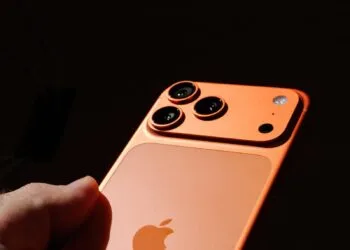
An overview of all the new features of iOS 26.2: from AirDrop improvements to new features for podcasts, weather and accessibility.
With iOS 26.2, Apple is testing AirDrop pairing via PIN for 30 days. More control and data privacy for file transfers are on the horizon.
iOS 26.2 brings tables to the Freeform app, making creative work more structured, flexible, and productive than ever before.
With iOS 26.2, Apple introduces alarms in the Reminders app. This makes tasks audible, visible, and easier to complete.
You are currently viewing a placeholder content from Facebook. To access the actual content, click the button below. Please note that doing so will share data with third-party providers.
More InformationYou are currently viewing a placeholder content from Instagram. To access the actual content, click the button below. Please note that doing so will share data with third-party providers.
More InformationYou are currently viewing a placeholder content from reCAPTCHA. To access the actual content, click the button below. Please note that doing so will share data with third-party providers.
More InformationYou are currently viewing a placeholder content from X. To access the actual content, click the button below. Please note that doing so will share data with third-party providers.
More Information